Hi All,
In our first look at Setup, I showed how we are bringing project configuration together in one workspace. Today I want to spend more time on something that matters as soon as an application has somewhere to go: targets, providers and the differences between your environments.
On Tuesday, we explored how the Application Map helps you create and organize the application. This is the other side of that work. You have built the pages and server actions, and now you need a clear picture of the environment they will run in.
This is a development preview of the upcoming Wappler 8. It is still being built and isn't available to try yet. We hope to launch the beta soon so you can try it for yourselves. The screenshots continue our Projects HQ example, and the deployment pipeline is still a developing proposal that I would particularly like your feedback on.
One application, different environments
Before going further, I want to acknowledge Brad's questions in the Setup discussion. New terminology can make familiar work sound more complicated. The aim is to bring the settings you need within easier reach and keep straightforward projects straightforward. You should not need a more elaborate hosting setup just because we are showing more ways to configure one.
Imagine you are building Projects HQ for a client. You need somewhere to develop the application, somewhere the client can review changes, and eventually the live application their team uses every day.
The pages and server actions belong to the same project. The environments have different jobs. During development, you want to make changes and inspect problems. During review, you want the client to test a representative version without affecting the live application. In production, you want the configuration appropriate for the people relying on it.
Those differences reach beyond the destination address. The database connection may change. Logging needs may change. Mail or external services may need separate configuration. A setting that is convenient while developing deserves another look before it reaches a live environment.
This is where I want Setup to help: put those choices in the context of the environment they belong to, while keeping the project as a whole understandable.

Settings, Targets and Providers have distinct places in Setup. Selecting a target gives you the context for that environment's configuration.
Start with Development
Every project has a Development target. That is our starting point. Staging and Production are additional targets you can use when the project needs them.
For a small project, your path may be Development straight to Production. For a client project, Staging may be an important review step. Other projects may have several destinations with their own configuration. I want the workflow to remain understandable at each of those sizes.
The first task is to get Development right. What runtime does this application use? Where will it run while you are working? Which database and other services does it need? Once that is clear, you have something concrete to compare with the next environment.
A target gives these choices a named context. When you select Development, you should be thinking about the environment you build and test against. When you select Staging, you are reviewing the configuration for that separate destination.
The target names help communicate their purpose, but the configuration is what makes each environment behave as intended. Naming something Staging does not by itself set up a server, create a database or copy your data.
Choose the workflow your project needs
Before we add Staging to our example, I want to address another way of working that has already come up in your feedback.
What if you work directly on the live application?
Brad asked about continuing to publish through FTP and using the live database during development. For those of you who publish through FTP, another everyday task to account for is uploading just one changed file. These are useful starting points for judging whether the new experience is actually easier.
Those are real workflows, and they need a place in this discussion too. An additional Staging environment should be a choice that helps your project. The presence of a Development target does not mean you must maintain a separate development server or database.
For a small, straightforward project, uploading one changed file may be all the publishing workflow needs. As an application grows, with more people depending on it and more changes happening together, separate targets and databases become much more valuable. Development and review can happen away from live data, while releases and database migrations follow a more deliberate process.
That is why we are making room for both. A simple update should stay simple, and a larger application should have a clear path toward more controlled development and deployment. The best fit depends on the work and its impact, not only on how many files the project contains.
For someone working directly against live resources, the important question is how clearly Wappler shows what is active: which target you are working with, which database it connects to and where a file will be uploaded. Those details should be easy to recognize while doing the work.
And when the task is one changed file, the desired journey is equally straightforward: select the file, choose the intended destination and upload it. We want to preserve that directness as we develop the publishing experience. The proposed pipeline should accommodate simple projects without making a single-file upload feel like a full release procedure. This is a requirement for the workflow we are shaping, not a claim that the new publishing interface is finished.
If this is how you work, please tell me what you expect to happen after saving a file. Do you explicitly upload it, use upload on save, or choose a few changed files together? And what indication of the live target or database would be useful without getting in your way?
Give Staging its own configuration when you need it
The rest of this example follows that more structured approach. It is particularly useful for larger projects, team development and changes that affect both application code and the database.
Let's continue the client example. Development is where we work, and Staging is where the client will review the next version.
In Setup, select the Staging target and work through its configuration on the canvas. Choose the concrete item you want to configure, then use the Inspector for its properties. The Library provides the applicable items for the selected context.
The database connection is a good example because it is both familiar and important. The application may refer to a connection named db, while that connection's configuration differs between Development and Staging. The logical name can stay familiar to the server actions using it, while each environment has its own connection details.

A concrete connection selected in Staging. The Inspector belongs to this target's instance, making the environment part of the configuration task.
That is the distinction I want to make easier to follow. You are building one application, but you need to know which environment a configuration change affects.
For this example, Staging would use a separate database with suitable review data. That separation is a decision we make for the project. It is not something the target name automatically guarantees, and creating the target is not a database-copy operation.
The same reasoning applies to services that can have real external effects. If a client is testing an email workflow, you will want to decide where those messages should go. If the application talks to an external service, you will want to review which account or test environment it uses. These are exactly the kinds of details that benefit from a clear target context.
The same connection, configured for each environment
Let's stay with our database example. The application's server actions use a connection called db. In Development, that connection points to the development database. In Staging, we want the same actions to use the staging database.
The name stays the same; the connection details belong to the environment. You select Staging, open its db connection and configure it for that database. You do not have to change the connection name throughout your server actions.
In the current preview, adding a target brings across the existing global-module names and structure, with their settings left to configure for that target. It does not copy a fully configured environment or establish automatic inheritance from General. Settings such as CORS and rate limiting are also enabled and configured separately for each target.

Setup brings the connections and other Server Connect settings together. A named connection such as db can have different configuration in each target.
How should a new target get its starting settings?
This is one part of the workflow we still need to make clearer and easier. When you add Staging or Production, you should be able to understand what you are starting with, what needs configuring and which changes will affect other environments.
Would you prefer to copy settings from an existing target once, then manage the new target independently? Or inherit shared defaults and override only the differences, with a clear indication of where each value comes from? Those are different behaviors, and I do not want to present either as a finished workflow in this preview.
For example, you might want Staging to start with Development's logging choices, but require a separate database connection and mail configuration. Tell me what you would expect to carry across, what should remain linked and what you would always want to configure explicitly. That will help us shape this part of Setup around a clear, practical path.
Where providers fit
A target describes an environment for your application. A provider represents the connection to an external platform and the resources you work with there.
You might have Development running locally and use provider-managed infrastructure for another target. You might already have your own server and need a different setup. Providers are part of the picture when they are relevant to your hosting choices.

Provider resources have their own context. This preview uses example resource references; the screenshot does not represent a newly provisioned cloud environment.
Keeping providers distinct from targets helps answer different questions. Which platform or account holds the resource? Which environment of this application uses it? What configuration belongs to that target?
For example, Staging and Production might use the same provider while referring to different resources. Or Production might use infrastructure that is already managed outside Wappler. Those are different workflows, and I want us to discuss them as concrete examples rather than assume everyone follows one hosting pattern.
There is also an important distinction between configuring a reference and performing an operation. Seeing a resource in Setup, selecting its properties or reviewing an available action does not mean infrastructure has been created or an application has been deployed. The provider workflows are still being developed, and we will show specific operations as they are ready to demonstrate.
Make the path to Production understandable
Tom welcomed the build/package idea, while Brad's questions remind us to preserve the simple route too. Both matter: room for a more involved release process, and a direct path when all you need is to upload a file.
Once the application is ready for client review, we need to prepare it for Staging. After review, we need to prepare a release for Production. This is where the proposed deployment pipeline connects with the target configuration.
I showed a first look in the Setup introduction. Today, think about it from the perspective of a particular environment: what has to happen before this version of the application is ready to use there?
The early votes in the Setup poll are useful here. At the time of writing, 13 people have voted: preparing and optimizing assets has six selections, while delivery to different destinations and checking the application after deployment each have five. Database changes and custom scripts have four. You can choose up to two, so these are overlapping interests from a small, still-open poll.
For this discussion, I would like to connect those interests to a real release: what do you prepare, where does it go, and how do you know it worked? If database changes or scripts are part of that sequence, tell me where they fit and what should happen if a step fails.

The pipeline is a developing configuration proposal. These stages are an invitation to discuss the release workflow, not a claim that a complete deployment has run.
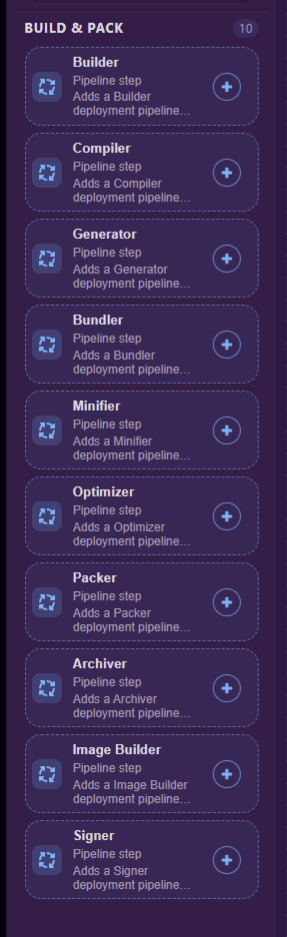
Build & Pack is about preparing the application. Depending on the project, that might involve building assets, optimizing files or preparing a container image. Some projects need very little here, while others have a specific sequence.
Destination connects that preparation with where the application is going. This is why choosing the correct target matters: Staging and Production can use the same application source while having different destinations and configuration.
Delivery is the part that gets the prepared application to that destination. I would like to understand what you need around this step, including any scripts or database work you currently coordinate yourself.
For a larger application, that can mean coordinating the release with a database migration, testing the change in Staging first and deciding how to recover if it does not go as expected. Those needs go beyond transferring a file, and they are an important reason to develop a more structured deployment workflow.
Verification is about checking the result. A successful transfer is useful information, but what tells you the application is actually ready? Perhaps you open a page, check an endpoint or run through a short test of the main workflow. Those are the real examples we need.
I am describing the intended jobs of these stages because this is still an RFC. Automated database changes, approvals, promotion between environments and recovery options need their own clear behavior; their mention here is not a promise that they are already implemented.
The workspace responsibilities remain straightforward: Setup defines the target and any pipeline configuration, Deploy runs the publishing workflow, and Monitor helps you follow the running application. That publishing workflow also needs to account for the direct, selected-file upload described above. We will explore the execution side in detail as it becomes ready.
Walk through the example as one piece of work
For Projects HQ, the journey we want to make clear is:
- Work against Development while building the pages and actions.
- Configure Staging with its own destination, connections and relevant service settings.
- Review the preparation, delivery and verification steps that this project needs.
- Let the client test the application in that environment.
- Review Production's configuration and release process before making the version live.
Those are the working steps for this client-review example, not a required sequence for every project or a claim that the preview already automates it. If your work is a direct change to a live application, the path may be much shorter. Setup's role is to give you a coherent place to make and inspect the configuration decisions behind either approach.
What excites me is having those decisions connected to the application you are building. You can work in Build, return to Setup when an environment needs attention, and understand which target and resource you are dealing with.
Tell me how your environments work
I would love to hear more about the setup you actually use. That includes working directly on a live target and database, uploading individual files over FTP, going from Development to Production, or maintaining several review environments.
- What targets do you normally use? Development and Production, a shared Staging environment, a separate environment per client, or something else?
- Which configuration should stay shared, and which must differ? Database connections, mail, logging and external services are useful starting points.
- How do providers fit your workflow? Do you create infrastructure yourself, reuse existing resources, or work with someone else who manages the servers?
- What must happen before you consider a release ready? Describe the checks, scripts or manual steps you would want the pipeline to make easier to manage.
For a quick indication, which environment pattern is closest to your usual project?
- Working directly against the live target and database
- Development directly to Production
- Development, shared Staging, then Production
- Several client or review environments
- Several Production destinations
- It varies substantially between projects
If you can, walk me through one recent release in a few sentences. Where did the application go, what changed between the environments, and which step required the most care?
That will help us shape this around the work you do every day. Thank you for continuing to share so much of that experience with us. Next week, I am looking forward to going deeper into the visual editors and showing more of the page and server-action authoring work.