Hi All,
In our first Wappler 8 articles, I introduced the Activity Workspaces, took you through Setup, and showed how Build and the Application Map bring application authoring together. We then looked more closely at the path from Development to Production.
Your replies have given us a lot to work with. You've shared how you organize projects, where configuration becomes confusing, and which parts of your existing workflow you want to keep straightforward. We've been working through those examples and refining the Setup direction, with especially valuable input from our Ambassadors.
Today I'd like to share a closer look at the thinking behind that work. There are some powerful possibilities here, but the starting point is a very ordinary need: find the configuration you need, understand what it affects, and get back to building your application.
The screens below are design mockups, not screenshots of the running Wappler 8 UI. They illustrate proposed workflows for feedback. The layout and behavior can still change, and these workflows aren't available to try yet.
Your everyday work is shaping the design
One of the clearest messages in the discussions has been that a familiar task should remain easy to recognize.
Brad described his publishing workflow: work on local files, then publish the changes when he's ready. Ben explained both the appeal and the difficulty of adding Docker and Staging. Those examples help us ask better questions about the interface. Can someone who just wants to update a site find the right destination quickly? Can someone adding a review environment understand which settings will differ?
There was also a useful observation about settings being spread across several places. Creating a project, configuring its database, adding mail and choosing server settings all belong to the same application, yet finding the right place can interrupt the work.
That is what we want Setup to bring together. Its value should be apparent when you make a routine change, as well as when you're preparing a more involved project.
See how your project fits together
Imagine opening Setup and getting a clear picture of the application: its frameworks, database, sign-in configuration and the environments where it runs.
The proposed Overview brings those pieces into view together. The Navigator gives you a direct route to a particular resource or setting, while the central area shows the part you're working on. Selecting an item brings its relevant properties within reach.
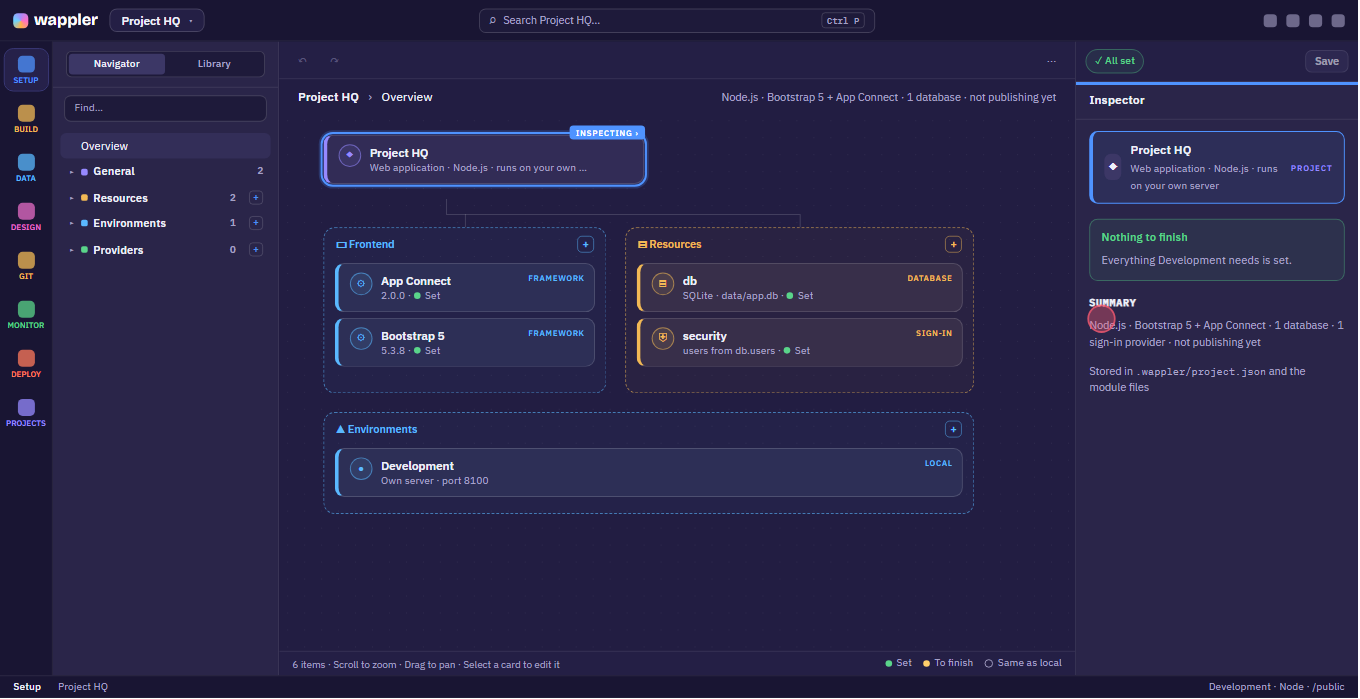
Design mockup: see how the project fits together and where to continue configuring it.
The Overview should help answer useful questions. What does this application use? Have I configured its database? Is publishing set up yet? Where should I continue?
When you already know what you want, the Navigator should take you there directly. When you've returned to a project after some time away, the overview can help you get your bearings. Both situations matter, particularly when you're moving between several client projects.
I like the possibility of having that context close to the actual configuration. You can start with the whole project, then concentrate on the one thing you came to change.
Bring related settings within reach
Databases, mail and sign-in are good examples of things that are easier to understand when their configuration has a clear home.
With the proposed resource approach, you would open the database or mailer itself, inspect its settings and see how the application uses it. If a choice differs for Production, that difference belongs alongside the resource's other configuration.
Think about changing the mail service for a project. You should be able to find the mailer, understand which environment you're editing and see what still needs to be supplied. You shouldn't have to remember the history of how those settings were added to locate them again.
The same thinking connects Setup with the other workspaces. Configure a database in Setup, then continue working with its tables and records in Data. Configure the destination and preparation for publishing in Setup, then move to Deploy when you're ready to run it.
That continuity is one of the parts of Wappler 8 I'm most excited about: each workspace has a clear purpose, while the choices you've made remain connected to the rest of the application.
Make environment differences understandable
Some projects need only a straightforward local setup and a Production destination. Others benefit from Staging, client review environments or separate services for different purposes.
As those choices grow, the important question becomes: what is shared, and what is different here?
Outgoing mail makes a useful example. While developing a feature, you might want messages caught locally so you can check their contents. On Production, those messages need to reach your users through your chosen mail service.
The proposed mail resource puts those choices together. You can see the Development behavior, select the Production configuration and finish its settings in place. You can also see when another environment uses the same configuration.
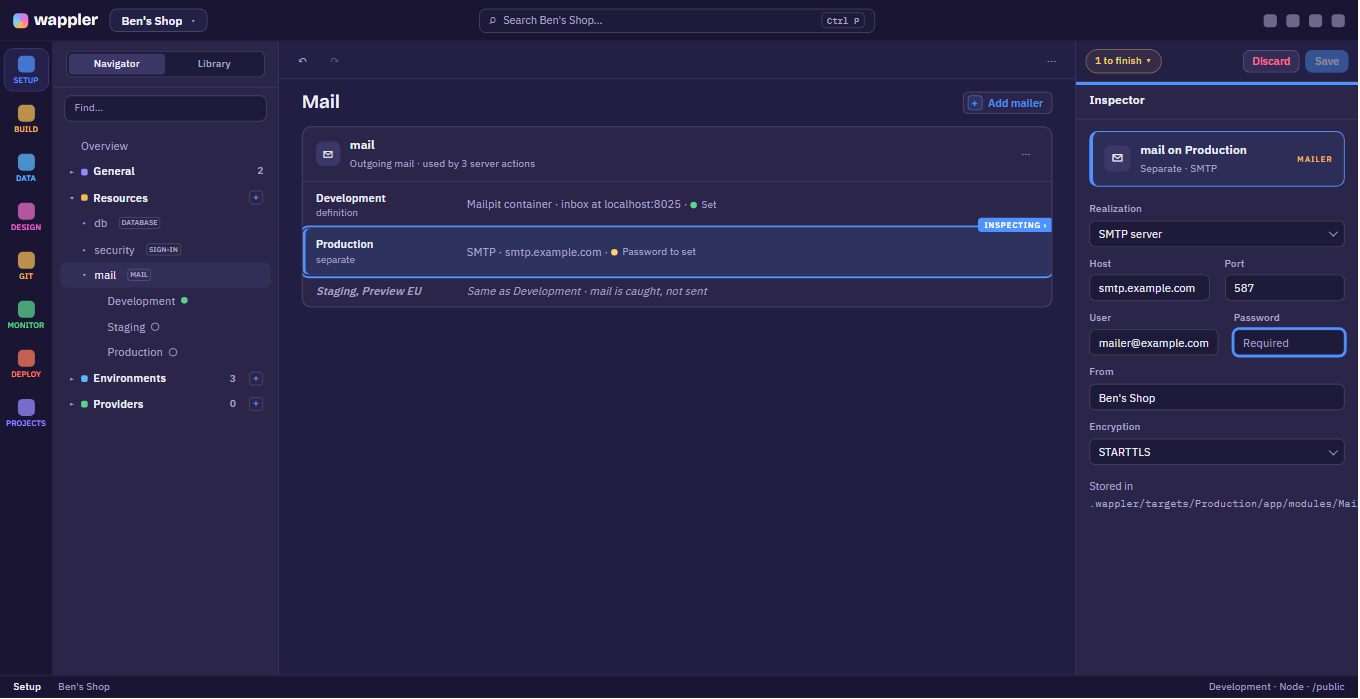
Design mockup: understand the mail behavior for each environment, with a remaining value clearly identified.
Here, the Production password is still to be supplied. The point of the example is that both the difference and the remaining work are visible where you're making the decision.
This is the kind of clarity we want to carry across resources. You should be able to understand the setup you have today and see what needs attention when you add another environment. The interface should help explain the choices as they become relevant to your project.
Know what is configured and what still needs attention
Several of your comments also touched on confidence: knowing which settings are on screen and whether changing something affects the environment you intended.
Hyperbytes raised a concrete concern about database settings when switching targets. That deserves careful implementation and testing. A cleaner-looking screen alone doesn't prove the underlying behavior is reliable.
The design goal is to make the context visible throughout the work. You should be able to identify the selected resource, see the environment being edited and understand whether its values are shared or different.
We also want unfinished configuration to be easy to return to. A “To finish” indication can point you to a missing value, instead of leaving you to search through forms and work out what you forgot. That becomes especially helpful when you're setting up several things and need to pause before everything is ready.
There is another distinction worth making clear: having settings filled in and having tested a connection are different things. A connection check should be an explicit action with an understandable result. The interface should tell you what is configured and what has actually been checked.
These details are part of what we're asking you to evaluate in the mockups. Can you tell where you are, what you're changing and what you still need to do?
Keep publishing straightforward
The publishing discussion has been particularly useful because it includes very different kinds of projects.
For a familiar FTP workflow, the aim is to keep the essential task clear: make your changes, choose when to send them to the intended destination, and understand the result. Having a place for more advanced preparation shouldn't mean every project needs that preparation.
In the revised proposal, saving your work doesn't upload it. You choose when to run deployment. Setup describes the configuration and delivery choices; Deploy is where the publishing run happens.
For projects that need more preparation, there is room for optional steps such as building frontend assets or minifying files before delivery. Those choices should serve a recognizable need in the project. If your files can go to the server as they are, you shouldn't need to learn a collection of build tools just to publish them.
This also makes room for a project to evolve. You may start with a simple destination, later add a review environment, and eventually introduce preparation steps for Production. We want those additions to be understandable when you need them.
Connect the services behind the application
There is a similar opportunity around hosting accounts and the resources they provide.
For projects that use them, the proposed provider connections would help bring the relevant servers and services into the same configuration picture. The useful part is understanding the relationship: which environment uses which host, or which resource belongs to the application you're configuring.
Combined with clearer database and mail configuration, this could make Setup a much more useful place to return to as an application grows. You could inspect the pieces behind the project, understand how they fit together and continue with the task at hand.
The two mockups here show a small part of that direction. We are working through the fuller workflows with our Ambassadors, while these public previews give everyone a chance to contribute examples and help us judge what needs to be clearer.
Help shape the next look at Setup
I'd love to hear how this fits the work you do today. A particular task is more useful than a general feature wish: it helps us understand the decisions the interface needs to support.
Think of the last time you changed a database, mail or hosting setting. What were you trying to do, and what would have made it easier to find the right setting and know which environment you were changing?
Perhaps the difficult part was finding the setting. Perhaps it was knowing whether a value was shared, remembering what remained unfinished, or preparing a change for publishing. Tell us where you hesitated and what you expected to see.
For a quick indication, which improvements to Setup would help your everyday work most? Choose up to two, and use the replies for an example or anything missing. This helps us choose what to explain and explore in more detail; it isn't a release-scope vote.
- Finding project settings and resources in one place
- Knowing which environment and values I am changing
- Seeing what configuration still needs attention
- Keeping FTP and straightforward publishing easy
- Understanding hosting accounts and their connected resources
- Adding optional preparation steps before deployment
Thank you again for the questions, encouragement and honest concerns you've shared. There is a lot of care going into this next chapter of Wappler, and your real project experience helps us keep that work grounded in what you'll need every day.