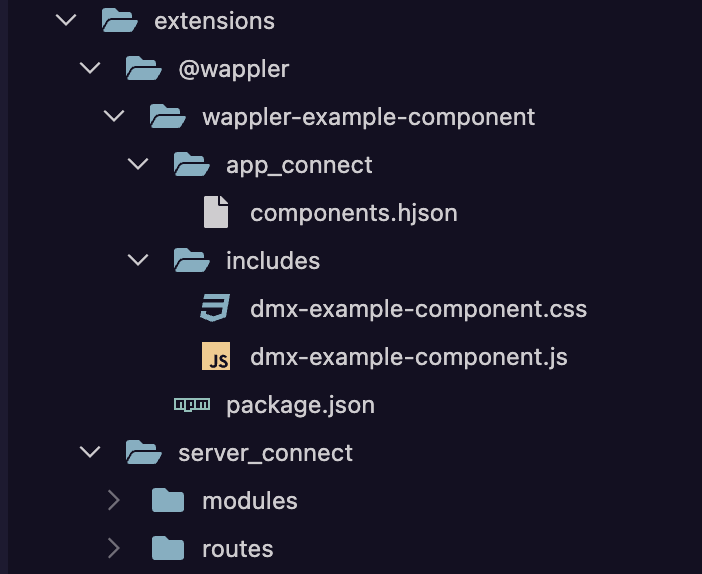
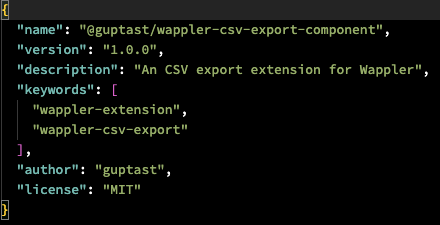
To learn more about the App Connect extensions, I added Wappler's wappler-example-component extension in a test project by following instructions to create the required folder structure under extension in the Project Options. After creating the folder structure, I copied code from the npm repository in the files and restarted Wappler. However, the example component is not appearing in the AC component's category.
If I install the same AC extension via npm, install / update node packages and restart Wappler, the custom extension appears correctly in the Components' list.
Have I missed a step when setting up an AC extension without installing it via npm? Any help would be greatly appreciated.
Not quite following the process you used but it sounds wrong. If you install via the project manager as recommended it should install correctly and create all the files/directories needed automatically.
Edit: sorry just reread you post,thats probably not what the issue is.
Did you create a new extension via the project manager first? App connect extension need a virtual folder in the library folder to be created to function which the project/create function does for you.
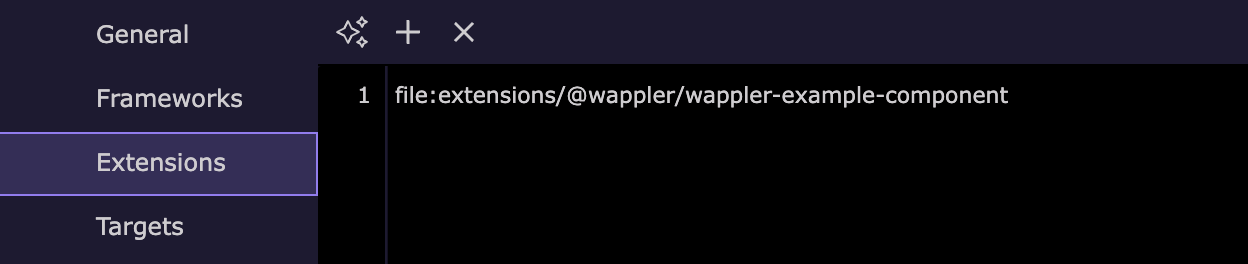
Added a new extension under Project Options, and selected the folder extensions/@wappler/wappler-example-component to created the package.json and component.hjson files
Then I created a new folder includes under @wappler/wappler-example-component, and new .js and .css files
Copied and pasted code from the npm repository @wappler/wappler-example-component in various files in the local extension files
Restarted wappler
No js file is copied from the extensions folder to the js folder (linked src and dst process)
When I go to add the custom extension / module on a page, the example component doesn't appear.
If I install the same extension via npm, it adds a new folder @wappler in the node_modules folder. After I updated/installed node packages, the extension worked correctly.
So, there seems to be something missing when extensions are not installed via npm in node_modules.
Which folder or file is created in the lib folder?
Not near computer currently but i do recall going through this myself when playing with AC extensions.
If i recall correctly, the entry in node_modules is a virtual folder mapped to the extensions/app_connect folder. Try adding the files via the extensions folder and see if they can also be seen in the node_modules folder.
My understanding was that extensions were not needed to be added to node_modules and that these could run independently.
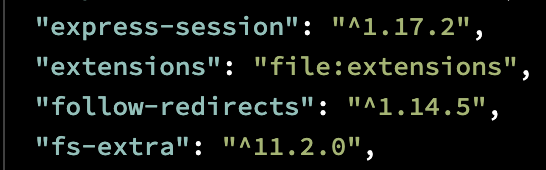
There's an entry in the main package.json file "extensions": "file:extensions" that I believe is telling the system to look for custom AC components in the extensions folder.
Yes, from memory, the files are added to the extensions folder.
The entry in node_modules is mapped to the extensions folder. Add content under extensions and you should see it mirrored in node_modules i think.
So the files reside in extensions but also reside in the node_modules folder for dependency reasons.
Sorry,cant be more specific as just on my phone, not near computer.
I have the same set of folders and files in the node_modules and it is still not appearing in the App Connect list. I understand that the AC extensions should appear in the UI without adding them in the node_modules. I'm unable to find any information on how to troubleshoot this in case the extensions don't appear in the UI.
Thank you for linking the post describing the process to create new App Connect extensions. I have followed the post and npm example, but the custom component is not appearing in the AC list.
I think the reason it is not working is because node_modules folder doesn't exist in the project. I'm running Docker for local development, and it doesn't create node_modules folder. Based on this response to JonL, I understand that the AC extensions need to be installed locally in node_modules and create a symlink to the extensions folder.
How do i get an AC extension to work when node_modules folder doesn't exist? The folder structure, main package.json, extensions package.json and Project Options have been setup like this:
Yes, you are probably correct.
Using extensions with docker leads to the need to jump through a few extra hoops.
The install routine needs a script added to copy the files into the extensions folder. I have just had to update all my extensions to deal with this.
I have not developed a script specific to App Connect yet but the server version should be easy enough to adapt. I will copy the relevant post below when i find it.
After going through the post, I'm still unclear about the setup required to get the AC extensions working in a locally deployed Docker project. The main points I can list at this stage are:
Is the folder structure and setup correct for a project that is using Docker locally when no node_modules folder exists in the project file structure?
Do I need to create a new node_modules folder just for this purpose?
How will this setup carry over to remote Docker deployments and environments?
I have tested the AC extension in another project where node_modules folder already exists, and in that project, it is available in the AC list and also works as expected except some UI tweaking.
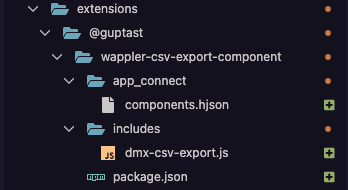
Well all seems fine for local extension, you have placed them well under the extensions/@guptast folder.
Normally if you choose the extension folder when added the new extension it should be added also correctly in your project package.json, but seems it isn't
You can just remote if from the project options extensions list, save and then readd it again, not as new but as existing extension but with url: file:extensions/@guptast/wappler-csv-export-component
and on save it should be added and linked.
You can do it also manually but it is better to use the project options / extensions
to check in your project package.json if you are installing them locally you will see:
when installed a virtual link folder will be created under node_modules (if it is a docker project then it will be under the node_modules in the docker container)
and then in the Project Assets updater, files to be copy will be shown.
do note that for docker indeed you will need also a copyFiles. as Brian indicated. in:
So it might be better to develop extensions with local node server.
But I will also make sure we generate this copyFiles.js scriptipt automaticlaly in the future.
Thank you for providing the detailed instructions set. I have removed and re-added the extension via Project Options > Extensions and I can see that the correct entries have been added in the main package.json and project.json files.
Unfortunately, the extension is still not available to add on a page. I also noticed that when I restarted Wappler after adding the extension files, it didn't come up with the Asset Updater window pop-up to add wappler-csv-export--component.js file to the 'js' folder.
On the other hand, the Aset Updater correctly shows there's a new file to be added/updated in the js folder if extensions are added via npm. So, this seems to be the missing link between npm / local server vs local Docker environments when any new AC extensions are available.
Thank you for your further guidance on this topic.
I have implemented the changes (I modified the copyFiles.js slightly for retrieving the correct src and dest directories). Unfortunately, the AC extension is still unrecognisable / unavailable in the list of components.
At this stage, it seems that I have exhausted all the possible solutions to get the custom AC extensions working in a local Docker environment with unavailaibility of a local node_modules folder in the project root directory. If the custom component is unavailable in the UI, it can't be run and tested fully before any remote deployments.
Thank you again for your help and support.
Thanks @Hyperbytes for your time and assistance in troubleshooting this issue.
Are you still on a docker based project for the local development?
Seems we still have to improve those as Wappler tries to load the extension ui from the node_modules folder but it isn’t available for docker projects as it is inside the docker volume.
So we will add it as volume mapping in the next update so it is added to docker compose file and the node _modules get exposed.
I use Docker for all local development across projects, which ensures a consistent environment both locally and in remote deployments.
Introducing this enhancement will significantly improve the workflow around custom AC extensions; thank you for taking it into consideration.
Would it be possible to also provide documentation tailored specifically for Docker-based setups? I believe this would help many Docker users when developing custom AC extensions.