good morning everyone
I am new to wappler
basically i have a main page where the design code split menu appears then i created a new index page where the menu design code split has disappeared
it must be some setting but i can not manage to find
thanks to you all loving wappler
I have uninstall and install again did not work
iam using the wappler version 6.8
and window Edition Windows 10 Pro
Version 2009
Installed on 24/11/2021
OS Build 19045.5854
Hello @jose_araujo_de_souza and welcome to the community 
How have you created the new page?
You should do something like this:
1.- Open your pages panel
2.- Select Pages manager
3.- Your content pages are located under pages/views (main layouts, under layouts)
4.- Then click plus button
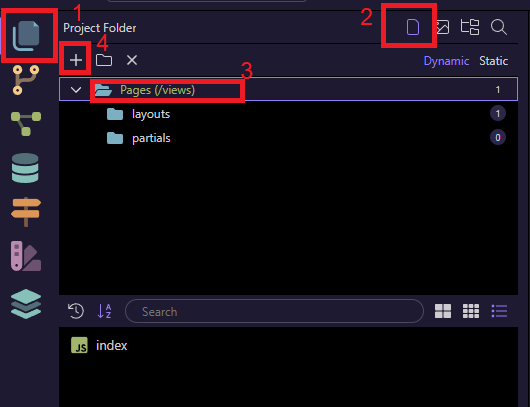
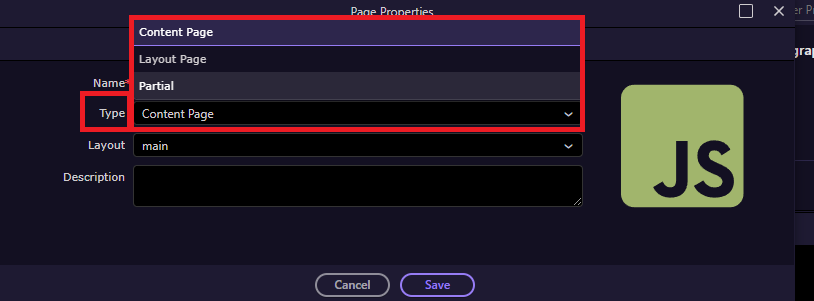
You can also change that when you create a new page:
i did exactly that i have capture the screens so you can see it
i have done some tests looks like that when i created the page it came without any code inside of it
I did wrote some html tags and now it shows the menu
Some thing wrong with the page creation
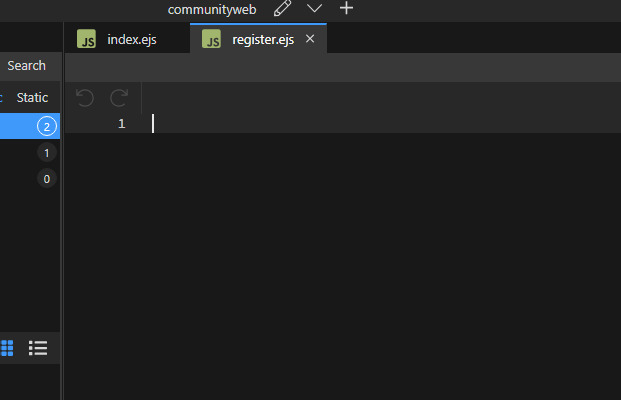
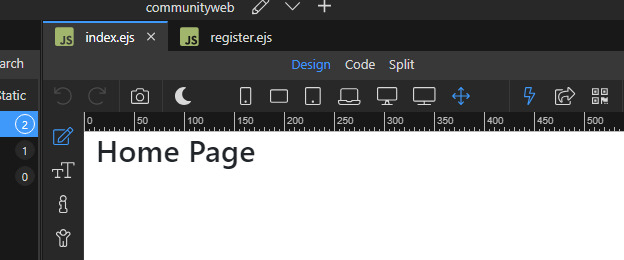
if i just add then the menu appears again
When the page is beeing created the code part is totally blank and this causes for the menu not to appear
Sounds strange, and I have the same version Microsoft Windows [Versión 10.0.19045.5854]
By any chance do you have both v6.8.0 and new v7 beta running at the same time?
You can also try to replicate the issue under logging mode:
How to report bugs together with the Wappler debug log
Then you can search for the wappler.log file and upload it here on a zip file
How do you create a new page? Can you share a short video please?
only 6.8
now it is working , ihave tryed to simulate again and does not do it
if it happens again i will film it