hi, I should send an email to the customer after he placed the order of some products.
In the mail there should be a table with the data of the products.
It works but I can not repeat the product rows (only the first one is displayed) because I think I’m wrong something in the code.
Here's the code i put in "mail body" in 'Send Mail-Properties'
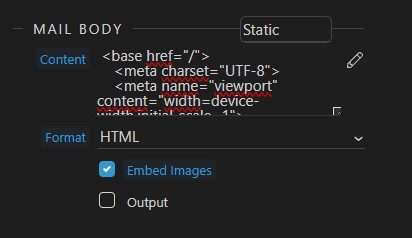
<base href="/">
    <meta charset="UTF-8">
    <meta name="viewport" content="width=device-width,initial-scale=1">
    <meta name="x-apple-disable-message-reformatting">
<title></title>

    <link rel="preconnect" href="https://fonts.gstatic.com">
    <link href="https://fonts.googleapis.com/css2?family=Palanquin:wght@200;300&display=swap" rel="stylesheet">
    <style>
        table,
        td,
        div,
        h1,
        p {
            font-family: Palanquin;
        }
    </style>


    <table role="presentation" style="width:100%;border-collapse:collapse;border:0;border-spacing:0;background:#ffffff;">
        <tbody><tr>
            <td align="center" style="padding:0;">
                <table role="presentation" style="width:602px;border-collapse:collapse;border:1px solid #cccccc;border-spacing:0;text-align:left;">
                    <tbody>
                    <tr>
                        <td style="padding:36px 30px 42px 30px;">

                          <h2>ORDINE DAL SITO - ORDER FROM WEBSITE</h2>


<p><b>Num.: {{isprev[0].numdoc}}<br>Data: {{isprev[0].data.formatDate('dd/MM/yyyy')}} <br>Cliente: {{isprev[0].desc}}<br><br></b></p>


<div class="table-responsive">
            <table class="table table-bordered table-sm table-borderless table-striped">
              <thead>
                <tr>
                  <th class="small font-weight-bold"><font size="-1">Cod.</font></th>
                  <th class="small font-weight-bold">
                    <font size="-1">Desc</font>
                  </th>
                  <th class="small font-weight-bold">
                    <font size="-1">Q.ta</font>
                  </th>
                  <th class="small font-weight-bold">
                    <font size="-1">Prezzo €</font>
                  </th>
                  <th class="small font-weight-bold">
                    <font size="-1">Sc1 %</font>
                  </th>
                  <th class="small font-weight-bold">
                    <font size="-1">Sc2 %</font>
                  </th>
                  <th class="small font-weight-bold">
                    <font size="-1">Sc3 %</font>
                  </th>
                  <th class="small font-weight-bold">
                    <font size="-1">Tot. riga €</font>
                  </th>
                  <th class="small font-weight-bold">
                    <font size="-1">Iva %</font>
                  </th>
                  <th class="small font-weight-bold">
                    <font size="-1">Note art.</font>
                  </th>
                </tr>
              </thead>
              <tbody is="dmx-repeat" dmx-generator="bs4table" dmx-bind:repeat="ordine_mov.data.ordini" id="tableRepeat1">
                <tr>
                  <td>
                    <font size="-1">{{ptmov[0].cod}}</font>
                  </td>
                  <td>
                    <font size="-1">{{ptmov[0].desc}}</font>
                  </td>
                  <td>
                    <font size="-1">{{ptmov[0].qta}}</font>
                  </td>
                  <td>
                    <font size="-1">{{ptmov[0].prezzo.formatNumber(2, ',', '.')}}</font>
                  </td>
                  <td>
                    <font size="-1">{{ptmov[0].sc1}}</font>
                  </td>
                  <td>
                    <font size="-1">{{ptmov[0].sc2}}</font>
                  </td>
                  <td>
                    <font size="-1">{{ptmov.sc3}}</font>
                  </td>
                  <td>
                    <font size="-1">{{ptmov[0].imp2r.formatNumber(2, ',', '.')}}</font>
                  </td>
                  <td>
                    <font size="-1">{{ptmov[0].iva}}</font>
                  </td>
                  <td>
                    <font size="-2">{{ptmov[0].cust1}}</font>
                  </td>
                </tr>
              </tbody>
            </table>

          </div>


                                    </td>
                                </tr>
                            </tbody></table>
                        </td>
                    </tr>
                    <tr>
                        <td style="padding:30px;background:#000000;">
                            <table role="presentation" style="width:100%;border-collapse:collapse;border:0;border-spacing:0;font-size:9px;font-family:Arial,sans-serif;">
                                <tbody><tr>
                                    <td style="padding:0;width:100%;" align="left">
                                        <p style="margin:0;font-size:14px;line-height:16px;font-family:Palanquin;color:#ffffff;">® Company Data</p>
                                    </td>

                                </tr>
                            </tbody></table>
                        </td>
                    </tr>
                </tbody></table>
If I put something like:
<link rel="stylesheet" href="dmxAppConnect/dmxBootstrap4TableGenerator/dmxBootstrap4TableGenerator.css" />
top before the rest, the message is not sent (I have not tried with an absolute path, could that be the problem?)
Maybe I should declare something at the beginning of the code, but I don’t know what