How can I force the load of a cached server connect with params? (More than one query)

Hello...

I have a project on NodeJS where I have a list of tasks.
Each task has a status "in progress", "completed" etc.

On the server side:
I have a get value and a condition, if hidecompleted = 1 then:
query all task where status != completed
Else: load all of them.

On the client side:
I have a checkbox that runs as a filter, so server connect input parameter will load like this:
api/tasks/query_tasks?proyectid=1&hidecompleted=
And:
api/tasks/query_tasks?proyectid=1&hidecompleted=1

The serverconnect has a data cache:
cache="session1"

When a task is edited, then a flow run:

  1. Set on session storage "reloadsc" -> true
  2. When go back to the list of tasks, if "reloadsc" is true, then force to reload the list again.

Now, the problem relies on the next thing:
The serverconnect will reload ONLY one of them depending of which one is selected (&hidecompleted=, or &hidecompleted=1)
But not both, so one list will remain exactly the same.

For example:
I have a first task named "example1", and the status is "in progress"
If I load all the tasks, the first item is "example1" and status "in progress"
If I load the uncompleted tasks, the first item is "example1" and status "in progress"

When enter on the task, set to "completed" , run the flow to force to load the sc, and go back:

The first item is "example1" and appears as "completed"
On filtering hideuncompleted the first item is "example1" and the status is "in progress"

The first thing that comes to my mind is, ok, force the load of both server connect, but one get cancelled until previous one is finished.
Now this is a bug? Because a page flow should run one step after another one?

A wait step is not an option because I don't know how much it will take to load it.

A dmx-onsuccess is also not an option because which one should it have it?

If it's complex to understand, please let me know and I'll record some video showing it

Thanks in advance everyone!
I'm not familiar with front-end stuff and therefore skipped a lot of your text, but if you put a random number in one of the GET parameters you could bypass cache?

Yes, I thought about that, but that will only work on one of them. I can't force the load of both url

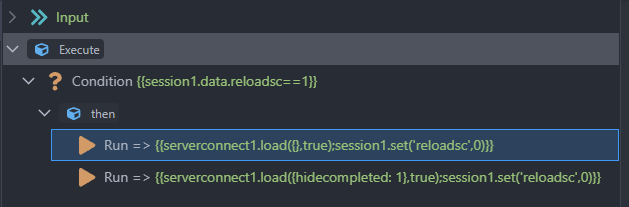
Also, this is the flow that "check if it needs to reload the sc"

But this is not working, one get cancelled..
Shouldn't wait until previous one finish?

I think some other user complained the same. Create Dynamic Event on success for the server connect, only after success you run the other step

That leads into an infinite loop of loading server connect :laughing::

Most of the components in a flow are in fact sync rather than async, however a server connect load is one of the exceptions. Using a run action that loads a server connect will not wait for it to complete, as you have experienced.

I’m not entirely visualizing your need but some things that might help:

  • Data stores. When things get complicated I move to a pattern where the server connect retrieves data, and the data store is used to display, manipulate, filter, etc.
  • Toggles. You can can a toggle when you start the flow indicating that you want your first server connect to reload the 2nd on success of the first. Then on the done event of the 2nd, you uncheck the toggle.
  • Server connect action in a flow. If you use a Run action in a flow, it acts upon the instance of the server connect you have declared on the page or layout. But if you use the Server connect action instead of Run, that runs a localized instance of the api call. In this case, it IS a sync call and you can wait for the results within the flow. But it does not update the element that is on the page. This is where you might use a data store(s). You can reliable run the 2 server connect actions in a flow, and load their results into a datastore for display.
  • Use a second server connect element (different ID) that points to the same api. I think in this case, when you call them both in a flow, one will get queued rather than canceled. In other words, they end up running as if they were called synchronously. Not positive on this one though.

Thanks both @Apple and @mebeingken

The problem is, that is only one server connect, it's just serverconnect1. Can't force to load with params because having params or not, a dynamic event will only fall into a loop, maybe using a flow is the only idea that can think this will work..

The datastore should indeed work, you say maybe I can store both on it and use a filter to display it on the page?
The sc will load once, then store both, and display one of them depending on the filter?

Will come back tomorrow with a simple example... Thanks again

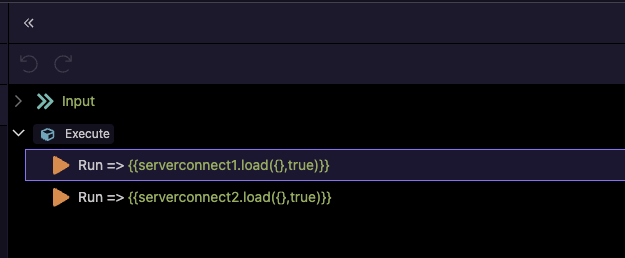
When you have a flow with two Run steps that call server actions, they will execute in parallel, not sequentially. This means neither step waits for the other to finish, and both actions will run independently without being cancelled.

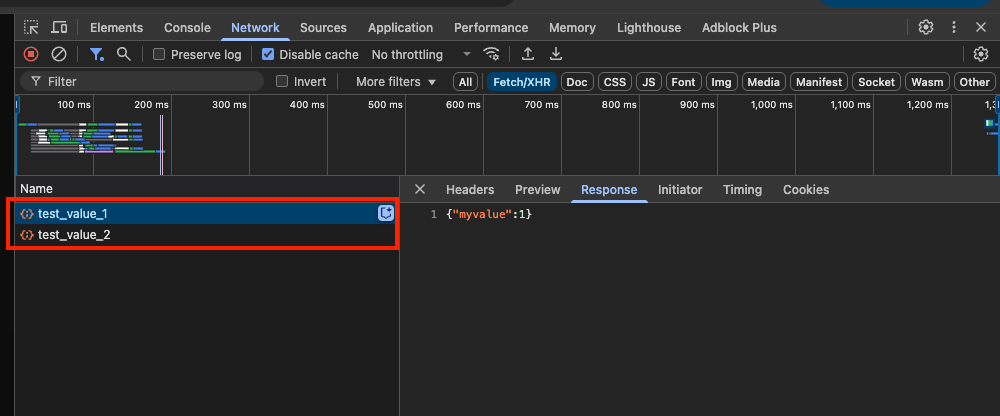
You can observe this in the Network tab:

You can test that using a simple flow:

Probably the issue is with your logic here:

where you set the session value to 0 just in the same step as the server actions.

Having two Server Connect components (with different IDs) pointing to the same API and calling them in a flow may cause them to queue rather than cancel. It’s not officially documented, so treat it as a potential workaround rather than a guaranteed feature.

Possible Alternative:
Move repeated logic into a Server Connect Library Action and call it in sequence. Library Actions run server‑side and return results only after completion, which ensures predictable execution order and avoids race conditions.

Yes but those are 2 different server connect.

This is my issue:

My server connect:

<dmx-serverconnect id="serverconnect1" url="/api/query" 
dmx-param:status="input2_group.value" cache="session1">
</dmx-serverconnect>

A button that reload the sc:

<button id="btn1" class="btn btn-secondary" dmx-on:click="serverconnect1.load({},true)">

This will only reload /query?status= BUT not also /query?status=completed

This for example: doesn't work as it only load one of them:

<button id="btn1" class="btn btn-secondary" dmx-on:click="serverconnect1.load({},true);serverconnect1.load({status: 'completed'},true)">Force reload server connect</button>

Here is a video explaining what I need:

You can see at the end of the video that one data says "completed" and the other one says "in progress"

Thanks @ben the workaround of using 2 server connect will help only in this case where I have one filter, and still an issue because I need to populate them in one table (Ken's solution using data store will help)
Or use a conditional region and use 2 tables, all seems to be an extra work for what I found a pretty standard issue of cached data..
Actually spend a lot of time searching on the forum and seems strange that nobody has a case like this..

I have a project in mind where I have around 10 filters, that means I should have 10 combinations of optional (yes/no) using those parameters so will be like infinite combinations.

I think what I need here is a solution to wipe all the cached data @Teodor is there a Wappler solution out there or should I do some js? (which is not so simple because some keys should remain)

Thanks

I don't think your setup - reloading the server action twice with different params makes sense. You should just reload the server action once, and filter the data on the client side using formatters in the repeaters for example.

Got it, will do it all client side on this one, but in the case of server side filtering, this is a challenge when having so much filters..

Imagine having a lot of records, the idea of filtering server side is a timing and data loading game

Maybe I'm missing a point here, and sorry if I do, but in the video uploaded above I have two different data populated because it's more than one query...

For me, that is what is confusing…what is driving the need for two calls of the same server connect? Why can’t it be a single server connect call that includes all the current filter options.

1 Like

Because when you filter a query via server side like the video above, or this example: https://community.wappler.io/t/filtering-database-query-with-multiple-checkboxes/4053

That will cache only the result pulled once, if an edit is made, you can't reload all the states..

When starting from scratch, a fillter is selected, then the url will be called once, and the data will be stored as the first call.

If you edit something, you can't wipe the cached data and call it again, because the url haven't changed = the data stays the same

If you look the video above, you can see at the end that the edited value is present in one case, because the reload only calls /query?status=
But the data showed for /query?status=completed is cached and no change is visible..

If I have a server side multi filter, all the cached data will be remain with no modifications even calling again the server connect..

If it is a search/filter api, why use caching when the results may be different? What am I missing?

It's not related with search, the idea of the cache is avoid the time that takes to pull the data, not necessary all the time to force a reload..

Not always a value is edited, but in case of need to force a reload of the data there's no option to pull al the cases..

Take the video I made as an example, yes, a client side filtering can be made, but expand it to having 2 more filters, then you'll only see in one scenario the edited data, in the other scenarios the data stays the same as before..

I feel like I’m not being helpful and not understanding, so I’ll leave you with this…when I get into the weeds and feel like I’m fighting the development process, it usually means I need to adapt my pattern rather than wondering why the tool doesn’t behave like I want. Only you will know if that is true here, but it has happened to me often.

Thanks Ken, sorry if my bad english can be an issue, and thanks for the advices..

The idea is simple.
Using this as example:
https://community.wappler.io/t/filtering-database-query-with-multiple-checkboxes/4053

Take the server connect and set -> cache -> session.

Edit the first record and click a button that forces reload the server connec (cache: reload)

When you click on the first checkbox, you'll see the first result with the edited value.

When you click on the second checkbox, you'll see all the data as it has never been edited..

Guess I have no option to wipe the cached results