Custom extension to Export XLSX using SheetJS.
It’s may help someone.
One node package need to be install
npm install --save https://cdn.sheetjs.com/xlsx-0.18.7/xlsx-0.18.7.tgz
Download it-NodeJS Only
Usage :Same as CSV EXPORT
any farther improvement are welcome
license Under MIT
7 Likes
Update sheetjs to latest version
sheetjs license
run
npm i --save https://cdn.sheetjs.com/xlsx-0.19.0/xlsx-0.19.0.tgz
new options
- expert one row or multiple rows
- support new exports files (xlsx, csv, xlsb ) more info
- add file name option
- add file type option
- add worksheet name
- few improvements
-MIT license
2 Likes
Thanks for this, will need it soon!
1 Like
Works perfect! Thanks
1 Like
I was just about to figure out how to use SheetJS and create a custom extension…you may have saved me a lot of time. I’ll check it out now, thank you!!!
1 Like
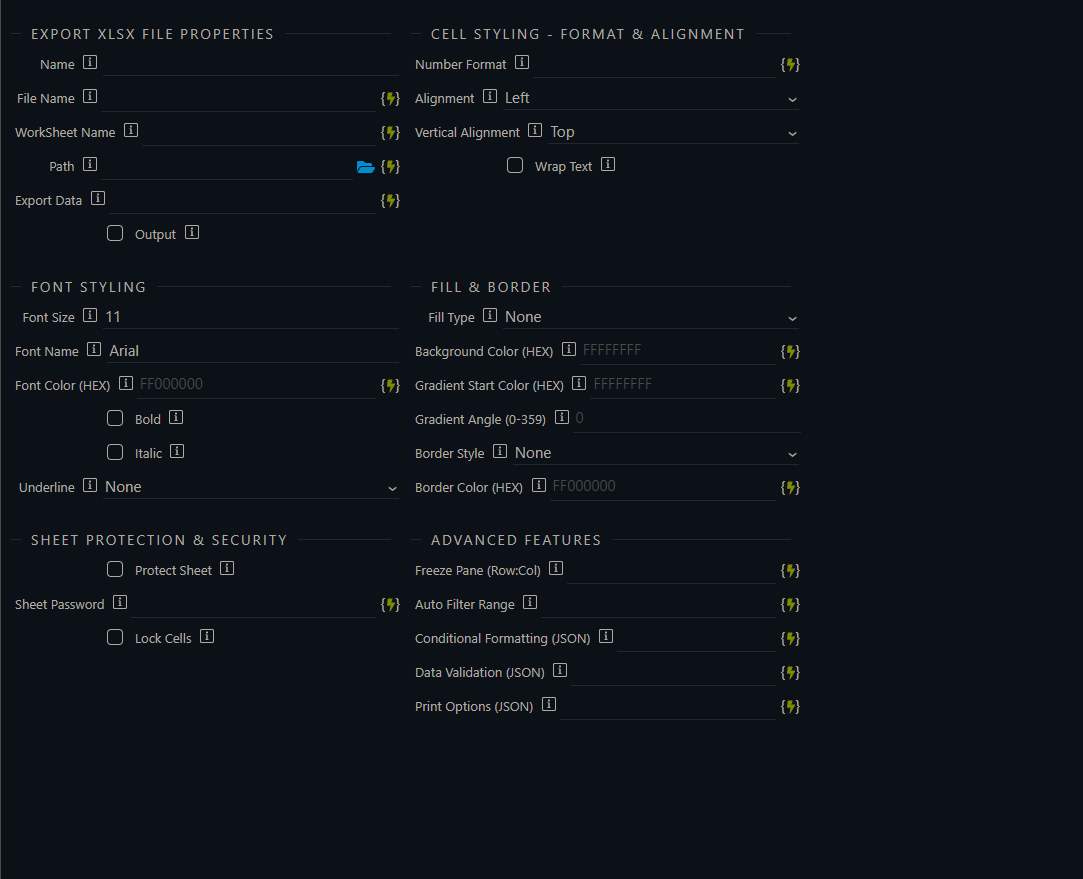
XLSX Export Extension v 2.0
A comprehensive Wappler extension for Excel file export with advanced formatting, protection, and styling capabilities.
Overview
This extension provides two main modules for working with Excel files in Wappler:
- XLSX Export - Create formatted Excel files with advanced styling, protection, and configuration options
## Note
** Sheetjs replaced with ExcelJs**
Features
 XLSX Export
Core Functionality
 Export data to Excel files (.xlsx format)
- Create custom-named worksheets (max 31 characters)
- Support for objects and array data structures
- Auto-fitting column widths
- Customizable file paths and names
Formatting & Styling
-
Cell Formatting
- Number formats (currency, percentage, date, time, accounting)
- Custom number formatting with masks
- Text alignment (horizontal & vertical)
- Text wrapping
-
Font Styling
- Font family selection
- Font size control
- Bold, italic, underline options
- Font color (ARGB hex colors)
- Font effects (strike, outline, shadow)
-
Borders & Fills
- Multiple border styles (thin, medium, thick, double, dotted, dashed, etc.)
- Border colors with ARGB hex support
- Solid cell background colors
- Gradient fills with angle and color stops
Advanced Features
-
Sheet Protection
- Password-protected sheets
- Cell locking with granular controls
- Customizable protection options
-
Freeze Panes
- Freeze rows and columns for easy navigation
- Flexible freeze positioning
-
Auto Filter
- Enable filter dropdowns in header rows
- Facilitate data filtering in Excel
-
Conditional Formatting
- Apply styling based on cell values
- Custom formulas for complex conditions
- Priority-based rule ordering
-
Data Validation
- List-based validation
- Numeric range validation (whole numbers, decimals)
- Date and time validation
- Custom validation formulas
- User-friendly error and prompt messages
-
Print Options
- Page orientation (portrait/landscape)
- Paper size selection
- Custom margins
- Fit-to-page scaling
- Print grid lines and row/column headers
Installation
Download and put it in extension folder as bellow
The extension is located in:
extensions/server_connect/modules/
Required Dependencies
ExcelJS Library:
"exceljs": "^4.4.0"
These dependencies are declared in the module configuration (.hjson files).
Quick Start
Basic Export Example
// Export simple data to Excel
{
  filename: "employees",
  sheetname: "Staff",
  path: "/Download",
  data: [
    { Name: "John Doe", Age: 30, Email: "john@example.com" },
    { Name: "Jane Smith", Age: 25, Email: "jane@example.com" }
  ]
}
Export with Formatting
{
  filename: "sales_report",
  sheetname: "Q1 Sales",
  path: "/Download",
  data: salesData,

  // Font styling
  fontName: "Calibri",
  fontSize: 12,
  fontColor: "FF000000",
  fontBold: true,

  // Cell alignment
  alignment: "center",
  verticalAlignment: "middle",
  wrapText: true,

  // Background
  backgroundColor: "FFE0E0FF",

  // Borders
  borderStyle: "thin",
  borderColor: "FF000000"
}
Export with Advanced Features
{
  filename: "protected_report",
  sheetname: "Data",
  path: "/Download",
  data: reportData,

  // Sheet protection
  protectSheet: true,
  sheetPassword: "secure123",
  lockCells: true,

  // Freeze panes (format: "rows:columns")
  freezePane: "1:0",

  // Auto filter
  autoFilter: "A1",

  // Print settings
  printOptions: {
    orientation: "landscape",
    paperSize: 1,
    margins: { top: 1, bottom: 1, left: 0.7, right: 0.7 }
  }
}
Property Reference
XLSX Export Properties
File Properties
| Property | Type | Required | Description |
|---|---|---|---|
name |
string | ✓ | Unique identifier for this export action |
filename |
string | ✓ | Excel file name (max 31 chars, no special chars) |
sheetname |
string | - | Worksheet name (default: "Sheet1") |
path |
string | ✓ | Directory path for saving the file |
filetype |
string | - | File extension (default: ".xlsx") |
data |
array/object | ✓ | Data to export (objects with named properties) |
Cell Styling
| Property | Type | Description |
|---|---|---|
numberFormat |
string | Custom number format (e.g., "$#,##0.00") |
alignment |
string | Horizontal: left, center, right, justify, distributed |
verticalAlignment |
string | Vertical: top, middle, bottom, distributed, justify |
wrapText |
boolean | Enable text wrapping |
Font Styling
| Property | Type | Description |
|---|---|---|
fontName |
string | Font family (default: "Arial") |
fontSize |
number | Font size in points (default: 11) |
fontBold |
boolean | Bold text |
fontItalic |
boolean | Italic text |
fontUnderline |
string | Underline: single, double, singleAccounting, doubleAccounting |
fontColor |
string | Font color in ARGB hex (e.g., "FF000000") |
Borders & Fill
| Property | Type | Description |
|---|---|---|
borderStyle |
string | Border: thin, medium, thick, double, dotted, dashed, etc. |
borderColor |
string | Border color in ARGB hex |
backgroundColor |
string | Cell background color in ARGB hex |
fillType |
string | Fill type: solid or gradient |
gradientAngle |
number | Gradient angle (0-360 degrees) |
gradientStartColor |
string | Gradient start color in ARGB hex |
Sheet Protection
| Property | Type | Description |
|---|---|---|
protectSheet |
boolean | Enable sheet protection |
sheetPassword |
string | Password for sheet protection |
lockCells |
boolean | Lock all cells when protected |
Advanced Features
| Property | Type | Description |
|---|---|---|
freezePane |
string | Freeze panes format: "rows:columns" (e.g., "1:0") |
autoFilter |
string | Enable auto filter (e.g., "A1") |
conditionalFormatting |
JSON | Conditional formatting rules |
dataValidation |
JSON | Data validation rules |
printOptions |
JSON | Print configuration settings |
Number Format Examples
Currency Formats
$#,##0.00           // USD: $1,234.56
"$"#,##0.00_)       // Accounting style (negative in brackets)
#,##0.00"₹"         // Indian Rupee
Date & Time Formats
mm/dd/yyyy          // 03/15/2024
dd/mm/yyyy          // 15/03/2024
yyyy-mm-dd          // 2024-03-15
hh:mm:ss            // 14:30:45
mm/dd/yyyy hh:mm    // 03/15/2024 14:30
Percentage & Decimals
0.00%               // 25.50%
0.0%                // 25.5%
#,##0.00            // 1,234.56
0.000               // 1.234
Accounting
_($* #,##0.00_);_($* (#,##0.00);_($* "-"??_);_(@_)
Data Validation Examples
List Validation
{
  range: "A2:A100",
  type: "list",
  formula1: "\"Option1,Option2,Option3\"",
  showInputMessage: true,
  showErrorMessage: true,
  promptTitle: "Select Option",
  prompt: "Please select from the list",
  errorTitle: "Invalid Entry",
  error: "Please select a valid option"
}
Numeric Range Validation
{
  range: "B2:B100",
  type: "whole",
  operator: "between",
  formula1: "1",
  formula2: "100",
  errorTitle: "Invalid Number",
  error: "Value must be between 1 and 100"
}
Date Validation
{
  range: "C2:C100",
  type: "date",
  operator: "greaterThan",
  formula1: "2024-01-01"
}
Conditional Formatting Examples
Highlight Values Greater Than 100
{
  range: "A2:A100",
  type: "expression",
  formula: "$A2>100",
  font: { bold: true, color: { argb: "FFFF0000" } },
  fill: { type: "pattern", pattern: "solid", fgColor: { argb: "FFFFFF00" } }
}
Color Scales
{
  range: "B2:B100",
  type: "colorScale",
  style: {
    fill: {
      type: "gradient",
      stops: [
        { position: 0, color: { argb: "FF00B050" } },
        { position: 50, color: { argb: "FFFFFF00" } },
        { position: 100, color: { argb: "FFFF0000" } }
    }
  }
}
Return Values
XLSX Export Response
{
  FilePath: "/Download/myfile.xlsx",
  FileName: "myfile.xlsx",
  Success: true
}
XLSX Import Response
{
  Data_Imported: [
    { "Column1": "Value1", "Column2": "Value2" },
    { "Column1": "Value3", "Column2": "Value4" }
  ]
}
Color Reference (ARGB Hex Format)
ARGB colors use the format: FF[HEX_COLOR]
Common Colors
FF000000  // Black
FFFFFFFF  // White
FFFF0000  // Red
FF00FF00  // Green
FF0000FF  // Blue
FFFF00FF  // Magenta
FF00FFFF  // Cyan
FFFFFF00  // Yellow
FFFFA500  // Orange
FFA0A0A0  // Gray
FFD3D3D3  // Light Gray
Limitations
Not Supported by ExcelJS
 Pivot Tables
- Charts
- Images
- VBA Macros
- Hyperlinks (not yet implemented)
Design Constraints
- Sheet name: Maximum 31 characters, special characters removed automatically
- File size: Depends on system memory and data volume
- Format precision: Limited by Excel's precision capabilities
Error Handling
The module includes comprehensive error handling:
// Example error response
{
  error: "XLSX Export failed: data: Data is required."
}
Common Errors
| Error | Cause | Solution |
|---|---|---|
| Path is required | Missing path property |
Provide valid directory path |
| Data is required | Missing data property |
Provide data array or object |
| Filename is required | Missing filename |
Provide filename |
| File write failed | Permissions or disk issues | Check directory permissions |
| Freeze pane error | Invalid freeze format | Use "rows:cols" format (e.g., "1:0") |
Best Practices
Performance
 For large datasets (>10,000 rows), consider pagination
 Use appropriate number formats to reduce file size
 Batch exports for better performance
Formatting
 Use consistent color schemes
 Keep headers descriptive and bold
- Use alternating row colors for readability
Security
 Always use passwords for sensitive data
 Combine sheet protection with cell locking
- Validate data before export
Data
 Validate data structure before export
 Use consistent column names
 Test imports with sample files first
Documentation Files
| File | Purpose |
|---|---|
XLSX_FEATURES_GUIDE.md |
Complete feature documentation |
XLSX_QUICK_REFERENCE.md |
Quick lookup reference |
XLSX_ADVANCED_EXAMPLES.md |
Advanced usage examples |
IMPLEMENTATION_SUMMARY.md |
Implementation details |
Troubleshooting
Files Not Exporting
- Check directory path exists or set
ensureDir: true - Verify file permissions
- Ensure filename is valid (no special characters)
Formatting Not Applied
- Verify ARGB hex color format (e.g., "FF000000")
- Check border and fill type values
- Ensure properties are spelled correctly
Import Issues
- Verify file path is correct
- Check sheet index/name exists
- Ensure file is not corrupted
Sheet Protection Not Working
- Set both
protectSheet: trueand password - Verify
lockCells: trueto lock all cells - Password must be non-empty string
Support & Issues
For issues, feature requests, or bug reports:
- Check the documentation files first
- Review the examples in
XLSX_ADVANCED_EXAMPLES.md - Test with sample data
- Check error messages in console logs
License
Exceljs is MIT License
This extension is part of Mohif1995's extensions and is Follow Apache Licence
Version History
-1.03 Sheetjs Node packege last version with it .
Current Version
- Change Sheetjs with ExcelJs
- Comprehensive ExcelJS feature support
- Full formatting and styling capabilities
- Sheet protection and data validation
- Print options and advanced configurations
- Auto-column width adjustment
Additional Resources
- ExcelJS Documentation
- Wappler Documentation
- Property configuration files:
.hjsonfiles in this directory
2 Likes