I am still struggling with this long term project.
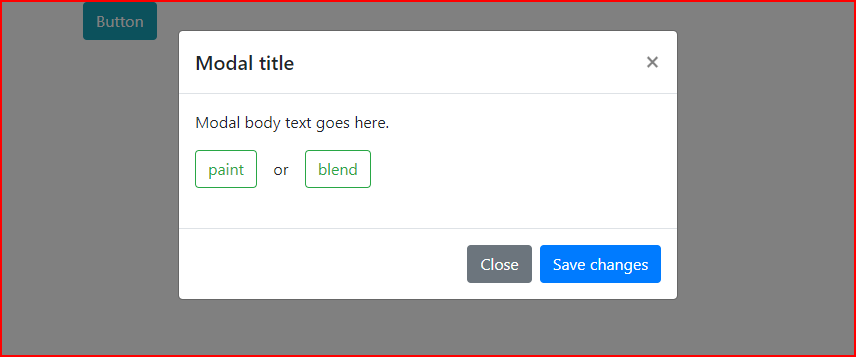
Below is a simple modal with two checkboxes (‘paint’ and ‘blend’) formatted as buttons, which toggle on and off as per the video (Screen.mp4) below.
I cannot understand why a form’s input ID works when manually entered like this
input id="a1_id_125_0"
but a dynamic ID (in this simple test) set-up via a variable which shows correctly in html, does not work
dmx-value id="var_id_number1" dmx-bind:value="'a1_id_125_0'"input dmx-bind:id="var_id_number1.value"
A quick video to show how the following code does work when entered manually.
Screen.mp4 (1.1 MB)
Copy the following code and enter into a blank php or html file.dmx-bind:id which uses the variable on line 57id="a1_id_125_0" then everything works, so why does it not work with dmx-bind:id ?
Help Please.
<html>
<head>
<meta name="ac:base" content="/daviesandgray.co.uk/httpdocs/httpdocs">
<base href="/daviesandgray.co.uk/httpdocs/httpdocs/admin/">
<meta charset="UTF-8">
<title>Untitled Document</title>
<script src="../dmxAppConnect/dmxAppConnect.js"></script>
<script src="https://code.jquery.com/jquery-3.3.1.slim.min.js" integrity="sha384-q8i/X+965DzO0rT7abK41JStQIAqVgRVzpbzo5smXKp4YfRvH+8abtTE1Pi6jizo" crossorigin="anonymous"></script>
<link rel="stylesheet" href="https://pro.fontawesome.com/releases/v5.10.1/css/all.css" integrity="sha384-y++enYq9sdV7msNmXr08kJdkX4zEI1gMjjkw0l9ttOepH7fMdhb7CePwuRQCfwCr" crossorigin="anonymous">
<script src="https://cdnjs.cloudflare.com/ajax/libs/moment.js/2.22.2/moment.min.js" integrity="sha256-CutOzxCRucUsn6C6TcEYsauvvYilEniTXldPa6/wu0k=" crossorigin="anonymous"></script>
<meta name="viewport" content="width=device-width, initial-scale=1, shrink-to-fit=no">
<link rel="stylesheet" href="https://stackpath.bootstrapcdn.com/bootstrap/4.3.1/css/bootstrap.min.css" integrity="sha384-ggOyR0iXCbMQv3Xipma34MD+dH/1fQ784/j6cY/iJTQUOhcWr7x9JvoRxT2MZw1T" crossorigin="anonymous">
<script src="../dmxAppConnect/dmxBootstrap4Modal/dmxBootstrap4Modal.js" defer=""></script>
<script src="../dmxAppConnect/dmxFormatter/dmxFormatter.js" defer=""></script>
<script src="../dmxAppConnect/dmxStateManagement/dmxStateManagement.js" defer=""></script>
</head>
<body is="dmx-app" id="test1">
<dmx-local-manager id="local1"></dmx-local-manager>
<div class="container">
<div class="row">
<div class="col">
<div class="row">
<div class="col">
<button class="btn btn-info" dmx-on:click="modal1.show()">Button</button>
</div>
</div>
<div class="modal" id="modal1" is="dmx-bs4-modal" tabindex="-1" role="dialog">
<div class="modal-dialog" role="document">
<div class="modal-content">
<div class="modal-header">
<h5 class="modal-title">Modal title</h5>
<button type="button" class="close" data-dismiss="modal" aria-label="Close">
<span aria-hidden="true">×</span>
</button>
</div>
<div class="modal-body">
<p>Modal body text goes here.</p>
<form id="form2" is="dmx-serverconnect-form" method="post">
<dmx-value id="var_id_number1" dmx-bind:value="'a1_id_125_0'"></dmx-value>
<dmx-value id="var_id_number2" dmx-bind:value="'a2_id_125_0'"></dmx-value>
<dmx-value id="var_id_group" dmx-bind:value="'input2_group'"></dmx-value>
<div class="form-group" id="input2_group" is="dmx-checkbox-group">
<div class="form-check form-check-inline">
<label
class="btn btn-xs btn-outline-success"
for="a1_id_125_0"
dmx-class:active="a1_id_125_0.checked">
<input
class="custom-control-input"
type="checkbox"
value="Door"
dmx-bind:id="var_id_number1.value"
name="paint[]"
dmx-on:change="a2_id_125_0.select(false)">paint {{var_id_number1.value}}</label>
</div>
<div class="form-check form-check-inline">or</div>
<div class="form-check form-check-inline">
<label
class="btn btn-xs btn-outline-success"
for="a2_id_125_0"
dmx-class:active="a2_id_125_0.checked">
<input
class="custom-control-input"
type="checkbox"
value="Door"
id="a2_id_125_0"
name="blend[]"
dmx-on:change="a1_id_125_0.select(false)">blend</label>
</div>
</div>
</form>
</div>
<div class="modal-footer">
<button type="button" class="btn btn-secondary" data-dismiss="modal">Close</button>
<button type="button" class="btn btn-primary">Save changes</button>
</div>
</div>
</div>
</div>
</div>
</div>
</div>
<script src="https://cdnjs.cloudflare.com/ajax/libs/popper.js/1.14.7/umd/popper.min.js" integrity="sha384-UO2eT0CpHqdSJQ6hJty5KVphtPhzWj9WO1clHTMGa3JDZwrnQq4sF86dIHNDz0W1" crossorigin="anonymous"></script>
<script src="https://stackpath.bootstrapcdn.com/bootstrap/4.3.1/js/bootstrap.min.js" integrity="sha384-JjSmVgyd0p3pXB1rRibZUAYoIIy6OrQ6VrjIEaFf/nJGzIxFDsf4x0xIM+B07jRM" crossorigin="anonymous"></script>
</body>
</html>
George
November 22, 2019, 6:33pm
2
What are you trying to achieve?
Hi @George , I am trying to achieve what is in the video but on a bigger scale, where there are many pairs of buttons for the user to select. These will all be created dynamically from a database. And each pair will be in a form-group dmx-checkbox-group.
It all started with Looking for help with Radio Buttons and I have been struggling ever since.
I have tried to break this down to the bare bones and realise that even in it’s basic form that it is still not working in a dynamic form.
Hi @George , do you have any idea on how to get this to work?
It is almost as if
dmx-class:active="a1_id_125_0.checked"
doesn’t recognise the dynamically generated ID
which is created via
dmx-bind:id="var_id_number1.value"
Does the variable need to be declared elsewhere, or do we need State Managers set-up with the variables declared? Am I missing something?
Can somebody PLEASE help me with this?
patrick
November 25, 2019, 10:57am
7
You need to set the static id and the dynamic id. The static id is the name under which the component will register itself and which you use in your expressions. The dynamic id is to update the id afterwards in the DOM to make the checkboxes work.
<html>
<head>
<meta name="ac:base" content="/daviesandgray.co.uk/httpdocs/httpdocs">
<base href="/daviesandgray.co.uk/httpdocs/httpdocs/admin/">
<meta charset="UTF-8">
<title>Untitled Document</title>
<script src="../dmxAppConnect/dmxAppConnect.js"></script>
<script src="https://code.jquery.com/jquery-3.3.1.slim.min.js" integrity="sha384-q8i/X+965DzO0rT7abK41JStQIAqVgRVzpbzo5smXKp4YfRvH+8abtTE1Pi6jizo" crossorigin="anonymous"></script>
<link rel="stylesheet" href="https://pro.fontawesome.com/releases/v5.10.1/css/all.css" integrity="sha384-y++enYq9sdV7msNmXr08kJdkX4zEI1gMjjkw0l9ttOepH7fMdhb7CePwuRQCfwCr" crossorigin="anonymous">
<script src="https://cdnjs.cloudflare.com/ajax/libs/moment.js/2.22.2/moment.min.js" integrity="sha256-CutOzxCRucUsn6C6TcEYsauvvYilEniTXldPa6/wu0k=" crossorigin="anonymous"></script>
<meta name="viewport" content="width=device-width, initial-scale=1, shrink-to-fit=no">
<link rel="stylesheet" href="https://stackpath.bootstrapcdn.com/bootstrap/4.3.1/css/bootstrap.min.css" integrity="sha384-ggOyR0iXCbMQv3Xipma34MD+dH/1fQ784/j6cY/iJTQUOhcWr7x9JvoRxT2MZw1T" crossorigin="anonymous">
<script src="../dmxAppConnect/dmxBootstrap4Modal/dmxBootstrap4Modal.js" defer=""></script>
<script src="../dmxAppConnect/dmxFormatter/dmxFormatter.js" defer=""></script>
<script src="../dmxAppConnect/dmxStateManagement/dmxStateManagement.js" defer=""></script>
</head>
<body is="dmx-app" id="test1">
<dmx-local-manager id="local1"></dmx-local-manager>
<div class="container">
<div class="row">
<div class="col">
<div class="row">
<div class="col">
<button class="btn btn-info" dmx-on:click="modal1.show()">Button</button>
</div>
</div>
<div class="modal" id="modal1" is="dmx-bs4-modal" tabindex="-1" role="dialog">
<div class="modal-dialog" role="document">
<div class="modal-content">
<div class="modal-header">
<h5 class="modal-title">Modal title</h5>
<button type="button" class="close" data-dismiss="modal" aria-label="Close">
<span aria-hidden="true">×</span>
</button>
</div>
<div class="modal-body">
<p>Modal body text goes here.</p>
<form id="form2" is="dmx-serverconnect-form" method="post">
<dmx-value id="var_id_number1" dmx-bind:value="'a1_id_125_1'"></dmx-value>
<dmx-value id="var_id_number2" dmx-bind:value="'a2_id_125_1'"></dmx-value>
<dmx-value id="var_id_group" dmx-bind:value="'input2_group'"></dmx-value>
<div class="form-group" id="input2_group" is="dmx-checkbox-group">
<div class="form-check form-check-inline">
<label class="btn btn-xs btn-outline-success" dmx-bind:for="var_id_number1.value" dmx-class:active="a1_id_125_0.checked">
<input class="custom-control-input" type="checkbox" value="Door" id="a1_id_125_0" dmx-bind:id="var_id_number1.value" name="paint[]" dmx-on:change="a2_id_125_0.select(false)">
paint {{var_id_number1.value}}
</label>
</div>
<div class="form-check form-check-inline">or</div>
<div class="form-check form-check-inline">
<label class="btn btn-xs btn-outline-success" dmx-bind:for="var_id_number2.value" dmx-class:active="a2_id_125_0.checked">
<input class="custom-control-input" type="checkbox" value="Door" id="a2_id_125_0" dmx-bind:id="var_id_number2.value" name="paint[]" dmx-on:change="a1_id_125_0.select(false)">
blend {{var_id_number2.value}}
</label>
</div>
</div>
</form>
</div>
<div class="modal-footer">
<button type="button" class="btn btn-secondary" data-dismiss="modal">Close</button>
<button type="button" class="btn btn-primary">Save changes</button>
</div>
</div>
</div>
</div>
</div>
</div>
</div>
<script src="https://cdnjs.cloudflare.com/ajax/libs/popper.js/1.14.7/umd/popper.min.js" integrity="sha384-UO2eT0CpHqdSJQ6hJty5KVphtPhzWj9WO1clHTMGa3JDZwrnQq4sF86dIHNDz0W1" crossorigin="anonymous"></script>
<script src="https://stackpath.bootstrapcdn.com/bootstrap/4.3.1/js/bootstrap.min.js" integrity="sha384-JjSmVgyd0p3pXB1rRibZUAYoIIy6OrQ6VrjIEaFf/nJGzIxFDsf4x0xIM+B07jRM" crossorigin="anonymous"></script>
</body>
</html>
Hi Patrick, now I understand a bit more, and this is great if I have one or two of these where I can manually input the IDs.
My problem is that I have many of them, perhaps hundreds, all dynamically populated from a database.
My scenario is that the above code would be in a repeat, and that repeat would repeat as many times as items returned in a query. So I cannot manually enter an ID, it needs to be dynamic.
patrick
November 25, 2019, 1:47pm
9
For your repeat it works exactly the same, you use the static id for the expressions inside the current repeat item and the dynamic id to have unique ids in the DOM.
Here your sample code with a repeater
<html>
<head>
<meta name="ac:base" content="/daviesandgray.co.uk/httpdocs/httpdocs">
<base href="/daviesandgray.co.uk/httpdocs/httpdocs/admin/">
<meta charset="UTF-8">
<title>Untitled Document</title>
<script src="../dmxAppConnect/dmxAppConnect.js"></script>
<script src="https://code.jquery.com/jquery-3.3.1.slim.min.js" integrity="sha384-q8i/X+965DzO0rT7abK41JStQIAqVgRVzpbzo5smXKp4YfRvH+8abtTE1Pi6jizo" crossorigin="anonymous"></script>
<link rel="stylesheet" href="https://pro.fontawesome.com/releases/v5.10.1/css/all.css" integrity="sha384-y++enYq9sdV7msNmXr08kJdkX4zEI1gMjjkw0l9ttOepH7fMdhb7CePwuRQCfwCr" crossorigin="anonymous">
<script src="https://cdnjs.cloudflare.com/ajax/libs/moment.js/2.22.2/moment.min.js" integrity="sha256-CutOzxCRucUsn6C6TcEYsauvvYilEniTXldPa6/wu0k=" crossorigin="anonymous"></script>
<meta name="viewport" content="width=device-width, initial-scale=1, shrink-to-fit=no">
<link rel="stylesheet" href="https://stackpath.bootstrapcdn.com/bootstrap/4.3.1/css/bootstrap.min.css" integrity="sha384-ggOyR0iXCbMQv3Xipma34MD+dH/1fQ784/j6cY/iJTQUOhcWr7x9JvoRxT2MZw1T" crossorigin="anonymous">
<script src="../dmxAppConnect/dmxBootstrap4Modal/dmxBootstrap4Modal.js" defer=""></script>
<script src="../dmxAppConnect/dmxFormatter/dmxFormatter.js" defer=""></script>
<script src="../dmxAppConnect/dmxStateManagement/dmxStateManagement.js" defer=""></script>
</head>
<body is="dmx-app" id="test1">
<dmx-local-manager id="local1"></dmx-local-manager>
<div class="container">
<div class="row">
<div class="col">
<div class="row">
<div class="col">
<button class="btn btn-info" dmx-on:click="modal1.show()">Button</button>
</div>
</div>
<div class="modal" id="modal1" is="dmx-bs4-modal" tabindex="-1" role="dialog">
<div class="modal-dialog" role="document">
<div class="modal-content">
<div class="modal-header">
<h5 class="modal-title">Modal title</h5>
<button type="button" class="close" data-dismiss="modal" aria-label="Close">
<span aria-hidden="true">×</span>
</button>
</div>
<div class="modal-body">
<p>Modal body text goes here.</p>
<form id="form2" is="dmx-serverconnect-form" method="post">
<dmx-value id="var_id_number1" dmx-bind:value="'a1_id_125_1'"></dmx-value>
<dmx-value id="var_id_number2" dmx-bind:value="'a2_id_125_1'"></dmx-value>
<dmx-value id="var_id_group" dmx-bind:value="'input2_group'"></dmx-value>
<div is="dmx-repeat" dmx-bind:repeat="5">
<div class="form-group" id="input2_group" is="dmx-checkbox-group">
<div class="form-check form-check-inline">
<label class="btn btn-xs btn-outline-success" dmx-bind:for="a1_id_{{$index}}" dmx-class:active="a1_id_125_0.checked">
<input class="custom-control-input" type="checkbox" value="Door" id="a1_id_125_0" dmx-bind:id="a1_id_{{$index}}" name="paint[]" dmx-on:change="a2_id_125_0.select(false)">
paint a1_id_{{$index}}
</label>
</div>
<div class="form-check form-check-inline">or</div>
<div class="form-check form-check-inline">
<label class="btn btn-xs btn-outline-success" dmx-bind:for="a2_id_{{$index}}" dmx-class:active="a2_id_125_0.checked">
<input class="custom-control-input" type="checkbox" value="Door" id="a2_id_125_0" dmx-bind:id="a2_id_{{$index}}" name="paint[]" dmx-on:change="a1_id_125_0.select(false)">
blend a2_id_{{$index}}
</label>
</div>
</div>
</div>
</form>
</div>
<div class="modal-footer">
<button type="button" class="btn btn-secondary" data-dismiss="modal">Close</button>
<button type="button" class="btn btn-primary">Save changes</button>
</div>
</div>
</div>
</div>
</div>
</div>
</div>
<script src="https://cdnjs.cloudflare.com/ajax/libs/popper.js/1.14.7/umd/popper.min.js" integrity="sha384-UO2eT0CpHqdSJQ6hJty5KVphtPhzWj9WO1clHTMGa3JDZwrnQq4sF86dIHNDz0W1" crossorigin="anonymous"></script>
<script src="https://stackpath.bootstrapcdn.com/bootstrap/4.3.1/js/bootstrap.min.js" integrity="sha384-JjSmVgyd0p3pXB1rRibZUAYoIIy6OrQ6VrjIEaFf/nJGzIxFDsf4x0xIM+B07jRM" crossorigin="anonymous"></script>
</body>
</html>
@patrick , starting to look really good and is making sense
Does it not matter that the initial Static ID will seem as though it is repeated in Wappler? In theory the ID (id=“a1_id_125_0”) could be repeated a hundred times.
When I look at the code in DevTools, you don’t actually see the Static ID, you only see the Dynamic ID. So does that mean that so long as you put something in as the Static ID it doesn’t matter what you put in?
The Static ID acts as a sort of placeholder in a template. That’s how it comes across to me.
patrick
November 25, 2019, 2:38pm
11
The static id is under which the component register itself with its parent, that name is used in your expressions. The dynamic id is used later and only updates the id attribute in the DOM. You can see the static id as a local variable in the repeat, that is why it works.
OK great, many thanks for your help. I will now go to my project and replicate what you have told me.