Antony
1
I’m trying to download a file from my S3 bucket using Wappler 3.9.7, and I’m getting the following error in the Network tab of the browser :
"Invalid Path! https://files.workshop-angel.com/30_b5d9b914fe1244c0_fp_hands.jpg"
However, you can see if you put this url into a browser, this path is correct.
I have the following setup for my Get File action:
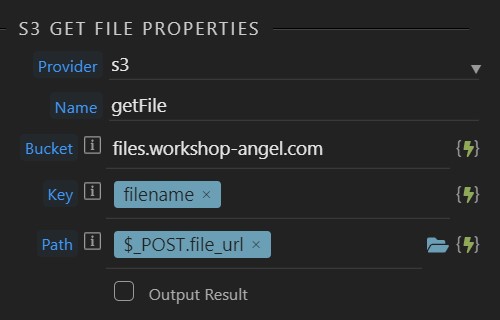
Where:
filename = 30_b5d9b914fe1244c0_fp_hands.jpg
$_POST.file_url = https://files.workshop-angel.com/30_b5d9b914fe1244c0_fp_hands.jpg
What am I doing wrong? 
George
2
Well you have the file name also already in the path…
Antony
3
So are saying it should be this?
filename = 30_b5d9b914fe1244c0_fp_hands.jpg
$_POST.file_url = https://files.workshop-angel.com/
George
4
Yes, that is why we have two separate fields, file name and path…
bpj
5
I’m pretty sure the path value should be a local folder where the file will be saved
Right, and the key is whatever key was used to put the file at s3 (which might include a path as well as file name)
bpj
7
If you are storing in a subfolder on S3 you currently need to create the local folders to match for the path
sid
8
Apart from the binding issues, the path needs to be very specific as well.
Although in your case I see the file is directly in the bucket, so you don’t have to worry about the above for this file at least.
Antony
9
Thanks for all your help, folks!
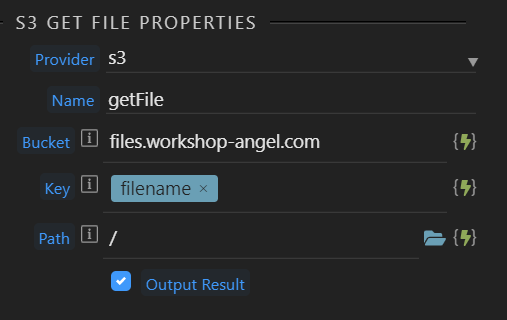
That all makes sense now with the path… luckily I don’t have any folders on the S3 side, so a / for the path seems to suffice…
I have it set as below and I have managed to overcome this hurdle.
(Another hurdle has presented itself, which I’ll open a new post for…  )
)