What happens if you set your Cookie Expiration to 0?

I am trying to avoid users being left in for long periods. Ultimately I'd like the user to have to log in every four hours.

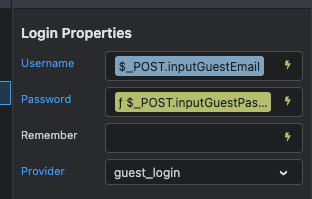
What happens if the cookie expiration is set to 0? Also, what happens if you leave the remember me setting on login blank?

Screenshot 2026-04-22 at 10.07.29 AM

For more information:

Update: I have left the Remember setting blank and tested it. No cookie appears to be set and it automatically logs out if browser is closed.

This is almost better than what I wanted. I would still like to clear the session after 4 hours. Any ideas?

You could store the date and time when they logged in and have an action which checks if 4 hours has passed and if it has, log them out again.

1 Like

Hmmm, I already record the date and time of login. Thanks Jon, I will look at that option further. I was hoping there was some way in the Wappler UI to set an expiry for a session value.

Hi Brad, there is no need to use a cookie to force a new login session. Instead use a Server Connect Flow to enforce a 4-hour session.

How to do it

Step 1 - Modify your Login Server Action

After the Security Login step:

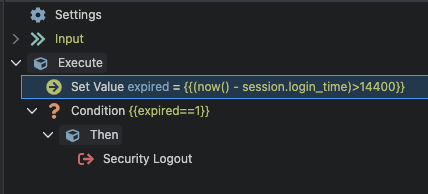
Add a Set Value step

  • Name: session.login_time
  • Value: now()

This stores the exact login timestamp in the PHP session.

Step 2 - Add a “session check” to every protected page

  1. Create a new Server Action: check_session.php

  2. Add a Set Value step:

    • Name: expired
    • Value:
      (now() - session.login_time) > 14400
      
      (14400 seconds = 4 hours)
  3. Add a Condition:

    • If expired == 1:
      • Add Security Logout
      • Add Response → Redirect to login page
  4. On each protected page:

    • Add Server Connectcheck_session.php
    • Set it to run on page load

Thanks Ben, that makes perfect sense. However the login session would get it's time from the server which is 7 hours later than local time. So that won't work?

Actually, now that I wrap my head around it, I believe it is all done server side so local time is irrelevant. I am excited to give this a go tomorrow morning. Thanks again. Much appreciated.

1 Like

Unfortunately this doesn't work, I get a 500 error on my check_session.php page. Here is how I have my serverconnect set up. I have my set value set as a boolean data type. Is that correct?

  1. {code: 0, file: "/home/lawrykca/mysite.com/dmxConnectLib/lib/core/Parser.php", line: 512,…}

  2. code: 0

  3. file: "/home/lawrykca/mysite.com/dmxConnectLib/lib/core/Parser.php"

  4. line: 512

  5. message: "Formatter "now" does not exist."

Yes because there is no such thing as now() in Wappler:

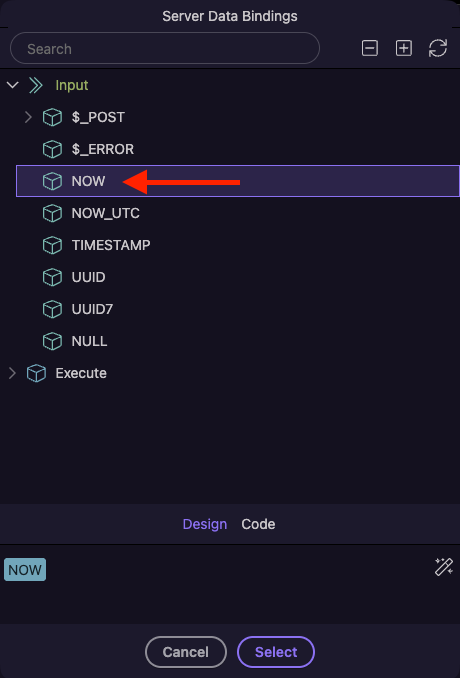
In server connect picker simply pick the NOW value

which generates the expression as

(NOW - session.login_time) > 14400

Well, that made a difference. But now I get a different 500 error.

message: "A non-numeric value encountered"

@Teodor , @ben ....... I am getting close. I no longer have any 500 errors. But this instantly logs me out. What am I doing wrong. I have a feeling I have to set my timestamps to a number or something?

You could use NOW.toTimestamp()-login time.toTimetamp()in the set value

Thanks Ben, no luck :frowning:

I even tried converting to Number

To figure out whats going on why not try have another set value that is now - Login time and outputs the value. Disable the logout part and see what value it actually gives you.

1 Like

I’ve just spotted, I think it should be $_SESSION.loginTime (so NOW.toTimestamp() - $_SESSION.loginTime.toTimestamp()

1 Like

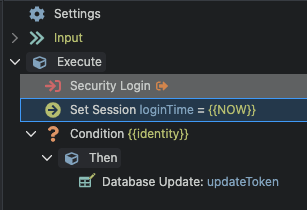
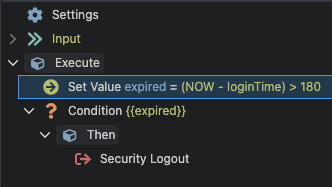
Thanks for the help pointing me in the right direction guys! I have it working! :beers:

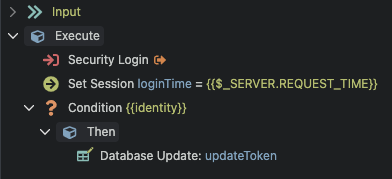
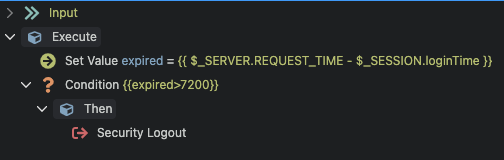
Here is how I had to set up my actions: