As you may have noticed, in the latest Wappler 7.6 we have just released a very extensive tours and docs system integrated in Wappler.
The system has some very cool features like automatic highlighting the exact interface elements and inputs that are being explained, rich interactive descriptions and actions on the steps.
Also it includes a full export to markdown and automatic screenshotting with even smart cutting of the focused Wappler UI elements.
Not only that but it can even generate a video out of a tour with also automatic UI highlighting and zoom/pan to.
We are working on full coverage of all Wappler functionality and our existing docs, so there is a lot of work more to do but we have made some great progress already.
Using the automated export and screenshotting will help us to produce a high quality and very up to date documentation of Wappler, which we will use to fill in our docs site. It will be possible even to translate it in multiple languages easy.
You can access the new Wappler tours from the (?) icon in the title - the main index, or on specific panels toolbars for their specific help or in the design view toolbar for specific info about the html page editor.
We have categorized it hopefully well, with various overviews, how-to's and references.
Also for the beginners is an extensive general information to get started in the main tour index about "Why Wappler", "Learning the Basics" and "Wappler Overview" as well various extended "Bootstrap" tours.
So check it out @wappler_ambassadors and let us know what you think of the working and organization.
We will be adding more and more contents and coverage in the coming weeks with the goal to produce full Wappler docs for our new upcoming docs site (build in Astro and fed by the same docs in markdown)
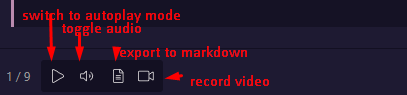
so you can go to autoplay mode - and the tour will run automatically
you can toggle the audio mode, between:
no speech (speaker off icon)
ai mode (speaker on icon)
browser speech engine - (headphones icon
export the tour to markdown - will auto run the whole tour in fast mode, capture and cut screenshots and save it as markdown in your download folder / WapplerTours
record video will auto play the tour in normal speed, and use the speech to read it, if enabled - and save a WEBM video again to your Downloads folder / WapplerTours
I’m so sorry @Hyperbytes for all the time you’ve put into the virtual academy. This new tours looks excellent but I can’t help assuming you had no idea this was in the pipeline?
Thank you for all you do. It is soooooo appreciated.
And thanks to the Wappler team for this new feature. I’m sure it will be very helpful for everyone.
The tours are just opening great new possibilities for automatic documentation and user guidance Brian!
We will be extending the system and making it open so you can write your own tours and explain workflows and functionalities in Wappler even more!
Also third party extensions will be able to provide tour files (which are simple json files) that explain the exact usage of the extension within Wappler.
Ans with the easy and automatic screenshotting and movie recording you can even fill up your Wappler Academy much more easy with quality tours, focusing more on the content than on how it is shotted.
I see no real need now for the academy to be honest George, i will actually leave it live until the new system is finalised but after that I am more than happy to switch focus onto the new system.
It actually takes a considerable burden off my shoulders so it's a win-win in my books.
The VPS contract i setup for it expires in July (it's only £2 per month) so that gives me a deadline for shutdown.
Meanwhile, i am here if needed.