I was playing locally with some videos and thought it would be cool to have a simple Server Connect action that generates a poster image from a video.
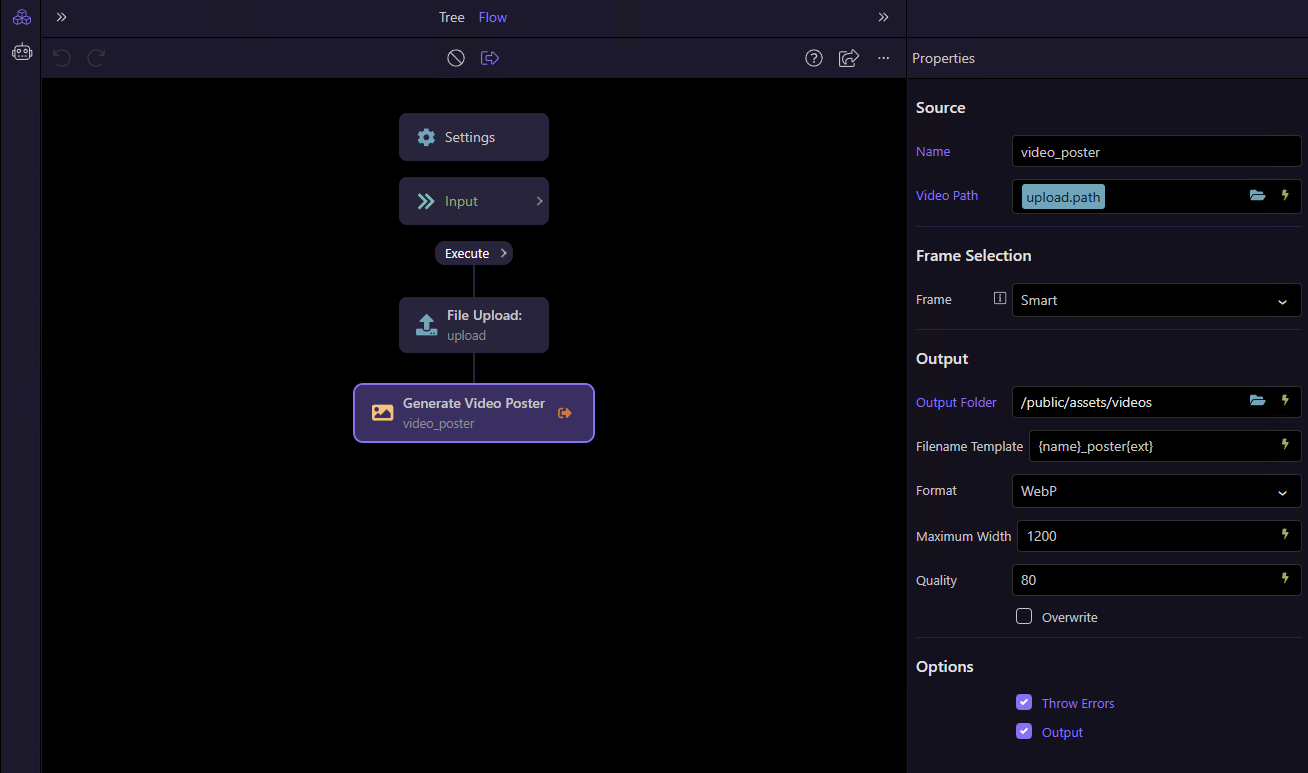
So I created Video Poster Generator, a custom Wappler Server Connect extension for Node.js projects.
The extension is available on npm:
Example use case
A typical workflow could be:
- A user uploads a video.
- Server Connect generates a poster image from the uploaded video.
- The video path and generated poster path are stored in the database.
- The poster is later used in the HTML video element:
<video controls poster="/uploads/posters/my-video.webp">
  <source src="/uploads/videos/my-video.mp4" type="video/mp4">
</video>
Features
The extension supports:
- Smart frame selection
- Exact timestamp selection
- Percentage-based selection
- Middle-frame selection
- WebP and JPEG output
- Configurable image width and quality
- Custom output filename templates
- Overwrite control
- Optional error throwing
Output
The action returns information including:
- Generated poster path
- Generated poster URL
- Filename
- Image format
- Selected timestamp
- Video duration
- Image width
- Image height
These values can be used in the following Server Connect steps - for example, when inserting the video and poster information into a database.
Installation
Search for the following package under Project Settings → Extensions:
wappler-video-poster
Add it to the project, save the project settings and run the Project Updater if requested.
After installation, the Generate Video Poster action should be available in Server Connect.
Feedback and suggestions are welcome, especially if you try it with different video-upload workflows.