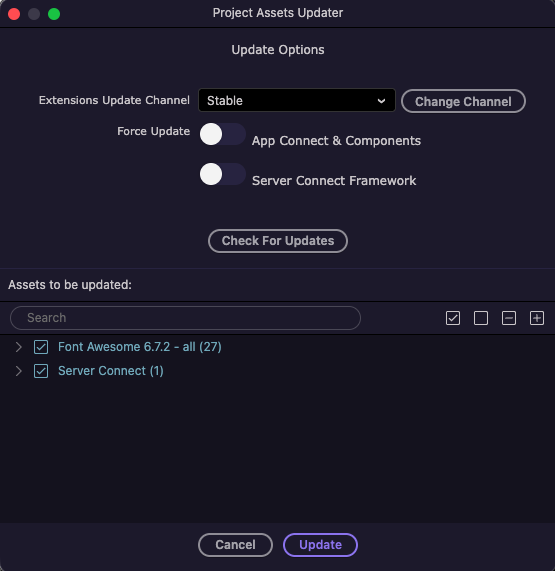
After upgrading Wappler from version 7.9.0 to 7.9.2, I’m seeing almost 100 file updates. Has Wappler v7.9.2 been released with so many updates? I’d like to double-check before accepting these file updates.
Also, 60 of the updates shown below have been applied automatically outside the project updater. These are all related to dmxAppConnect. There are actually more dmxAppconnect file updates than what’s shown in the screenshot.
I agree with @brad that I’ve had only a few file updates with each Wappler release. The .map files have been included in the package since at least version 5.
I have to say, Gremlins are pretty nasty creatures.
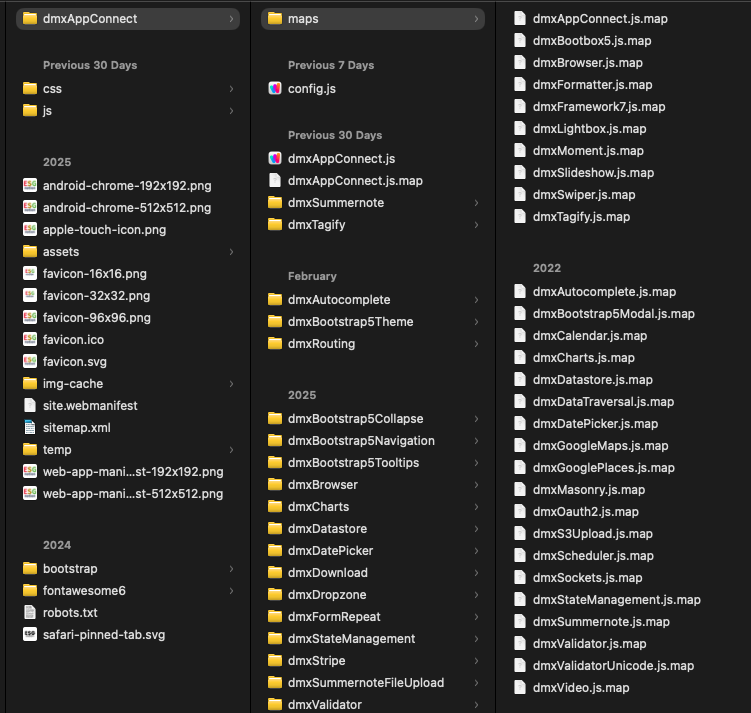
None of the projects on my laptop have any maps folder under public/dmxAppConnect. The js.maps files have always been included in the same folder as the main js files.
The map files that have been added after the update have timestamps from 2017 to 2023.
So, it seems the v7.9.2 update has been released by moving the map files in a new folder instead of keeping them with the original js files.
It might be an old map files left over in the Wappler installation, we don’t have a single map files folder for more than a year. Map files are now delivered next to the js files in the same folders.
So you can just delete the separate maps folder - it is no longer used.
Could you please give me the folder path for the user configuration folder so that I can check?
I can see existing Map files are correctly saved next to the js files in the same folders. The new folder has started to appear only after upgrading to v7.9.2 from v7.9.0.
Unfortunately, a clean re-install (deleted the user folder except configuration sub-folder) hasn't resolved the issue. The maps sub-folder has re-appeared under dmxAppConnect after I opened a project.
I have noticed that the maps sub-folder doesn't get added when a project is opened, it is re-created after a layout page is opened or saved.
I have been regularly updating the projects. The appConnect v2 would have been installed when v7.x.x was released. I'm running v2.2.5 released on 03/03/2026.
I didn't delete the configuration folder, as the Clean reinstall instructions has this note. I want to keep the current configuration settings.
Note : if you want to keep you previous projects configuration just leave the 'Configuration ' sub folder it in and delete the rest only.
Where is the setting for the js.map files in the configuration folder?
As I mentioned in my previous post, the maps sub folder is re-created when layout pages are opened. It's not recreated when a project is opened. So, the opening or saving of the layout page must be checking the js files included in the project and creating this sub folder outside the actual dmx sub folders.
This might provide further details to the Wappler Team to identify and fix the issue.
On macOS, there is a maps folder under this path. After I removed the maps folder, the sub-folder for maps no longer gets recreated when I open or save layout pages.
It looks like the folder was introduced in very early versions of Wappler and is now being recreated as an include in the projects.