I've noticed that using SQLite was mentioned before in relation to NodeJS etc. I know little about Docker, or NodeJS, but when I have used Docker (locally), I've used it with MySQL which suits me best as I'm familiar with it and can use Navicat etc.
Is there a particular advantage in using SQLite in this context, or is it just used as an example, as a simple way to get started? Also, can SQLite be used locally while the project was deployed using MySQL (for example), without compatibility issues? I imagine there could be some issues with custom queries for example.
SQLite is a server-less database and it is self-contained, unlike MySQL which requires a server to run.
SQLite with NodeJS is the fastest way to get started with dynamic websites in Wappler as Wappler has integrated server which runs your NodeJS project and SQLite as mentioned above does not require a server.
So you don't need to install anything than Wappler to get up and running - no Docker, no MAMP/WAMP etc. servers.
Thanks Teodor, that’s helpful. I often have to work with SQLite files, but I’ve never used them for any development - eg with Wappler.
I’ve just had a quick go setting up project with SQLite but haven’t got very far.
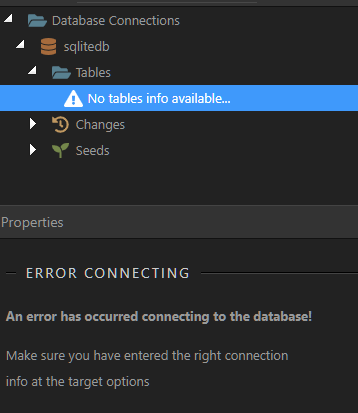
Having selected a SQLite file and testing the connection:
… which is probably not very surprising as I didn’t know what to enter in the Project Settings panel for the Target. It seems I need to add a Web Server URL. Access type is presumably ‘Local Folder’. Should I have chosen NodeJS rather than PHP perhaps?
Well in order to run PHP (server actions etc) you need a web server and a target pointing to it.
If you select Node then you are using the server Wappler runs for Node.
I just mean I use PHP in other applications, without using a server. At some point I would like to work on a desktop app with Wappler, which wouldn't need a server - or at least wouldn't require a user to install one.
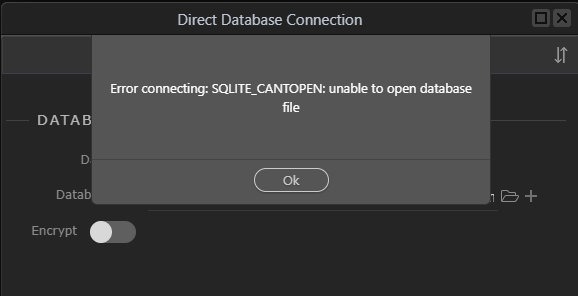
.. and could apparently set up database connection to a SQLite file successfully. However, adding a query, no tables were listed. In Database Manager, I clicked Direct Database Connection, but:
I probably need to do some research into all the installation errors first and using NodeJS with Wappler, but I'll probably leave this for another time. I was just curious about using Wappler with SQLite.
Thanks George. Everthing works usually and it didn’t occur to me to run a system check. I had v8.12 of Node installed. Some of the essential issues now seem to be resolved.
I can create a connection, but still couldn’t see any tables in query builder or database manager. I can see them in Navicat.
I created a database from scratch, in Wappler, and can now see the tables, and create a query. I don’t know why I wouldn’t be able to open an existing file. Perhaps it was created with an old version of SQLite. Anyway, I thought I was almost there, but opening the query API file in the browser, I get a 500 status and a missing modules. Perhaps something else needs installing or there is path issue.
Hey @TomD ! Welcome to Nodejs! I am so excited to see you venture into this new world!
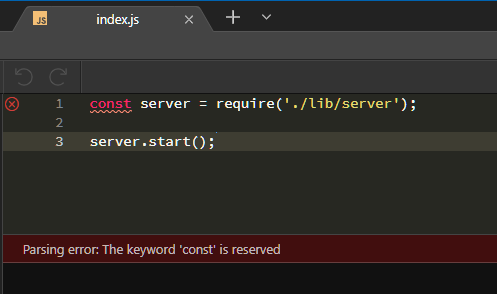
I would not worry about the index.js file, it should be fine with the default entries. I have never had to modify or even look at it.
As far as the database goes, I experience this sometimes with a new project. Try restarting Wappler and then see if the tables show up. Since they are viewable in Navicat, the tables are there.
I have not used SQLite with nodejs, I have stuck with mysql, so I will be watching this so see how it works for you.
Hi @scott. I’m not sure if I’ve quite ventured into this new world. So far I’ve been circling around it, looking from a distance. I tried a landing but it wasn’t very successful.
I suspect some of the Node modules for SQLite are not installed by Wappler. I tried reinstalling them but without success. However, I’m not quite sure what I’m doing or what version to use etc. I have some longer term plans to use SQLite, perhaps with Electron - but that’s another world too.
When I next experiment with NodeJS, I’ll probably try it with MySQL.
Seems to me the node modules aren’t installed for your node project. How did you created it? Did you choose NodeJS as option in the initial project settings? Then everything should be done automatically
I started a new project, choosing node. The node modules folder was created and populated, but there were errors indicating some modules were missing. I’ve now deleted the folder and clicked the install node packages icon as suggested by @scott - that seems to have done the trick.
That's what I did. As I mentioned in my last reply, it's working now, but only with a new SQLite database, created in Wappler, not with an existing database file.
It’s all working now. I was fiddling with a few things but I think the problem was that the file had an extension .sqlite.db. This wasn’t a problem when I’ve accessed the file with DB Browser for SQLite or Navicat. However, I have over 500 SQLite files on this computer and I think this was the only one which didn’t have a .sqlite extension, so it was bad luck that I chose one with a non-standard extension. So, not much of an issue.