Please check the FTPS connection protocol because I can’t connect to IONOS provider. It does not work and I have had support from IONOS and they have told me that it should be updated.
I have tried it with FILEZILLA and it does work but not in wappler.
Perhaps you could show us how you have it set up as there may be a config error.
Also are you taking about FTPS implicit or explicit as they are very different protocols. From recollection (not used IONOS for a long time) Implicit works, explicit wont (it is not well supported on any platform)
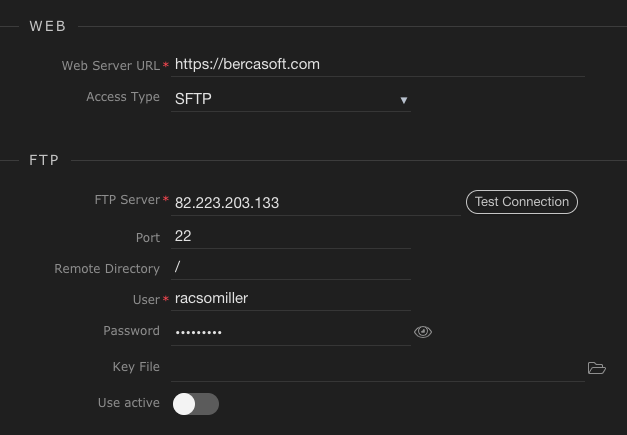
So you mean SFTP not FTPS? (they are different)
is the remote directory correct?
Do the web files get loaded into the root as above or is there a directory such as htdocs, public_html, www or similar where the web files need to be downloaded?
Filezilla will connect to the root regardless of whether that is the web site root, Wappler settings need to point to the web root, not the FTP root (if different)
I am having the exact same thing with my IONIS account. Works great in Filezilla.
“The authenticity of host ‘74.208.215.130 (74.208.215.130)’ can’t be established.” when I check connection.
@racsomiller did you ever solve this?