Why am I not allowed to do that sort of thing? What is wrong with it? Why is it a bad thing?
You know what... Blaming me for bringing it up is fine. I don't mind.
Why am I not allowed to do that sort of thing? What is wrong with it? Why is it a bad thing?
You know what... Blaming me for bringing it up is fine. I don't mind.
Hi George,
We would be interested to know how the deployments of web applications with Docker v29.x.x have worked for you, whereas I and many other users have experienced 404 errors. Could you please explain the difference so that we can adjust the deployment method accordingly?
I'm happy to run tests if needed to assist the team to provide a permanent fix for this long standing issue.
Sorry I mis have missed your solution, there was some talks about pinning the docker to older version and others about updating Traefic.
So which exactly worked for you?
Well it is unclear to me exactly what are you fixing - I rather have a list of fixes instead of a tool to dissect.
Of course you can make as many tools as you wish but I rather have a clear list of what is wrong and how it can be fixed so we can apply that in Wappler.
I fixed the deployment issue, initially as an internal tool, and then via requests (dozens of them) I was asked for a solution (and what I was using). Half the options in this tool were born out of internal needs, however they remain in the tool, which in itself is incredibly useful and has helped dozens of Users deploy without issue. It is not a dig at Wappler deployment being a problem, it just so happened it helped resolve the issue for others. It gives extended abilities to those deploying with Docker. Rather than running CLI commands. It allows for multiple options to install addons that the User may find helpful, etc, etc, yada-yada. It allows for security audits, and lots of other helpful features. It is a single unified tool with multiple options. It checks the host to see if Docker is installed, and if not it will install it for them (Digital Ocean Droplets do not install Docker by default). It is helpful in many ways. It runs health checks, allows users to connect to their remote terminal, it dissects Projects and creates useful files for use in AI cutting inference costs dramatically. It answer questions on your code-base, it sends you a text, the list goes on and is ever growing as requests come in, and feedback. It is not a replacement for Resource Manager or deployments in Wappler. It is an advanced set of tools for those who wish to do more than just deploy. Nothing is overwritten in Wappler Targets. All of its configurations remain within its own directory. It allows rolling back a deployment, on and on etc etc.
I provided that back in November George. Nothing has changed in that regard. I've shared everything I know about that issue with Docker and Traefik, I really have...
Cheese,
Please provide me with exact list of bugs and the solution you have found. Preferably in separate topics with explanation.
Differences are highlighted here in what I had to do prior to overcoming it with internal deployment solutions.
I did not like this method as was a real mess on subsequent deploys:
That whole thread covers what I did.
Then there are @guptast's threads:
Hope that helps.

I asked my chain of models (6 LLM's working in unity) to explain it in-depth. This may be far more useful. Rather than weaving in and out of posts.
DigitalOcean and many VPS images now ship Docker Engine 29.x. Stacks that worked before (Node app + Traefik + Compose, typical for Wappler Server Connect deploys) started failing in confusing ways: containers “up,” site dead.
Below is the list of issues we traced and the fixes that actually worked.
Symptom: Traefik listens on 80/443. App container is running. Browser shows 404 page not found. Traefik logs may include:
client version 1.24 is too old
Cause: Docker Engine 29+ requires Docker API ≥ 1.44. Older Traefik images (e.g. traefik:v3.0 through v3.5) still use API 1.24. Traefik starts but cannot talk to the Docker socket, so it discovers no backends and serves 404 for everything.
Fix:
traefik:v3.6.1 or newer (we standardised on traefik:v3.6.7).Upstream reference: github.com/traefik/traefik/issues/12253
Symptom: Correct Traefik version. App process is fine. Site still 404.
Cause: Traefik v3 does not route to containers whose Docker HEALTHCHECK is failing. Many Node/Wappler apps only serve /, not /health. A probe to /health fails → Docker marks the container unhealthy → Traefik drops all routes for that service.
Fix:
HEALTHCHECK at something the app actually serves, e.g. http://localhost:3000/ (not /health).--providers.docker.allowEmptyServices=true so routes don’t vanish during the container start-period while the app is still starting.Symptom: docker compose up errors because network traefik-public (or similar) doesn’t exist.
Cause: Docker 29.x does not auto-create external networks declared in compose. They must exist before up.
Fix: Create the network first:
docker network create traefik-public 2>/dev/null || true
Use whatever network name your compose file expects.
Symptom: Second deploy fails with ports 80 or 443 already in use — common after a failed first attempt or a leftover Traefik container.
Cause: An old container still holds those host ports; Docker 29 won’t bind them again.
Fix:
docker compose up -d --force-recreate.docker compose down, stop any container still on 80/443, then retry.Symptom: HTTP may work briefly; HTTPS never gets a certificate; little obvious error in the app.
Cause: Usually one of:
letsencrypt vs leresolver).Fix:
www, both need DNS (A or CNAME) pointing at the server.${DOMAIN}, ${ACME_EMAIL}) empty or unresolvedSymptom: Traefik host rules blank; compose warns about unresolved variables.
Cause: Variables in the compose file itself (e.g. in Traefik labels) are resolved at compose parse time. Putting values only in a service env_file: does not substitute them in labels. Docker 29 is stricter about missing values.
Fix: Pass env file globally to compose:
docker compose --env-file .env.deploy -f docker-compose.yml up -d
Put DOMAIN, ACME_EMAIL, etc. in that file.
Symptom: Deploying one app breaks others on the same VPS, or port conflicts on every deploy.
Cause: Each project starting its own Traefik on 80/443.
Fix: Run one Traefik on the host. Per app, only add:
traefik-public or whatever Wappler’s local proxy uses)Do not publish 80/443 again from each app stack.
| Issue | Typical symptom | Fix |
|---|---|---|
| Traefik API too old for Docker 29 | 404; “client version 1.24 is too old” | traefik:v3.6.1+ |
| Bad HEALTHCHECK | 404 while app runs | Probe / on app port; allowEmptyServices=true |
| External network missing | Compose network error | docker network create … before up |
| Port conflict on redeploy | “port already allocated” | force-recreate, down + cleanup, retry |
| ACME / TLS | HTTPS never works | Matched resolver; no global :80→HTTPS for HTTP-01 |
${VAR} in compose |
Blank hosts / compose errors | Global --env-file |
| Shared staging | Sites fight over 80/443 | One Traefik; labels + shared network per app |
traefik:v3.6.1 or newerHEALTHCHECK → http://localhost:<app-port>/--providers.docker.allowEmptyServices=truecompose updocker compose --env-file … for label variableswell great list maybe post it as troubleshoting list.
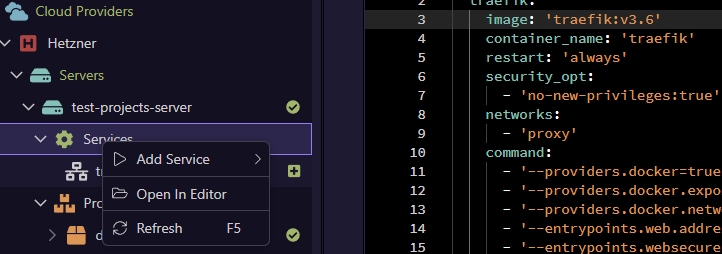
As for the traefik update to the new version 3 we will add it in the next update, but for now you can just do it manually, by opening the docker compose file in the editor from the services context menu " Open In Editor"
And just chang the traefik version to the latest v3.6
you can also add:
- '--providers.docker.network=proxy'
for the proxy issue.
Then just redeploy the server.
That would be great. Thank you. So much better for the Users experiencing this issue than a hack/work-around if the fix is native.
Success!
The web project is now running correctly after updating the docker‑compose file.
Thank you @George for providing a reliable workaround while the permanent fix is on the way.
And thanks to @Cheese for the thorough investigation and clear guidance. Your consistent effort in helping the community, and the time you put into breaking down complex issues, is genuinely appreciated. The place feels more welcoming because of contributions like yours 
Similar to this.
Thank you @guptast you are way too kind.


This topic will close 2 days after the last reply.

Fixed in Wappler 7.9.6