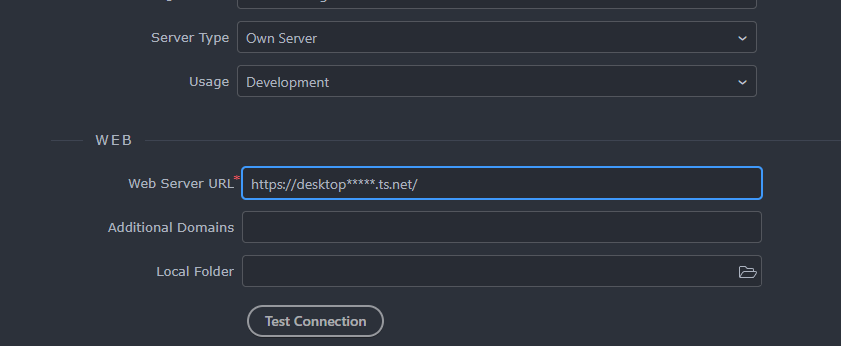
Error: ENOENT: no such file or directory, open 'E:\xampp\htdocs\****\certs\desktop****.ts.net-key.pem'
  errno: -4058,
  code: 'ENOENT',
  syscall: 'open',
  path: 'E:\\xampp\\htdocs\\****\\certs\\desktop****.ts.net-key.pem'
}
I’ve been using Tailscale and Tailnet in my projects. The error indicates that Tailscale cannot find the valid certificates that match the magicdns name. These certificates might be missing (Wappler didn’t create them locally) or have different names.
I haven’t set up or used magicdns to access the local machine using https; instead, I use Tailscale to create internal networking between web apps, databases and access servers and databases from the local machine.
Have you thought about using Tailscale Funnel to expose local resources through a secure connection?
The problem here is that I'm using funnel, the address starts with https, so not possible to use that address in the Wappler project url under development without Wappler trying to create the certs..
I can use instead, localhost:4000 and then manually enter to the tailscale address which is the same result, but that makes everytime I need to preview something from Wappler, the browser will open localhost instead the tailscale one (so I need to edit each tab url)
Of course is not a big problem, and I think is a very isolated one..
But maybe there's another workaround..
I get what you are saying. Tailscale Funnel needs its own certificates, and Wappler seems to create its own when you start a project url with https.
From what I can see, there is no option in Wappler’s Project Target settings to use Tailscale certificates instead of making new ones, at least not in the interface.
Another thing you might want to look into is ‘cloudflared’. It’s a secure tunnel that connects your machine’s outgoing traffic to Cloudflare’s network, and you can access it through a public HTTPS URL. Plus, you won’t need a certificate, Tailscale Funnel or any changes to how you access your local project on ports 3000 or 8100.
Perhaps Wappler team can provide an option in Wappler's Project Target settings interface to use different certificates when https protocol is enabled for local targets.