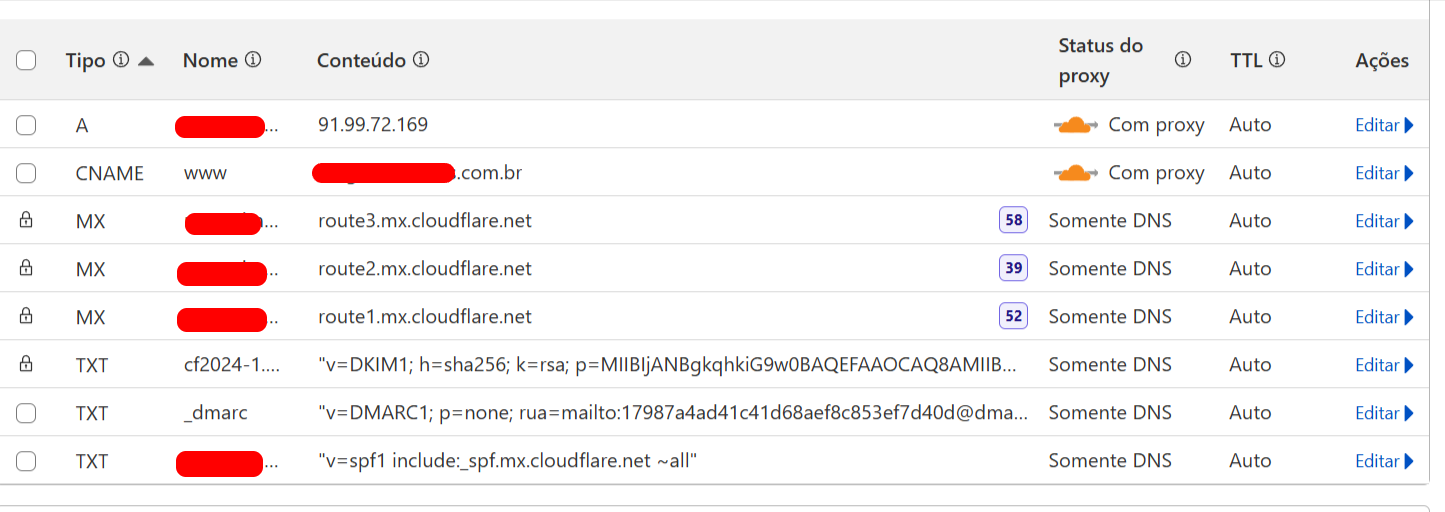
SSL, Proxy, Cloudflare, Hetzner, what's the right way?
I have an app I published on Hetzner and I'm using Cloudflare because of the certificates.
I have both CNAME and A proxies enabled. This is still the best scenario. I've tried disabling one, then the other, both, and nothing works. The system ends up crashing.
If I go to CHECK DNS PROPAGATION and type www.... for type A, everything is green. For CNAME, it's red worldwide.
Sometimes to access it, I need to go into an incognito tab. On my 5G phone, it works fine. But on my home network, sometimes it opens, sometimes it doesn't.
I need help setting this up correctly.
I don't have advanced knowledge, so if anyone can help me, please detail what I need to do or provide a video link, I'd be grateful.
There's no need to disable the Proxy status to redirect from www to root domain. I don't know exactly why CNAME record is not working, but this is another way to redirect traffic.
Under your Domain Name in Cloudflare:
Go to Rules > Overview > Templates > Redirect from www to root > Create rule
Select custom filter expression
For incoming request > URI Full - contains - www.yourdomainname
The expression will appear like this (http.request.full_uri contains "www.yourdomainname")
Url redirect > Dynamic - concat("https://","yourdomainname",http.request.uri.path) - status 302 or 301 depending on your setup
Select Order > First
Save and Deploy
Note: Step 3 should include domain name with www. Step 4 is the domain name without www.
You may have to delete the CNAME record to get this working.
I'm afraid I don't have a tutorial for you, but you're clearly lost
You didn't need to use Cloudflare because of the certificates, because Let's Encrypt has been a thing since a few years ago, so you could get free HTTPS certificates.
DNS records are highly unlikely to cause an application to "crash" - what do you understand by "application crashed"? Please note e.g. a 404 or a 500 HTTP error is not considered a "crash", unless it's a 502 Bad Gateway error that means the actual backend crashed (it's not alive anymore).
I assume you're using Wappler's Resource Manager to deploy to Hetzner? I don't have much experience with Wappler deployment solutions.
Have you considered using a shared hosting solution instead? I feel it would make things slightly easier.