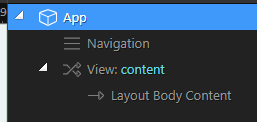
Ok. im probably gonna embarrass myself, so here it goes anyway.
First - Is this possible for SPA? A layout with more than one Content (or view or section or…{insert item here}) … I have dug thru the community pages and every SPA how to shows with one view: Layout Body Content. … Can i have 2? More? Where a link or action or route (like browser.goto) update section 2?? etc.
I’d like to create a multi section SPA that updates related portion of a page.
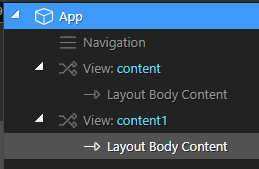
(when i do try to add an extra section or view I get two copies of the same)
To start with, there are Single Page Applications and Single Page Websites
Single Page Website is a website that puts all the content on one page. You normally scroll through the page to get to the other sections and often there is a sticky navigation that follows you and tells you which section you’re on. Also clicking on navigation is often an anchor link that will keep you on the page and jump you to the section without reloading (this can be done without JavaScript).
Single Page Application is where a single page is loaded together with a little JavaScript program that controls the page content depending on user input. As an example, the home page URL is selected, rendering the contents of the home page and all of the elements that are required to show the content of all of the other states. When another state is selected, by way of a menu item, the JavaScript program will replace the home page content with the content of the new page. There is no page refresh which can be demonstrated by the browser’s reload button.
With a SPA, this does not change, with an MPA this changes into a cross while the new page is loaded.
@Sorry_Duh ; that is the exact 2 pages i worked off of and successfully cloned. Yet it creates the “View: content -> Layout Body Content” … I guess my goal is can i have a 2nd (or more) of those views that are independent of each other … Example:
What im imagining to create:
Notice the 2 views(or other means)… Now of course when i have this ;; I get 2 copies of the exact page the internal-link-route … so if I have “about” link, im gonna get 1 on top the other… I’d be nice to say ‘about’ is routed to ‘content’ and ‘hello-world’ is routed to ‘content 1’ … My whole goal is to avoid a lot of back-n-forth page loading and refreshing