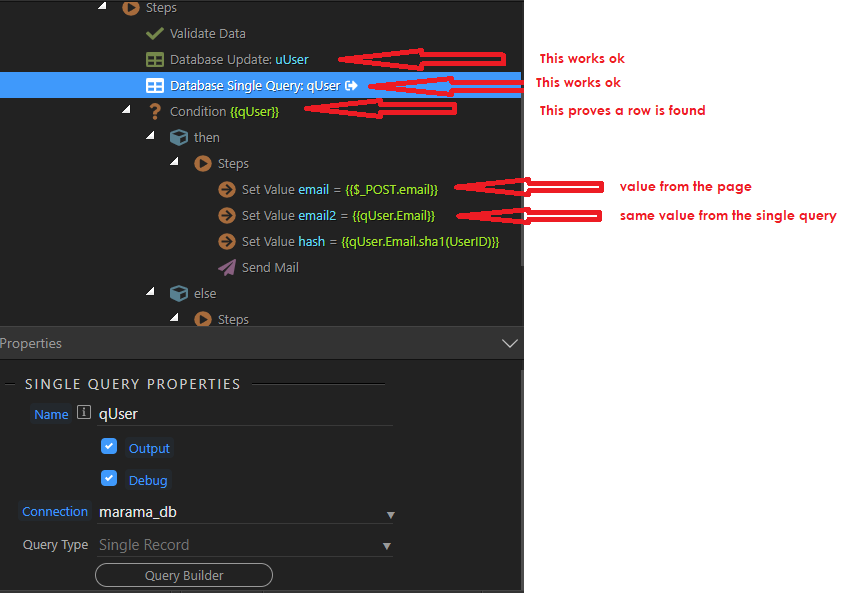
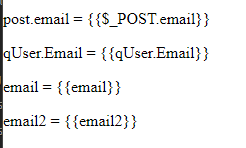
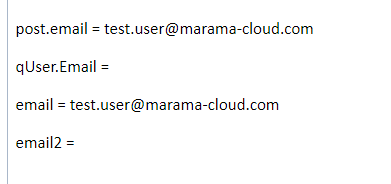
Hi, I have created a server connect logic using a single record query to supply values to an email. However, column values from the query are blank in the email. My setup is…
But in the resultant email shows only values based on POST.email , not those based on qUser.email
I have referred to the tutorial on single query and followed it diligently, there are many more values from the query that I need to use in the email content, how do I do this?
Hi.
Try disabling the condition and see the output of the query.
I usually put in query1.somecolumn in the condition. If there is a row, it will have some value, hence true, else this expression will be null, i.e. false.
Hi Sorry, that works beautifully in the condition, thank you, that is one problem solved.
The next problem is that the query is actually not returning anything, despite what I said before.
Note: The validate action in my logic setup does indicate that there is a row present, when searching by email, which is correct.
Hi Sid
How do you see the output of the query, I have been searching for a way in the server side, but cannot see a way including looking in Inspect in Chrome
In addition to what has already been said, a useful feature in case you haven’t discovered it yet is:
Its usefulness will depend on how the query is generated but I often find it helpful for checking and debugging queries. If a query requires GET parameters, you can of course add them manually to the page while testing. In your example above, you could temporarily disable the conditon, to focus on the query.