Quy
1
OS info
- Operating System : Windows 10.0.26200
- Wappler Version : 7.5.0
- PHP
Applied the latest inline update.
Steps to reproduce
- Open Server Connect settings in Development target.
- Enable
Debug Mode.
- Click
Save button.
- Open Server Connect settings.
Debug Mode is disabled.
George
3
just tested but it saves well to me.
Maybe you can reproduce it with debug logging on and send us the log
Quy
5
Sent to you directly. Reproducible on 2 laptops.
Quy
6
Values are saved in the config file but not loaded later. Thus the UI does not reflect saved values and wiped out such as environment variables.
\.wappler\targets\Development\files\dmxConnect\config.php
Quy
7
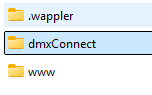
Also dmxConnect folder is generated at the Web Root Folder level.
George
8
Aha that is the problem, seems in php indeed, I tested in nodejs so that’s why i couldn’t reproduce it
system
Closed
12
This topic was automatically closed 2 days after the last reply. New replies are no longer allowed.