Hey guys.
I have an input field that I transformed into a tagify field and applied Mode SELECT. I also applied the source to a Server Connect that lists mysql countries. I need that, when I type the name of the country, select opens so I can select it. I’ve already achieved this but I can’t add more countries to the tagify field. And the tagify field doesn’t expand to accommodate other countries. And when I load the page, only one country appears even though there are several registered in the field.
Can you share the code for your select?
You need to use the code  formatter to post code here. ie…
<input is="dmx-tagify" id="bulk_category_id" name="bulk_category_id" class="w-100" dmx-bind:data="sc_categories.data.query" tag-text="category" tag-value="category_id" min-chars="0" tag-class="category" tag-image="'/assets/mapicons/'+category+'_plain.png'" max-tags="1">
1 Like
<div class="form-group">

                    <label for="inp_pct_pais"><b><span class="text-danger">*</span> Country</b></label>

                    <input id="inp_pct_pais" name="pct_pais" aria-describedby="inp_pct_pais_help" is="dmx-tagify" dmx-bind:data="sc_sel_paises.data.query" tag-text="country_title" mode="select" dropdown-position="input">

                  </div>
Ah - use the default mode, not Select. If you want the box to open when clicked in to show all the options add Min Chars 0.
1 Like
Hello @Heather_Mann.
Hello.
Thanks for the answer. I tried but I still couldn’t.
I’ll try to be more clear about what I need.
I have a page with a country filter that is loaded with select. When I select a country in select the page already filters by the selected country. The country code loads in the URL.
What I need is multiple countries because I have a product that was offered in a single country but now my client wants the same product to be available in several countries.
So I’m trying to use tagify to create a list of country codes in the COUNTRY field of the products table.
At https://sandbox.korustravel.com/journeys, you will see that if you select a country, for example Argentina, the URL loads the code for that country. What I need is a way to select multiple product countries.
https://sandbox.korustravel.com/journeys?country=ARG,BRL,CHI,USA.
Products that have these codes in the COUNTRY table will be filtered.
Sorry for the long text.
Just so i’m clear - here’s a rudimentary example of what I think you’re trying to achieve - https://dashboard.triptakers.travel/Testing
Note: I’m doing this by filtering the server connect with the tagify value, not by passing them into the URL.
1 Like
Yes. The first step I need is that.
Can you paste this code here please?
Thank you very much.
Sure.
First of all I have a server action that has the data I want filtered. In that server action I get the countries as an array…
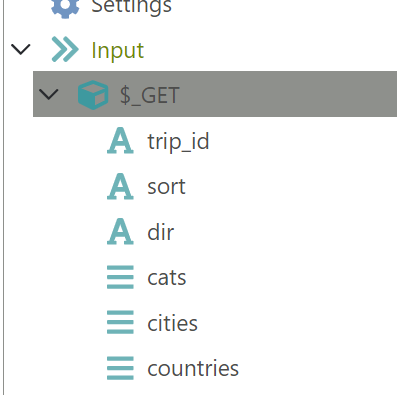 .
.
Then in the conditions for the query which will return my data I have the following…
Note the need to split the array. I also use the condition {{$_GET.countries}} so that if there aren’t any countries passed in the array it shows all.
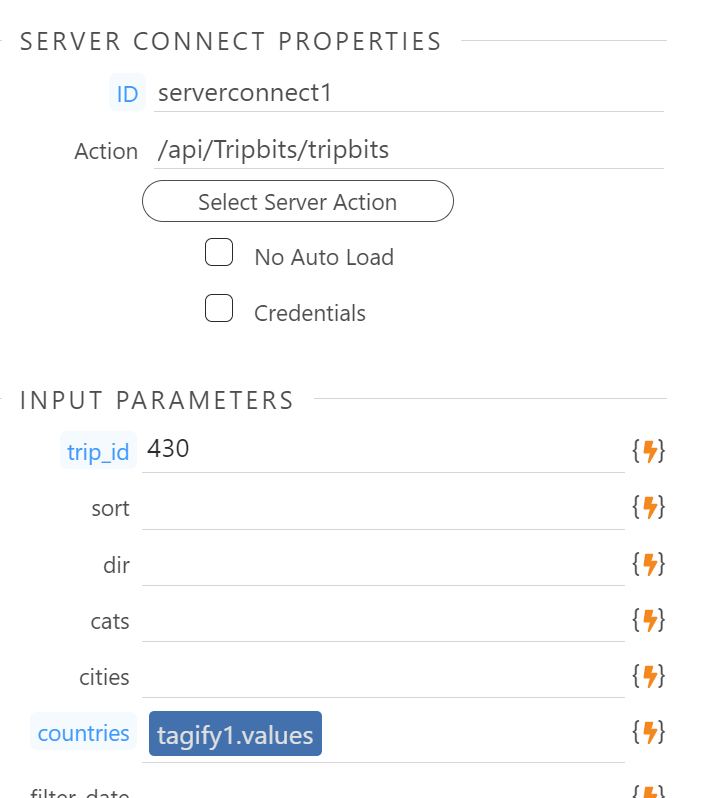
Back in my page I use the tagify values in the countries parameter
Note the trip_id, cats, cities, etc is because I used an existing server action so you can ignore those.
This is the code for my tagify
<input is="dmx-tagify" id="tagify1" name="tagify1" tag-text="nicename" dmx-bind:data="serverconnect2.data.countries" min-chars="0" tag-value="iso">
2 Likes
Hello.
Well. Sorry but it hasn’t happened yet.
I have two server connect on the page.
- Product data with name, value, country, etc.
- List of countries: country name, code, etc.
My tagify input looked like this:
What would be tag-value=“iso”?
Ah - sorry about that - I’m using the ISO values for the country, not the country name or id. In the tagify component select the value that matches the data you’re filtering.
1 Like
Perfect.
I achieved. Thank you very much.
Hello @Heather_Mann.
Would you help me?
Thank you very much for helping me with the previous problem
The next objective is to filter by countries. I can now filter by a single country when I click on the checkbox or choose in select.
But I need to filter products by more than one country separated by a comma in the URL. Example: journeys-teste?country=BRA,CHI,ITA
I already tried to do a server connect with the condition {{$_GET.country.split(’,’)}} to get the URL separated by a comma but I couldn’t. I have also transformed the GET field in server connect into ARRAY.
What am I missing here?
If you select two countries from the drop down, not the check boxes, does that work? You need to pass the value array of all the check boxes to the server connect like you did with the select box. You shouldn’t need to have the variables in the URL at all.