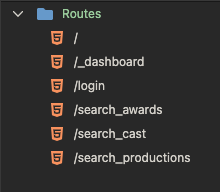
With the new way of doing security provider included in the routing, is there a way that secure pages can be indicated in the Routes panel? For example, my /_dashboard route has security restrict applied to it and it would be cool if you could see at a glance what pages have security applied to them. Even if its a different colour icon.
2 Likes
Good idea - we were indeed already planning to do more similar enhancements in the route panel.
Btw underscore in the route filename usually means hidden route so unless you really want this I suggest you don’t use it
2 Likes
Interesting, what is a hidden route? They seem to work no problem.
Good question, i was thinking the same
It is hidden voor NodeJS - might still be working in php but because we are all making same functionality it can became hidden as well, so I’m just warning you
Thanks George, I am having a hard time finding info on this. What exactly is hidden and from where? I found t his in ChatGPT. From what I read, if it's a dashboard page it should have the underscore?
A route starting with
_usually means:
- Internal or hidden endpoint
- Not intended for public API use
- Often excluded from docs
- Still accessible unless explicitly secured
It’s mainly a developer convention, not an HTTP standard.
Do I have to change the file name too? Or just the route?
Sorry for the questions, this is a new wrinkle for me. 
Change the file name as well, hidden routes are used only for internal calls
1 Like
Thanks George, luckily that was the only route I have used that formatting in any of my projects. I have fixed it. Thanks again for the heads up.
Bump ......
Bump so it doesn't get forgotten ..... 