bpj
April 5, 2022, 7:43pm
1
I’m trying to process some images and upload to S3 but the S3 connector in PHP doesn’t want to play ball. Whenever I use the putFile step I get the following:
code: 0
file: "/var/www/html/dmxConnectLib/aws/GuzzleHttp/Promise/RejectedPromise.php"
line: 16
message: "method_exists(): Argument #1 ($object_or_class) must be of type object|string, array given"
trace: "#0 /var/www/html/dmxConnectLib/aws/GuzzleHttp/Promise/RejectedPromise.php(16): method_exists(Array, 'then')\n#1 /var/www/html/dmxConnectLib/aws/Aws/Handler/GuzzleV6/GuzzleHandler.php(56): GuzzleHttp\\Promise\\RejectedPromise->__construct(Array)\n#2 /var/www/html/dmxConnectLib/aws/GuzzleHttp/Promise/Promise.php(203): Aws\\Handler\\GuzzleV6\\GuzzleHandler::Aws\\Handler\\GuzzleV6\\{closure}(Object(GuzzleHttp\\Exception\\ClientException))\n#3 /var/www/html/dmxConnectLib/aws/GuzzleHttp/Promise/Promise.php(156): GuzzleHttp\\Promise\\Promise::callHandler(2, Object(GuzzleHttp\\Exception\\ClientException), Array)\n#4 /var/www/html/dmxConnectLib/aws/GuzzleHttp/Promise/TaskQueue.php(47): GuzzleHttp\\Promise\\Promise::GuzzleHttp\\Promise\\{closure}()\n#5 /var/www/html/dmxConnectLib/aws/GuzzleHttp/Handler/CurlMultiHandler.php(118): GuzzleHttp\\Promise\\TaskQueue->run()\n#6 /var/www/html/dmxConnectLib/aws/GuzzleHttp/Handler/CurlMultiHandler.php(145): GuzzleHttp\\Handler\\CurlMultiHandler->tick()\n#7 /var/www/html/dmxConnectLib/aws/GuzzleHttp/Promise/Promise.php(246): GuzzleHttp\\Handler\\CurlMultiHandler->execute(true)\n#8 /var/www/html/dmxConnectLib/aws/GuzzleHttp/Promise/Promise.php(223): GuzzleHttp\\Promise\\Promise->invokeWaitFn()\n#9 /var/www/html/dmxConnectLib/aws/GuzzleHttp/Promise/Promise.php(267): GuzzleHttp\\Promise\\Promise->waitIfPending()\n#10 /var/www/html/dmxConnectLib/aws/GuzzleHttp/Promise/Promise.php(225): GuzzleHttp\\Promise\\Promise->invokeWaitList()\n#11 /var/www/html/dmxConnectLib/aws/GuzzleHttp/Promise/Promise.php(267): GuzzleHttp\\Promise\\Promise->waitIfPending()\n#12 /var/www/html/dmxConnectLib/aws/GuzzleHttp/Promise/Promise.php(225): GuzzleHttp\\Promise\\Promise->invokeWaitList()\n#13 /var/www/html/dmxConnectLib/aws/GuzzleHttp/Promise/Promise.php(62): GuzzleHttp\\Promise\\Promise->waitIfPending()\n#14 /var/www/html/dmxConnectLib/aws/Aws/AwsClientTrait.php(58): GuzzleHttp\\Promise\\Promise->wait()\n#15 /var/www/html/dmxConnectLib/aws/Aws/AwsClientTrait.php(86): Aws\\AwsClient->execute(Object(Aws\\Command))\n#16 /var/www/html/dmxConnectLib/modules/s3.php(150): Aws\\AwsClient->__call('putObject', Array)\n#17 /var/www/html/dmxConnectLib/lib/App.php(195): modules\\s3->putFile(Object(stdClass), 'putFile_copy', NULL)\n#18 /var/www/html/dmxConnectLib/lib/App.php(159): lib\\App->execSteps(Object(stdClass))\n#19 /var/www/html/dmxConnectLib/lib/App.php(127): lib\\App->execSteps(Array)\n#20 /var/www/html/dmxConnectLib/lib/App.php(116): lib\\App->exec(Object(stdClass), false)\n#21 /var/www/html/dmxConnectLib/lib/App.php(94): lib\\App->exec(Object(stdClass))\n#22 /var/www/html/dmxConnect/api/photos/upload_multiple.php(8): lib\\App->define(Object(stdClass))\n#23 {main}"
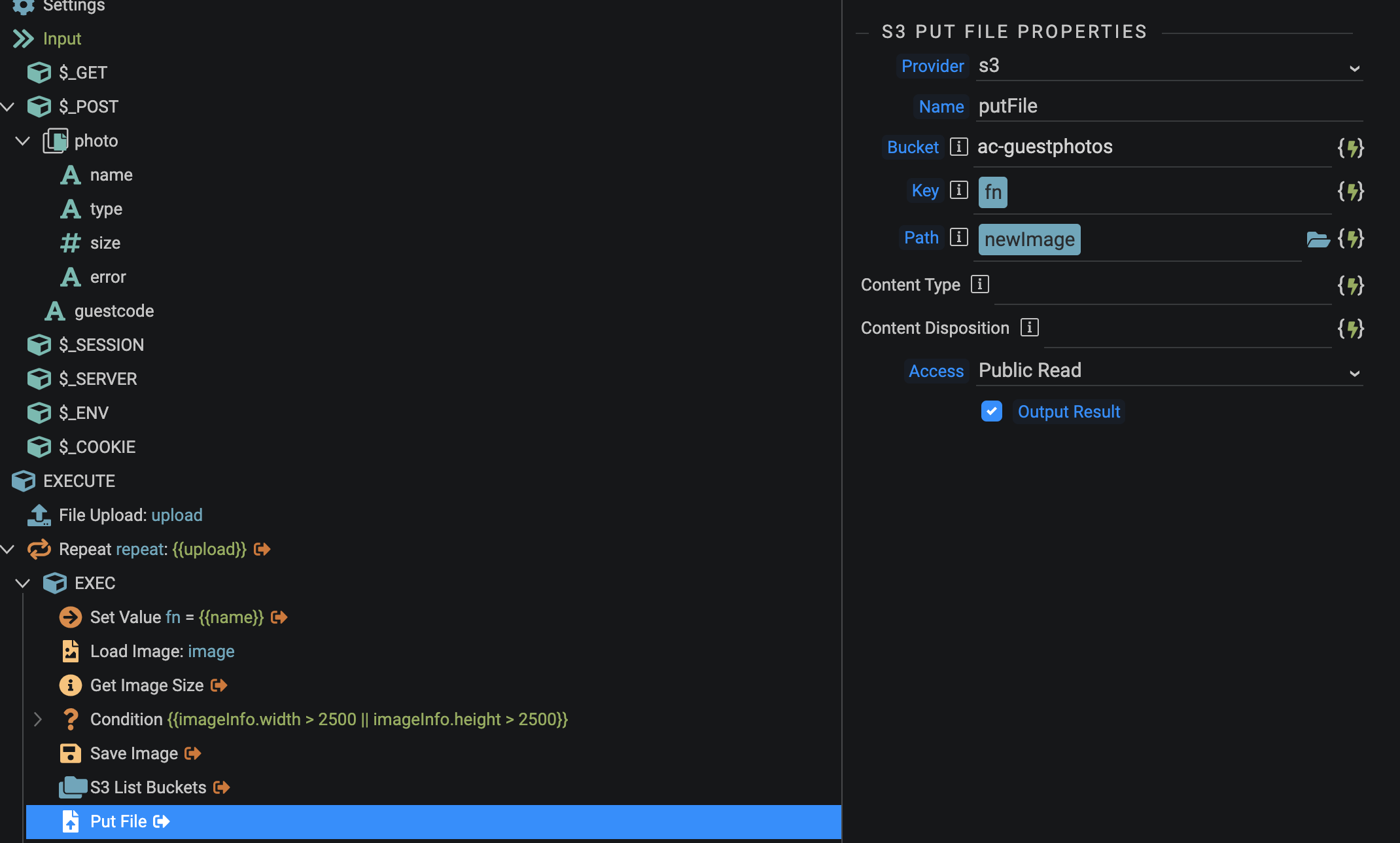
I can use the same S3 connector to list buckets etc. so the connection details are fine, but can’t get a file to upload. Any ideas if it is something I have got wrong in the setup or a problem with the Server Action step?
The error seems to be from the asw sdk. Which PHP version do you use?
We don’t have the latest version bundled currently with Wappler, you can download the latest version of the sdk from Installing the AWS SDK for PHP Version 3 - AWS SDK for PHP (amazon.com) . Unpack it in dmxConnectLib/aws.
Let me know if the latest sdk version fixes the problem, then I will include that also with the next Wappler update.
bpj
April 6, 2022, 9:24am
4
I’m using PHP v8.0.x (in a Wappler created Docker AWS target)
It got further this time but threw the following error:
code: 0
file: "/var/www/html/dmxConnectLib/aws/Aws/WrappedHttpHandler.php"
line: 195
message: "Error executing \"PutObject\" on \"https://ac-guestphotos.s3.eu-west-2.amazonaws.com/84806A7B-67BB-4982-B5C4-6E8D6AD646D2.jpg\"; AWS HTTP error: Client error: `PUT https://ac-guestphotos.s3.eu-west-2.amazonaws.com/84806A7B-67BB-4982-B5C4-6E8D6AD646D2.jpg` resulted in a `400 Bad Request` response:\n<?xml version=\"1.0\" encoding=\"UTF-8\"?>\n<Error><Code>AccessControlListNotSupported</Code><Message>The bucket does not all (truncated...)\n AccessControlListNotSupported (client): The bucket does not allow ACLs - <?xml version=\"1.0\" encoding=\"UTF-8\"?>\n<Error><Code>AccessControlListNotSupported</Code><Message>The bucket does not allow ACLs</Message><RequestId>DJ8P6TCFT69HRYYR</RequestId><HostId>J086rXh+d1OUeqT2hWasPn55W1G17r46k46ZPA0iNUvZ0MeuBmS2oM7tWFpmnk5Nq8iqcMuI7nQ=</HostId></Error>"
trace: "#0 /var/www/html/dmxConnectLib/aws/Aws/WrappedHttpHandler.php(97): Aws\\WrappedHttpHandler->parseError(Array, Object(GuzzleHttp\\Psr7\\Request), Object(Aws\\Command), Array)\n#1 /var/www/html/dmxConnectLib/aws/GuzzleHttp/Promise/Promise.php(204): Aws\\WrappedHttpHandler->Aws\\{closure}(Array)\n#2 /var/www/html/dmxConnectLib/aws/GuzzleHttp/Promise/Promise.php(169): GuzzleHttp\\Promise\\Promise::callHandler(2, Array, NULL)\n#3 /var/www/html/dmxConnectLib/aws/GuzzleHttp/Promise/RejectedPromise.php(42): GuzzleHttp\\Promise\\Promise::GuzzleHttp\\Promise\\{closure}(Array)\n#4 /var/www/html/dmxConnectLib/aws/GuzzleHttp/Promise/TaskQueue.php(48): GuzzleHttp\\Promise\\RejectedPromise::GuzzleHttp\\Promise\\{closure}()\n#5 /var/www/html/dmxConnectLib/aws/GuzzleHttp/Handler/CurlMultiHandler.php(118): GuzzleHttp\\Promise\\TaskQueue->run()\n#6 /var/www/html/dmxConnectLib/aws/GuzzleHttp/Handler/CurlMultiHandler.php(145): GuzzleHttp\\Handler\\CurlMultiHandler->tick()\n#7 /var/www/html/dmxConnectLib/aws/GuzzleHttp/Promise/Promise.php(248): GuzzleHttp\\Handler\\CurlMultiHandler->execute(true)\n#8 /var/www/html/dmxConnectLib/aws/GuzzleHttp/Promise/Promise.php(224): GuzzleHttp\\Promise\\Promise->invokeWaitFn()\n#9 /var/www/html/dmxConnectLib/aws/GuzzleHttp/Promise/Promise.php(269): GuzzleHttp\\Promise\\Promise->waitIfPending()\n#10 /var/www/html/dmxConnectLib/aws/GuzzleHttp/Promise/Promise.php(226): GuzzleHttp\\Promise\\Promise->invokeWaitList()\n#11 /var/www/html/dmxConnectLib/aws/GuzzleHttp/Promise/Promise.php(269): GuzzleHttp\\Promise\\Promise->waitIfPending()\n#12 /var/www/html/dmxConnectLib/aws/GuzzleHttp/Promise/Promise.php(226): GuzzleHttp\\Promise\\Promise->invokeWaitList()\n#13 /var/www/html/dmxConnectLib/aws/GuzzleHttp/Promise/Promise.php(62): GuzzleHttp\\Promise\\Promise->waitIfPending()\n#14 /var/www/html/dmxConnectLib/aws/Aws/AwsClientTrait.php(58): GuzzleHttp\\Promise\\Promise->wait()\n#15 /var/www/html/dmxConnectLib/aws/Aws/AwsClientTrait.php(86): Aws\\AwsClient->execute(Object(Aws\\Command))\n#16 /var/www/html/dmxConnectLib/modules/s3.php(150): Aws\\AwsClient->__call('putObject', Array)\n#17 /var/www/html/dmxConnectLib/lib/App.php(195): modules\\s3->putFile(Object(stdClass), 'putFile', NULL)\n#18 /var/www/html/dmxConnectLib/lib/App.php(159): lib\\App->execSteps(Object(stdClass))\n#19 /var/www/html/dmxConnectLib/lib/App.php(127): lib\\App->execSteps(Array)\n#20 /var/www/html/dmxConnectLib/modules/core.php(69): lib\\App->exec(Object(stdClass), true)\n#21 /var/www/html/dmxConnectLib/lib/App.php(195): modules\\core->repeat(Object(stdClass), 'repeat', Array)\n#22 /var/www/html/dmxConnectLib/lib/App.php(159): lib\\App->execSteps(Object(stdClass))\n#23 /var/www/html/dmxConnectLib/lib/App.php(127): lib\\App->execSteps(Array)\n#24 /var/www/html/dmxConnectLib/lib/App.php(116): lib\\App->exec(Object(stdClass), false)\n#25 /var/www/html/dmxConnectLib/lib/App.php(94): lib\\App->exec(Object(stdClass))\n#26 /var/www/html/dmxConnect/api/photos/upload_multiple.php(8): lib\\App->define(Object(stdClass))\n#27 {main}"
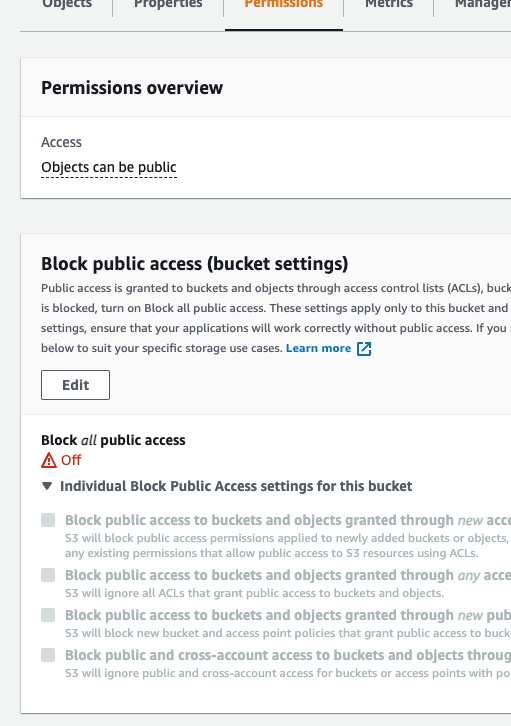
The bucket is configured to allow public access:
Troubleshooting - Amazon Simple Storage Service
Not sure when it happens, but it seems to be that your bucket is configured so that ACL may not be set/updated. Open the server action in code view and remove the acl option from the action.
bpj
April 6, 2022, 9:56am
6
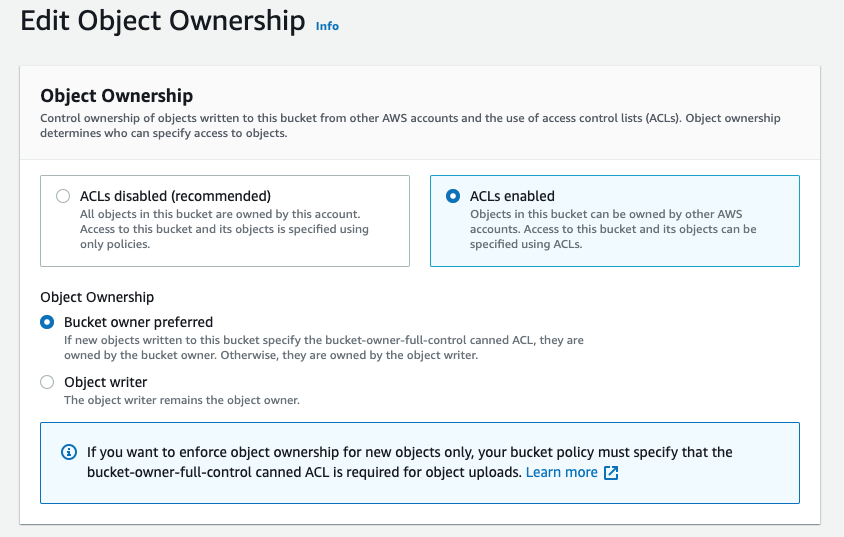
Under Object Ownership of the bucket you have to specify:
Have you updated the CORS to accept uploads from your domain?
If not, click on the bucket you’re using.
[
    {
        "AllowedHeaders": [
            "*"
        ],
        "AllowedMethods": [
            "GET",
            "PUT",
            "POST",
            "DELETE"
        ],
        "AllowedOrigins": [
            "https://yourdomain.com",
            "http://yourdomain.com"
        ],
        "ExposeHeaders": []
    }
1 Like
bpj
April 8, 2022, 9:16am
8
Thanks for the idea. I don’t think it’s that as I can upload if I enable ACLs.
I suspect it is something I need to remember when setting up the bucket or maybe @patrick can cater for in terms of how the private/public option is delivered through the Wappler/AWS SDK connection
Emiel
July 24, 2023, 11:27am
9
I’m experiencing a similar issue. However, Amazon warns about enabling ACL:
We recommend disabling ACLs, unless you need to control access for each object individually or to have the object writer own the data they upload. Using a bucket policy instead of ACLs to share data with users outside of your account simplifies permissions management and auditing.
Can this error be avoided by setting a bucket policy instead?
 something that