Hi,
I am trying to use the get files from S3. I am using this to get all the required files in one folder so I can then make a zip file and download it. I have it setup like this:
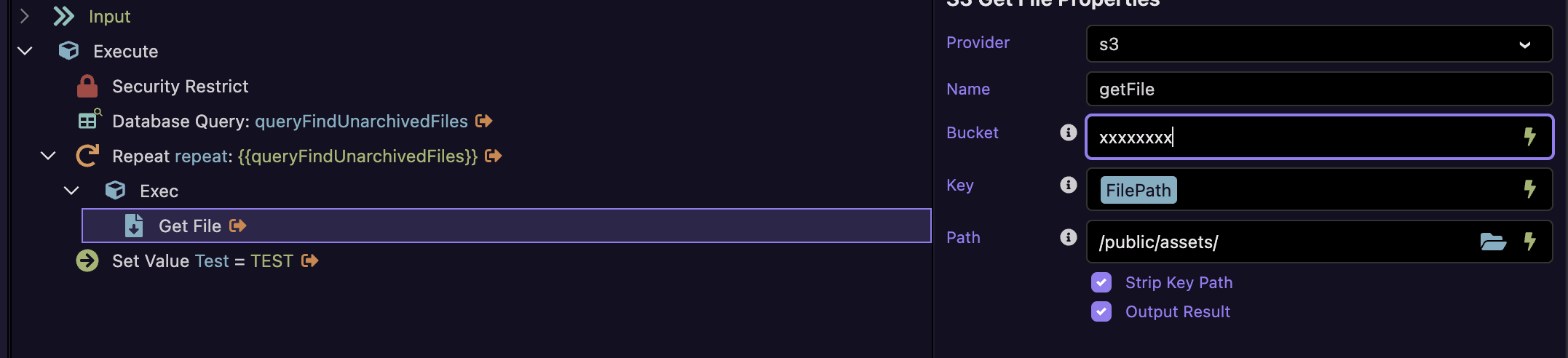
It works absolutely fine until I have 'Strip Key Path' ticked and then I get this error:

Am I doing something wrong? I want the files to save in /public/assets/{filename} and not into /public/assets/{filepath}.
Any help would be greatly appreciated 
Thanks,
Asked Claude about this and it come up with a solution. Think this might be a bug.
Title: s3.getFile throws TypeError: Assignment to constant variable when stripKeyPath: true
Description:
Calling the S3 "Get File" action with Strip Key Path enabled throws a server-side error instead of stripping the key path as documented:
TypeError: Assignment to constant variable.
Steps to reproduce:
- Add an S3 "Get File" action with
stripKeyPath set to true, and a key that contains at least one folder segment (e.g. folder/subfolder/file.ext, not just a bare filename).
- Run the action.
- It throws
TypeError: Assignment to constant variable instead of downloading the file with the folder path stripped.
Root cause (found it in lib/modules/s3.js, happy to be wrong if this isn't the shipped source for everyone, but it matches what I'm seeing):
js
const file = Key;
if (stripKeyPath) file = basename(file);
file is declared const, then reassigned on the very next line when stripKeyPath is true — that's the exact cause of the TypeError. Only reproduces when stripKeyPath is actually used; works fine with the default (false).
Suggested fix: change const file = Key; to let file = Key; (or introduce a second variable for the stripped value) so the reassignment is legal.
Workaround in the meantime: patched lib/modules/s3.js locally to fix it, since it's straightforward — but flagging here since it'll presumably get overwritten on the next Server Connect runtime update.