Hi, me again.
is there anyway to have a role based query, I will try to explain. I have a page in /dashboard - secured by login. On this page I display that users bookings, that user only sees their bookings as the query has userid=identity condition.
Now i have admin users, who, when signed in should be able to see ALL bookings. I was in the process of basically duplicating the pages and setting up duplicate server connects removing the userid restrict, but would double the site admin.
Is there anyway i can have it so if a user is signed in they only see their own bookings,if admin signs in they see all bookings for all users?
in the query I guess it would be if userid=idendity or role=admin or something along those line if possible, but then the server connect query has to know the user is an admin role without passing that info in a form or link
I know how to do role base “show” elements in a page but this is a bit deeper than that.
Thanks
Darren
Hey Darren,
Here is what I would try first:
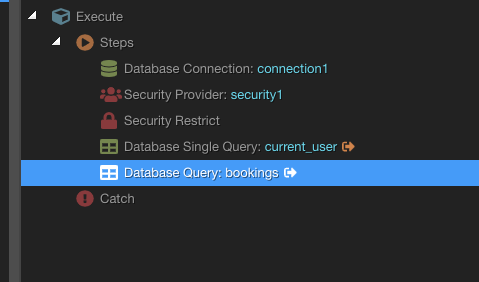
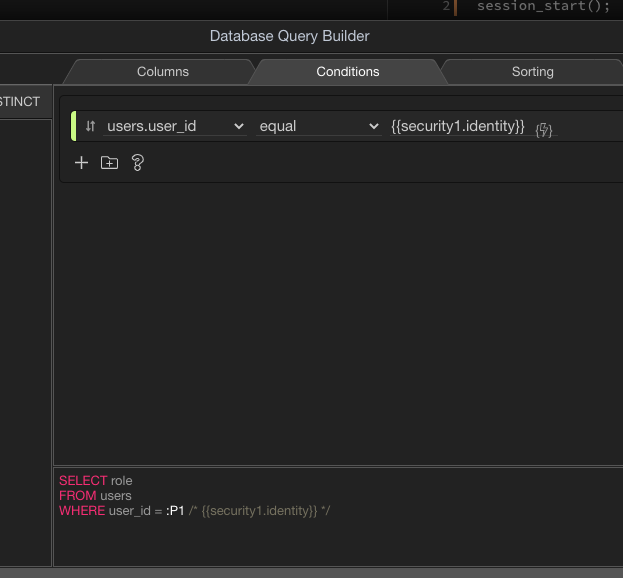
Do a single query action to lookup the current user role, using the identity of the security provider.
In the query for bookings use a condition of userid=identity, but only trigger that condition if the role is not admin.
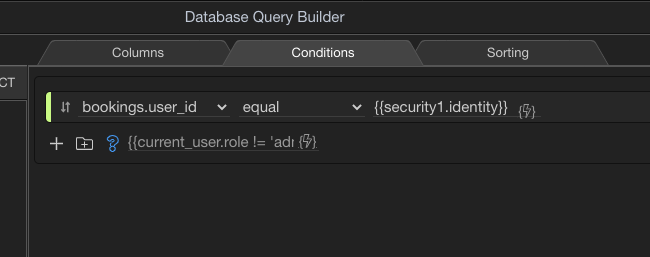
The Toggle Condition code is cutoff in the screenshot, but is: {{current_user.role != 'admin'}}
wow thanks for taking the time to do all that, I will give that a shot, certainly looks like it might work. I assume I have to run the single query? as a user is logged in we know their userid and assume we know the role due to role based security, but assume server connect doesn’t know it? just like to cut down on queries and seems like somewhere in the app we must know the role from the login, it just needs to persist to server connect
I don’t believe the security provider exposes that. I would just set a session variable on the server upon login and then it will always be available. You can remove the single query from my example, and just use the session variable instead.
thats great, just to work out how to set up the session on sign in  the wappler tutorial on it is a bit vague, says easy to setup (which it is, click $_session and create new, but doesnt show/explain how to give that session variable its value from a query, so more googling lol
There is a Set Session action.
ooh, think i found it, core-acions->set session
still not managing to get this working, the wappler docs on using, setting, retrieving session data is pretty poor, various forum posts say for a dynamic session you have to use a repeater,but not sure if that is true. Other posts say to set a session as a step you have to set the global session name, again not sure if true.
So on my login SC I have setup a global session name of “user_role_id” as a number. Then in my steps after my query that gets the user_role_id I set session "user_role_id = query.user_role_id. I cant find anyway to test if this session is set, as again on a forum post it says sessions dont work on output so you have to assign the session to a variable (again not sure if true as older posts).
So, I think I have setup the session in the login SC.
Then in one of my other queries where it has a condition of
userid = Identity and booking_status_id = 1
I added the conditional above you suggested and put {{$_SESSION.user_role_id != 2}} (role id 2 is admin, so surely this wants to equal 2?)
i usually like to do things one step at a time, ie set the session, test the session set, but i cant even work that out from wappler docs/forum posts, not my night lol
i have NOT got my set session in a repeater of any sort
If you have a PHP server...you can just drop the following code into a php file (replace all contents with this) and execute in a browser (the same browser session you are logging in with) and it will output all session variables.
<?php

    session_start();
    echo "<h3> PHP List All Session Variables</h3>";
    foreach ($_SESSION as $key=>$val)
    echo $key." ".$val."<br/>";

?>
OR, you can just use a Set Value w/Output and point to the session var for its value.
thanks, so can see I have the session set correctly so can rule that out, now to get the query working with that session variable thanks for your help