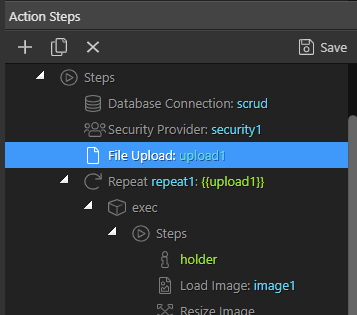
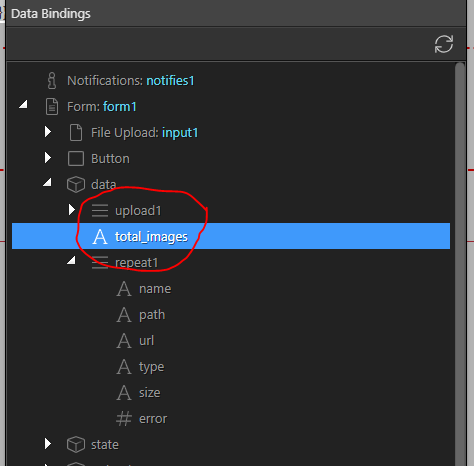
During webinar 5B I was asked how you could return the number of images uploaded within an upload server action.
Due to time constraints I deferred the answer and said I would post a reply in the forum
User who asked was Amediod1031 who’s forum name I should remember but for the life of me can’t
There are probably other ways of doing this but this is how I would do it
So we had the server action for upload.
Upload 1 is a record set and all we need is the count of records in the recordset
Select “Set Value” from Core Actions and set a variable equal to upload1.count() manually or with the expression picker like below
What if i wanted to get the number of images before the upload step, so the count of the $_POST.files1[] instead.
Dropzone has a bit of an issue in my opinion here.
So lets say I have a person upload 3 images, named image1.jpg, image2.jpg, image3.jpg
A week later another user uploads 1 image also called image2.jpg
I do not want to replace the image, as the first users image2.jpg was of a boat, and the new users is a car. So totally different images with the exact same name.
If i turn off replace, then it will add a random number sequentially to the end of the filename so image2_1.jpg lets say.
In my case, I would rather throw an error before upload, saying image2.jpg is already taken, please choose another name, and make the person rename the file before they upload it.
I could use the if file exists step but i need a way to iterate through all the image names before the File Upload step even begins its work, hence why i would like to try get the count of the $_POST before things even begin.
Any ideas, anyone?
Edit: found a way around this, upload to a tmp directory, then check if file exists in the normal uploads directory, if not then move the file there. Now I see why so many upload systems may opt to use tmp directories and move afterwards other than directory security reasons.