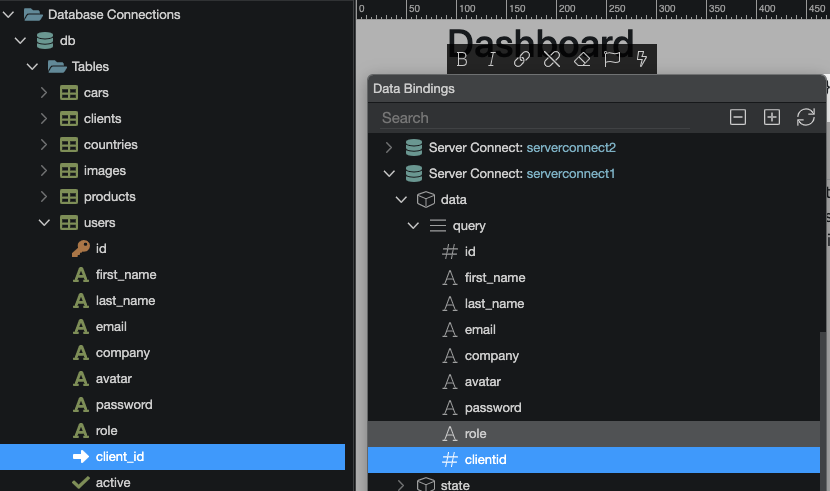
In my ‘users’ table, I created a new reference field called ‘clientid’ but shortly afterwards renamed it to ‘client_id’.
I’ve tried refreshing the schema, reloading the page and App structure panel, but for some reason, the dynamic data picker keeps showing the original name ‘clientid’ instead of the renamed field ‘client_id’.
I also added a new boolean field ‘active’ to see if a new field would show in the dynamic data picker, but this is not showing either.
Is there something I else I need to do for these renamed DB fields to appear in the dynamic data picker?
After renaming the field, you need to click the button to create the migration, only then the changes are propagated to the actual database. Have you missed thet step by any chance?
I think I had a look before at the schema in the API action and the field was displaying the correctly renamed value so I assumed all was OK. But as per your suggestion, I clicked the refresh button, which didn't change the list of fields in the query builder, but it updated the fields in the dynamic data picker.