Query Builder regression in v7.6.0, IN conditions do not generate parameters and produce invalid SQL

Query Builder regression in v7.6.0, IN conditions do not generate parameters and produce invalid SQL

Product
Wappler Desktop App

Version
7.6.0

Environment
Server model: PHP (dmxConnect)
Database: MariaDB / MySQL
Feature: Query Builder in Server Actions

Summary
After upgrading to Wappler v7.6.0, the Query Builder no longer generates parameters for IN conditions. This results in invalid SQL being generated, such as "column IN ?" or empty "IN ()", which causes MariaDB error 1064. The same queries worked correctly in previous versions, indicating a regression.

Steps to Reproduce
Create or open an existing project.
Create or open a Server Action that contains a database query using Query Builder.
Add a WHERE condition using the IN operator.
Bind the IN value to a dynamic variable, for example an array created via Set Value using split(',').
Save the Server Action and inspect the generated SQL or execute the query.

Expected Result
The Query Builder should generate a parameterized IN clause.
The Parameters tab should include a parameter for the IN value.
The generated SQL should look like: column IN (?, ?, ?)

Actual Result
No parameter is created for the IN condition.
The Parameters tab does not list the IN value.
The generated SQL becomes "column IN ?" or may result in "column IN ()" at runtime.
MariaDB throws the error SQLSTATE[42000]: Syntax error or access violation: 1064.

Additional Notes
Equal and Not Equal operators still correctly generate parameters.
The issue appears specific to IN and NOT IN operators.
The same Server Actions worked correctly before upgrading to v7.6.0.
This affects a large number of existing queries and breaks backward compatibility.
Workarounds such as FIND_IN_SET or custom SQL are required to keep projects functional.

Impact
High. This issue breaks existing production projects that rely on IN conditions and requires significant refactoring to work around.


Hello. This behavior was already present in version 7.5.2 (I haven't updated). I even thought it was something I wasn't doing correctly. I had to change my logic on a screen because of it. If it's really a bug, it needs to be reviewed.

Version 7.5.2
Environment
Server model: JS (dmxConnect)
Database: Postgres

1 Like

Hello, thanks for the additional info.

In my case, I did not see this issue before updating to the latest version. The last version I had before this started was some version after 7.2.2. I updated through the Wappler application, so I don’t know the exact version number I was on, but everything was working properly.

Last week, I updated to the latest version and my entire application stopped working. I then rolled back to 7.2.2 (the last installer executable I had), and the app loads and displays data correctly, but I’m now getting conflicts.

Current issue when creating records in the database
Reading data works fine across the application, but creating new records no longer works. When I try to insert a record, the API fails and returns an error similar to:

Undefined property: lib\db\Connection::$client
File: dmxConnectLib/modules/dbupdater.php (line 27)

It looks like the server is still trying to use the Database Updater module for inserts, and it is failing because the Connection object does not have the “client” property. As a result, the app can show existing data, but I cannot create new records anymore.

Question
What is the correct way to resolve this so record creation works again?

Is there a known incompatibility between dbupdater and certain connection drivers in older versions?

Should I switch my insert steps to Database Connector inserts instead of Database Updater, or is there a specific project update or library version alignment step I should run to make dbupdater compatible?

If this is a dependency mismatch, what exact folders or dependencies should be updated or re published to ensure all server side files match the same version?

Thanks in advance for any guidance on the proper fix.

Do you use git for version control? It looks like the Connection.php is maybe an older version while dbupdater.php is using a newer version.

Check if the file dmxConnectLib/lib/db/Connection.php has the following on line 16:

	public $client;

If it is not there than the file has not been updated to the latest version.

Simple fix is to delete the dmxConnectLib folder and restart Wappler, it should recreate the folder and copy all the files of the recent (installed) version back.

1 Like

Hi! Has anyone noticed this issue in the mssql/asp.net environment? I can't test this at the moment, but it scares me a bit.

Thanks @patrick for the suggestion.

For this project I am not using GitHub or any version control system.

I verified that Connection.php does not contain the $client property, which explains the error. Deleting and re publishing the dmxConnectLib folder did not resolve it, as the regenerated files were still incompatible.

What fixed the issue was copying the dbupdater.php file from another Wappler project where inserts were working correctly and replacing it on the server. That version of dbupdater.php does not reference $connection->client, and once replaced, record creation started working again immediately.

So the issue was caused by a mismatch between dbupdater.php and Connection.php versions in this project, and manually aligning dbupdater.php resolved it.

Keep getting notifications for this......... :grimacing:

2 Likes

Me too. Is it in any way related to a bug I raised recently? Asking because it doesn’t seem to be the case…

Thx,

Alex

1 Like

Same here. Nuisance

1 Like

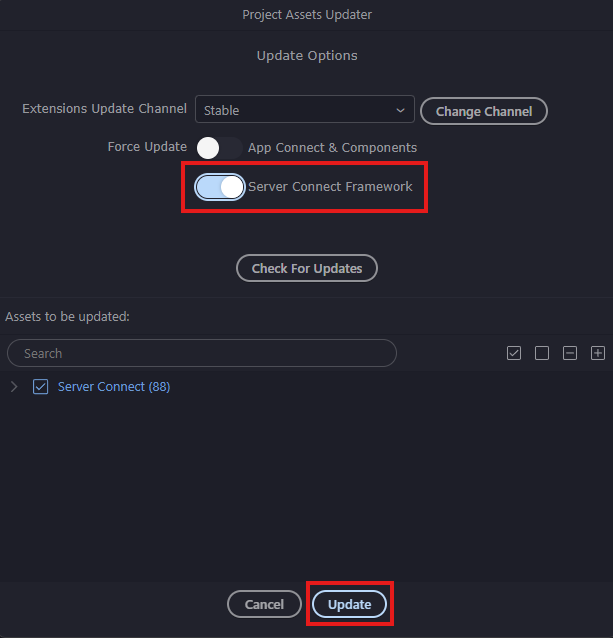
You can also use the Project Updater to force updating the files.

image

For version control you can use just click the Create Repository in the Git Manager, no Github or external Git server is needed as it will create a local repository within the project folder.

1 Like

I never knew this, thats very handy to know…

I am locking this topic because some people are complaining that they receive notifications while following it. If there is anything further to add, please open a new topic.