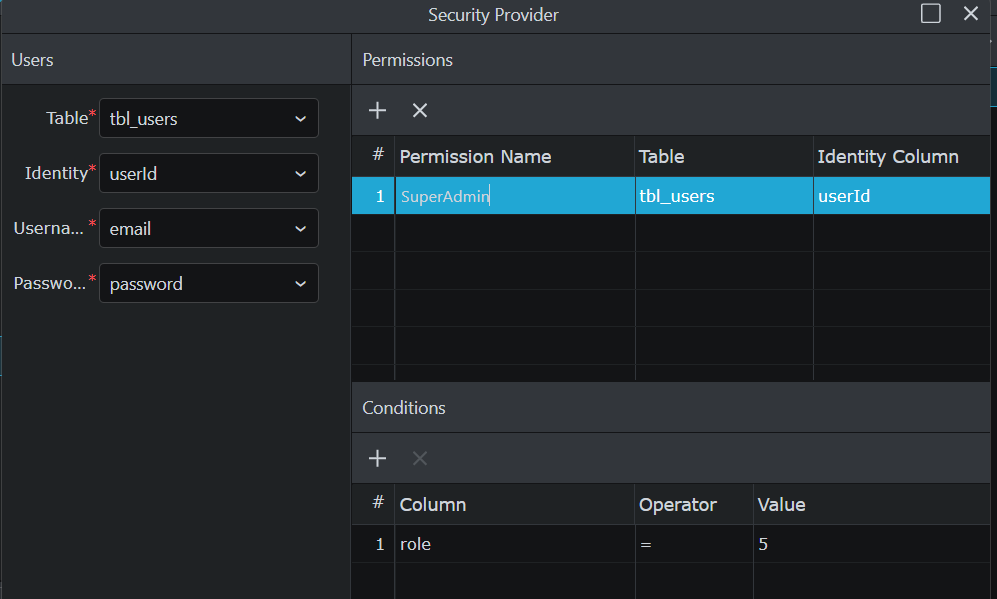
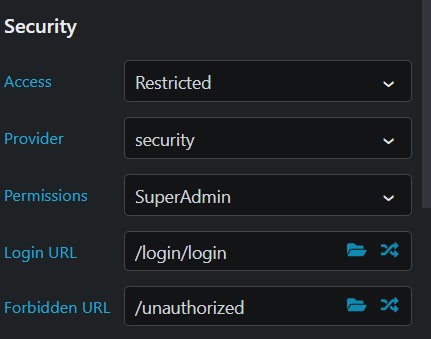
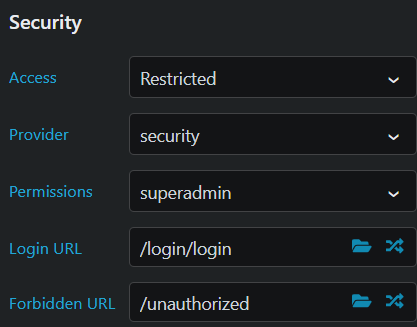
but when I log that user in, it diverts to the unauthorised page . The user is definently logged in, but I can’t see what I’m doing wrong. As i have some deadlines to meet I am setting the page access permission to ‘any’ as a workaround. I have checked against the Demo Projects HQ and it looks identical. Has anyone any thoughts or is there any JS config scripts I can look at to check what I’m doing wrong?
Hi @Journeyman,
I am facing the exact same issue. My setup is the same as yours, it looks identical as the Demo Projects HQ. But I am getting a “302 Found” status code when I am logged in as an admin and try to access the /admin page.
And no problem with the “Any” permission either.
Did you find what was wrong? Or anyone could guide us please.
I have done quite a lot of searching around and comparing code on this, one thing I found was in the way the routes file was being saved when you change the security conditions on the individual page. So when i changed or added permissions on the page
and then I looked in the routes.js file (app/config)
"path": "/Payments/allPayments2",
"page": "Payments/allPayments2",
"routeType": "page",
"layout": "lh_menu_3",
"restrict": {
"provider": "security",
"permissions": "admin",
"loginUrl": "/login/login",
"forbiddenUrl": "/unauthorized"
}
I noticed the permissions line should actually read “permissions”: [“admin”], ie list array note square brackets. I edited the file manually.
This was on the local host and it worked ok, I may be talking rubbish but that’s what has worked for me
I haven’t been able to get it working on my remote staging server which is on Digital Ocean droplet , but I think there are other issues , which i’m investigating and will report later
It should indeed be an array instead of a string. The permissions are wrongly generated when edited in the App Properties panel. Will be fixed in the next update.