NodeJS SPA Load action issue

We need to bring this topic back up, as the NodeJS SPA Load action isn’t working at all, and the workaround suggested by @patrick doesn’t work in our case either.

We have a query parameter intended to scroll the page to a section whose id is passed via the URL query:

<meta name="ac:route" content="/recap/:hash">

<script is="dmx-flow" id="flow1" type="text/dmx-flow" autorun="true">{
  run: {outputType: "text", action: "{{scroll1.goto('#'+query.hash)}}"}
}</script>

The problem is that when this flow executes, the DOM doesn’t seem to be fully loaded, causing the scroll to jump to an incorrect location. However, if I trigger this flow manually (e.g., on a mouse click) after the page has fully loaded, it scrolls to the correct element.

I’ve also tried triggering the flow on page load with: dmx-on:ready="flow1.run()" - but that doesn’t work at all.

1 Like

It has just been something that is so very needed when developing a spa and I have been forced to find workarounds like putting a wait step on my page flows or running the flows when a animated region displays(making sure it is put at the top of the page). All of these are hacks applied because of app connect not being able to observe app level load and ready dynamic actions on content pages.

Other option is to try and conditionally add the flow on the layout page and maybe run based on route. Again a workaround for something that seems easy to fix for the Wappler devs when they are done with all the AI development.

1 Like

Are these sections dynamic, in a repeat region from a dynamic data source?

No.

<div class="row">
	<div class="col">
		<form id="formRecap" method="post" is="dmx-serverconnect-form">

			<!-- Start accordian for recap income -->
			<div id="accordion-income" class="accordion main-items-silver accordion-flush mt-3">
				<div class="accordion-item shadow-sm rounded">
					<h2 class="accordion-header">
						<button class="accordion-button rounded rounded-bottom-0" type="button" data-bs-toggle="collapse" data-bs-target="#collapseOne" 

In addition by using this simple code bellow we can prove that there NO Load event as such:

<!-- Wappler include head-page="layouts/main" fontawesome_5="cdn" bootstrap5="local" is="dmx-app" id="test" appconnect="local" dmx-on:ready="text1.setValue('ready')" -->
<meta name="ac:route" content="/test">

<div class="container">
    <div class="row">
        <div class="col">
            <input id="text1" name="text1" type="text" class="form-control">
        </div>
    </div>
</div>

No, these events (App Ready/Load) are not available for content pages. You can't use them like in your example:

<!-- Wappler include head-page="layouts/main" fontawesome_5="cdn" bootstrap5="local" is="dmx-app" id="test" appconnect="local" dmx-on:ready="text1.setValue('ready')" -->

these events are only available for the main pages.

You meant for layout pages?

Layout page = man page, same thing yes. The App Ready/Load events are only available for layout/main pages.

Can you elaborate this please and why this is not available for content pages?

These events were never available for content pages, they have always been only available for the main/layout pages. Content pages don't have events.
If you want to run anything on page load you can add a flow on the content page and set its action to auto run.

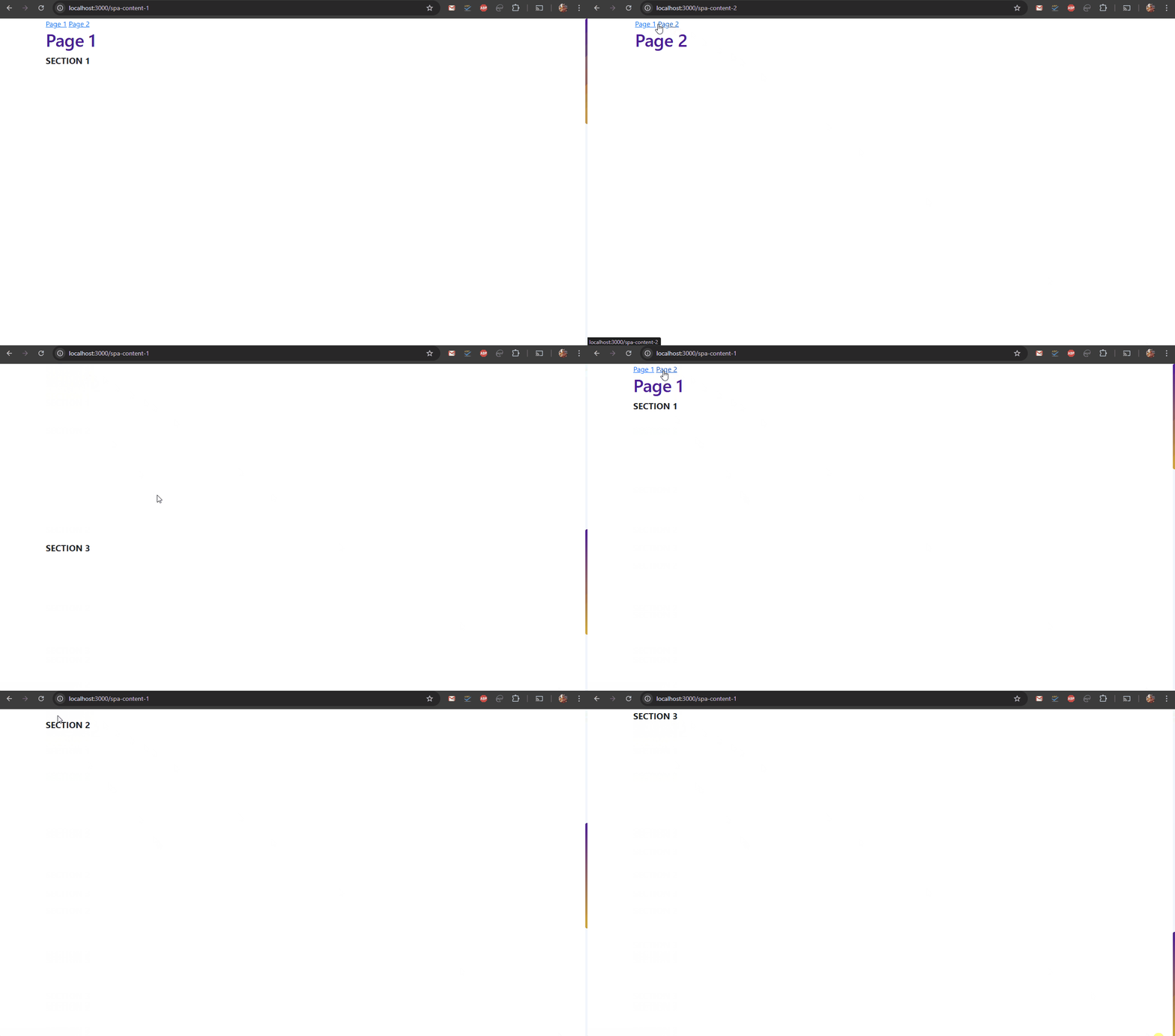
And i just tested the same with a NodeJS SPA, where on opening a specific page a flow on it auto runs:

img-1

It works perfectly fine, as the flow runs when the content page loads.

Can you share your code?

Yes, it's quite simple:

Content page:

<!-- Wappler include head-page="layouts/spa-main" fontawesome_5="cdn" bootstrap5="local" is="dmx-app" id="spacontent1" appConnect="local" components="{dmxSmoothScroll:{}}" -->
<script is="dmx-flow" id="flow1" type="text/dmx-flow" autorun="true">{
  run: {outputType: "text", action: "{{scroll1.goto('#section3')}}"}
}</script>
<div class="container">
    <div class="row">
        <div class="col">
            <h1>Page 1</h1>
        </div>
    </div>
</div>
<section class="vh-100" id="section1">
    <div class="container">
        <div class="row">
            <div class="col">
                <p class="lead text-uppercase fw-bolder">Section 1</p>
            </div>
        </div>
    </div>
</section>
<section class="vh-100" id="section2">
    <div class="container">
        <div class="row">
            <div class="col">
                <p class="lead text-uppercase fw-bolder">Section 2</p>
            </div>
        </div>
    </div>
</section>
<section class="vh-100" id="section3">
    <div class="container">
        <div class="row">
            <div class="col">
                <p class="lead text-uppercase fw-bolder">Section 3</p>
            </div>
        </div>
    </div>
</section>
<meta name="ac:route" content="/spa-content-1">

Layout page:

<!doctype html>
<html>

<head>
  <base href="/">
  <script src="/dmxAppConnect/dmxAppConnect.js"></script>
  <meta charset="UTF-8">
  <title>Untitled Document</title>

  <link rel="stylesheet" href="https://use.fontawesome.com/releases/v5.15.4/css/all.css" integrity="sha384-DyZ88mC6Up2uqS4h/KRgHuoeGwBcD4Ng9SiP4dIRy0EXTlnuz47vAwmeGwVChigm" crossorigin="anonymous" />
  <meta name="viewport" content="width=device-width, initial-scale=1, shrink-to-fit=no">
  <link rel="stylesheet" href="/bootstrap/5/css/bootstrap.min.css" />
  <link rel="stylesheet" href="/css/style.css" />
  <script src="/dmxAppConnect/dmxRouting/dmxRouting.js" defer></script>
  <script src="/dmxAppConnect/dmxSmoothScroll/dmxSmoothScroll.js" defer></script>
</head>

<body is="dmx-app" id="spamain">
  <dmx-smooth-scroll id="scroll1"></dmx-smooth-scroll>
  <div class="container">
    <div class="row">
      <div class="col">
        <a href="/spa-content-1" internal="true">Page 1</a>
        <a href="/spa-content-2" internal="true">Page 2</a>
      </div>
    </div>
  </div>
  <main is="dmx-view" id="content">
    <%- await include(content, locals); %>
  </main>
  <script src="/bootstrap/5/js/bootstrap.bundle.min.js"></script>
</body>

</html>

Again, I'm using same "workaround" as @pixlapps above - just added 500ms of delay in page flow - then it scroll to needed section:

<script is="dmx-flow" id="flow1" type="text/dmx-flow" autorun="true">[
  {
    wait: {delay: 500}
  },
  {
    run: {outputType: "text", action: "{{scroll1.goto('#'+query.hash)}}"}
  }
]</script>

Can you share your whole code then? If there is no repeat or any dynamic data needed for the sections to be shown/rendered on the page, there should not be any need for delay step to be used.

This is very weird.
I've change the PageFlow to be static:

<script is="dmx-flow" id="flow1" type="text/dmx-flow" autorun="true">{
  run: {outputType: "text", action: "{{scroll1.goto('#accordion-liabilities')}}"}
}</script>

It still doesn't scroll to correct section, BUT, as soon as I added small code from you page to the bottom of my page:

<section class="vh-100" id="section1">
    <div class="container">
        <div class="row">
            <div class="col">
                <p class="lead text-uppercase fw-bolder">Section 1</p>
            </div>
        </div>
    </div>
</section>

It started to work.
When I remove this section - doesn't scroll.

Is the sections content dynamic? It is possible that the scroll runs before the dynamic content is loaded, so the section(s) don’t yet have their actual height and the browser is scrolling to a wrong location.

Content inside this section is indeed dynamic. But please read my post above. This is very weird.

Yes when you add the code you pasted the browser height becomes more than 100% and probably then it just scrolls to the correct position. When your content is less than 100% of the browser height (when your content is not yet loaded), there is just not enough space to scroll down.