Hi
Got a question.
How do you manage the header and in particular meta in nodejs project.
I was thinking to use a partial for that but sounds that Wappler logic is to apply in layout.
What would you advice?
The header would normally go in the layout page then any content page using the layout page gets the header haven’t played around with meta much yet but there is a option to set it on each pages app area at the top of app structure
yes, but was wondering if it’s not more “clean” to create a header partials.
Well a partial is just a reusable item it still adds everything to the page as it would without I believe so you’d essentially just be moving the header code from one area to another
Here’s how I undertand this:
Anything which is reused, optionally - make it a partial.
Anything which is used in all routes/content-pages etc - put it in the layout page.
For header, in majority of situations, it is used in all pages.
For cases like login page where you don’t want to show some menu items, you can use a condition to hide based on URL.
I agree with @sid except for
Make it a static standalone page - e.g. login.html - and place it directly in the public folder.
for log in page for exemple you can’t create an “empty” layout like for pages like that and apply it to those pages? @ben what you think?
Well you can create ‘static’, not template/layout based pages as Ben explains in his reply.
Not a very good option in my opinion since it will loose server side magic in NodeJS. And there is no longer an option to create standalone content pages.
Best thing next to static pages is creating a separate layout & content page for login.
it’s what I had in mind. To follow node “logic” and being consistent.
In use a seo data table with a key matching the route
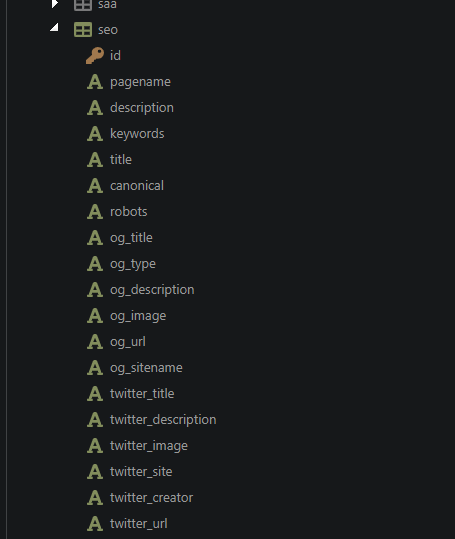
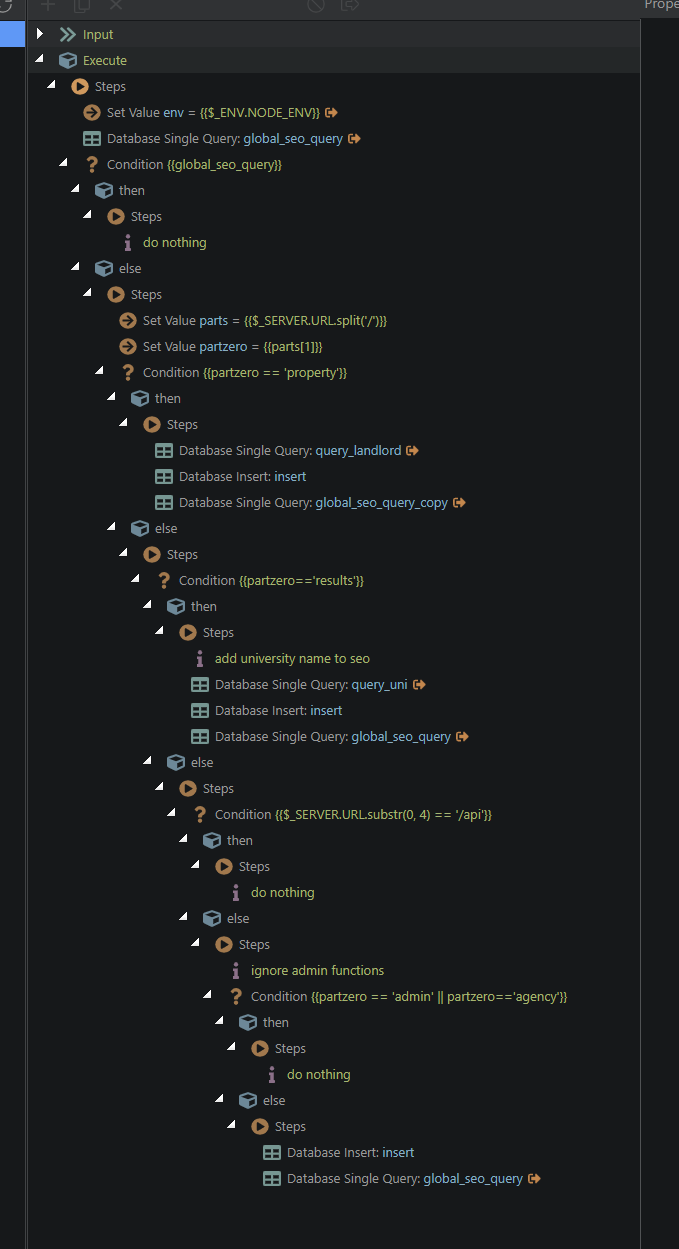
I then have a global query which retrieves a record which matches the route ($_SERVER.URL )
(In the below case if the URL is not matched and is in the correct directory ( I don’t SEO admin/ agency/api pages in this system) then basic details are auto inserted from database values based around another query so at least some level of SEO exists.)
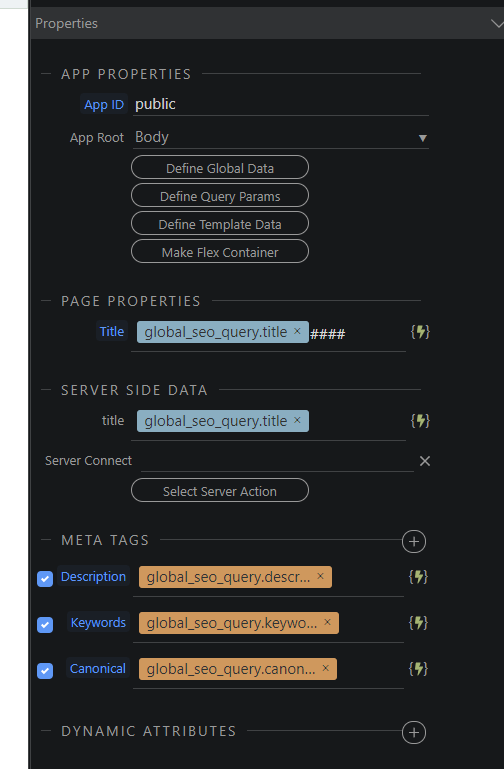
I the pick up the global query values and link them within the layout to the global SEO query like this.
I then create an SEO management console within the admin function to tweak the values, simple CRUD to database management.
As the global query runs before the layout is rendered then some sort of SEO is always present
True, but what server side magic is required for a log in page? Needs no header or footer, it just needs to interact with an API to function. Why then bring it into the Express arena to be manipulated for nothing?
For server side data.
I can put in seo stuff in the server side response. And also put in a check that if user is logged in, they get redirected to dashboard/homepage without even seeing the login page ever.
Yeah. For me this is the main reason.
I just use different layouts:
- Marketing layout (landing pages, about us, features, pricing, etc)
- Auth layout(register, login, 2FA, forgot, etc)
- App layout
- Admin layout
And everything would be even easier if the team could implement:
Thanks guys for your time and support.
For beginners this is the main issue with Wappler : everything can be done, it’s flexible (wich is a plus) BUT as a lot of doc and up to date informations are missing about good practices (wich is complicated as some use php, other node etc) it’s a real challenge and learning curve.