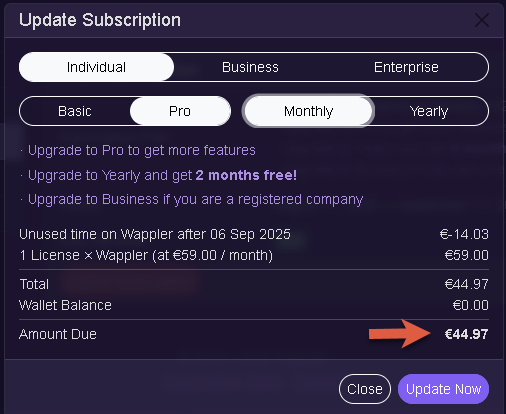
I need to update my web page for and have a feature I guess I need. It requires a pro license to access that feature. So I went to update my subscription from Basic to Pro and instead of just charging me the difference for the rest of the month it want to also charge me next month.
That is not right. I only need this one update for one page and then I am done. Likely will not need to do updates for the rest of the year.
Either dmx-query-manager or Session-Manager. I need to redirect to a page after a form is submitted that shares the details of their order. Basically user goes to page, fills out form, I give them an overview to review changes within a modal. User says submit and then I want to redirect. All of that works. However; I want the post data from that form displayed on the redirected web page.
The submit kicks off an api to send the customer an email. It has all of the info and is working great.
I right now just redirect to a thank you page. However; I am just trying to add some of the elements from that order form such as name, their email, phone, and things like that.
I used AI and it led me a couple of directions. One was query manager and the other was session manager.
When I post it to write to an URL it does that as well. However; the fields I am using are empty of the confirmation page.
Here are two common approaches I use for this kind of workflow:
1. Using a Database
Save the form/post information into a database before sending the email.
From your Server Connect action, return the last inserted ID as a variable.
On the frontend, use the Browser component to redirect the user to a new page, passing that ID as a GET parameter.
On the new page, add a Server Connect that queries the database for that specific order.
For security, don’t use a simple incremental ID—use Wappler’s unique ID generator so other users can’t tamper with the parameter and view someone else’s order.
2. Using Server-Side Sessions
Create a session variable on the server side when the form/post is submitted.
Retrieve this session later in the frontend using a Server Connect component.
You can either:
Create a session for each submitted value, or
Query the database for the last inserted item and bind it to the session.
Can you please share a screenshot of what you’re seeing?
When upgrading from a monthly Basic to a monthly Pro subscription, our payment system automatically prorates the cost. This means it calculates the unused days left in your current billing cycle and only charges you the difference at the higher Pro rate.
What is unusual is even if you do the basic monthly its 29. The Pro is 59. A difference of 30. So even the whole month would be a difference of 30 to switch. That is why I am asking before I do this.
I put the educational price I meant the 39 euro. Sorry about that part.
This is what is hanging me up though. I now understand how you are doing the math but here is the part that I am trying to figure out. So I have already paid 39 euro for basic. The monthly is 59 euro for pro. That I understand but this is what I need explained. It is going to cost me 44.97 euro for 11 days. I paid 39 euro. So 39+44.97 is 83.97 euro. The monthly is only 59 euro. It is going to cost me more than the monthly pro of 59 euro for 11 days. That is what I am hung up on.
I decided to do the upgrade as I need to get my site updated. What it does when you do a subscription update it does not extend it the remaining period of your basic however; it extends it a full 30 days again.
Maybe that will help someone out when they go to do this.