In an attempt to create a fuzzy search Gemini 2.5 suggested placing a serverconnect.load inside the input variable. It did not work. Gemini swore it was structurally sound design but "the problem must lie in a subtle but crucial detail of how Wappler's App Connect framework"
Good design or bad? App Connect or something else?
This is the problem with paraphrasing, we don't actually understand what you mean 
You should post the actual suggested HTML code to get a reliable opinion, else different people will think different things
<dmx-value id="v_member_search_filter" dmx-on:updated="sc_qryMembersRole.load({sort: sortDir.data.sort, dir: sortDir.data.dir, v_member_status_filter: v_member_status_filter.value, v_member_role_filter: v_member_role_filter.value, v_member_search_filter: value})" dmx-bind:value="value"></dmx-value>
Here's the associated input field:
<input id="member_search_filter" name="member_search_filter" type="text" class="form-control round" placeholder="Search name, email" dmx-on:changed="run({condition:{outputType:'boolean',if:`(value.length() == 0)`,then:{steps:{run:{name:'zero_refresh',outputType:'text',action:`v_member_search_filter.setValue(null)`}}},else:{steps:{condition:{outputType:'boolean',if:`(value.length() >= 2)`,then:{steps:{run:{name:'start_2',outputType:'text',action:`v_member_search_filter.setValue(v_member_search_filter.value)`}}}}}}}})" dmx-bind:value="v_member_search_filter.value">
Good, now did you see any error in the browser console?
No activity displayed in the dev tools console.
What happens if you replace this expression with true?
I'm not sure if that formatter .length() exists, in Wappler I commonly see .count()
Edit: Properly diagnosing this issue would require to do stuff like calling browser notifications (Browser component, notify) on those Dynamic Events/flows to trace the execution and figure out where the problem is
Hi Jimed99,
I'm trying to understand the logic of dynamic binding of values in both input and search variable. If the purpose of member_search_filter input field is to let user enter text to search in the database by setting a value of the search variable, then I don't think binding dmx-bind:value to the search variable will work correctly.
I will suggest testing the code after removing dmx-bind:value for both input and search variable.
I see some weird things in the code. What exactly are you trying to achieve here? Maybe explain your idea so we can help.
Are you trying to only search when the input has 2 or more characters?
Basically Gemini gave bad advice. This is not the way to do it.
You should bind the filter input directly to the server connect and the refresh will be automatic, no need for on:change triggers. I will see if i can dig out a sample video.
1 Like
I agree with Hyperbytes, bind it directly to the server connect like:
using a variable
<dmx-serverconnect id="scListData" url="/api/content/list" dmx-param:search_param="varSearchParam.value"></dmx-serverconnect>
using a $_GET query param
<dmx-serverconnect id="scListData" url="/api/content/list" dmx-param:search_param="query.search_param"></dmx-serverconnect>
That's just a quick simple example. Course you can add the all dmx-param: you need for sort, offset, etc. with your parameters. The server connect will automatically reload the new data when those params change.
-Twitch
This may help

1 Like
This happens with Wappler AI in general in my experience, this is why I don't promote Wappler AI at all, or even trust it to ask Wappler front-end questions which is what I'm less familiar with. I think it's dangerous for beginners
And those who use AI are saying Gemini is not good, GPT is much better currently.
Thank you all.
I've done a fuzzy search before and got myself stuck down an AI rabbit hole attempting something. Should have gotten up, walked away and came to review the old school (right way) like Brian's video shows.
I've been using all of them alot. They all have had their good days and bad. Gemini has been the most consistent for me - it was also the first I found to read the repository - saved tokens not uploading code sections.
Went back to Wappler AI this week and with explicit instructions of "DO NOT CHANGE CODE" GPT changed code. Third time this has happened inside Wappler AI, Claude did twice now GPT.
Moved to VSC for the github/copilot integration and found that to be another step saved. No more sending to github for code review. VSC reads directly from the local repository and has done a great job of reviewing APIs etc within the project.
GPT/Claude keep tokening out on me. So I went back to Gemini.
I beg to differ! It is horses for courses Brian. Out the gate with no instruction or training lets be honest they are all as bad as each other. Like GPT there are different versions of Gemini and if you are using Flash and not Pro you will see quite a bit of difference with regards to your success (and if you don't provide context and training well might as well use anything as those results will be poor). We are currently working on our most complicated code base yet and neither Claude nor GPT have come close to Gemini Pro (Deepseek or Qwen). Outside of Claude Code usage Claude as a standalone has gotten progressively worse since 3.5. I'm all for terminal solutions now. They are far more superior to their IDE bound cousins. This goes for Cursor, Cline in VSC, Windsurf and the rest of them.
Current LLM Leader Board (context window is very important to factor in).
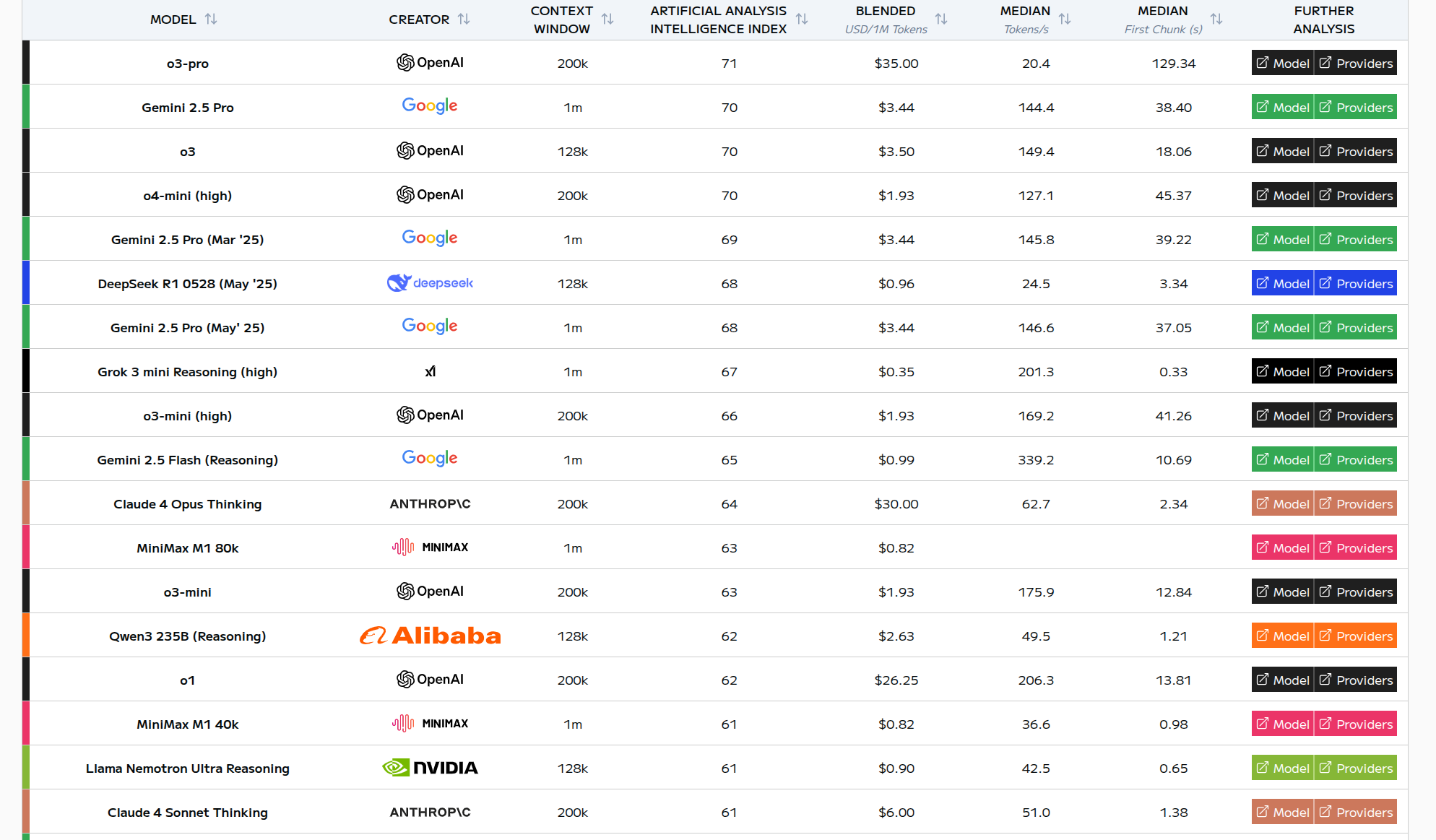
Lets face there are not many of us going to fork out for 03 Pro! Nor is it available in Copilot etc. We did however use it in Open Router and still found Gemini Pro to be equal and in most cases superior for our specific needs and the task load (based upon code base size and positive results).
I think to summarise, AI is useful but as a support tool, experience and personal skill remain paramount.
1 Like
Prompting and knowledge of the code base. Best tip I can give is create a rules file for any LLM to follow. On top of that a full Project summary. And as a Brucey bonus have an LLM describe all your scripts for reference. If need be ask an LLM to do this all for you and output the files to your Project root directory and refer to those when starting or continuing a session with any LLM. It is also highly recommended to keep both a chat log and change log. There is also no hardship in asking the LLM you are working with to improve your prompt for you to get the most out of it prior to continuing your session. More often than not this will aid in achieving a higher success rate and reduced token usage.
Do note @Cheese and @Apple that within Wappler we supply the AI models with extensive knowledge of the used App Connect and Server Connect frameworks working and syntax when calling them in their system prompt.
So the AI model can then translate the generic knowledge they have to Wappler specific solutions and use the App Connect expressions syntax and available components for the frontend as well generate or edit Server Connect actions with the available actions and syntax.
Also project specific organization is passed so the AI model knows what server type is running and where to place the files.
We also provide tool functions from the Wappler AI Manager to the AI models to call back on Wappler and let it do work as well supply more info about database structure, execute generated migrations, read and write project files or open and edit actions or pages. That is the used agent mode.
Also the AI code generation, specifically for generating server actions is being fully validated by Wappler before applying and errors are passed directly to the AI model so it can correct them directly. This is the great AI agentia conversation that you see when you start a task in the AI manager.
We also smartly pass the amount of knowledge and information in the system prompt, to handle the limited context size of some of the AI models.
The AI manager for example uses general knowledge about the current project in Wappler and App Connect and Server Connect and delegates the specific editing actions to the html editor for editing html/ejs/php pages which receives the full app Connect knowledge, while the server Connect editor receives the server Connect action knowledge only.
This satisfies the common AI models that currently have like 128 kb tokens context size. Also GitHub copilot limits its AI models to 128kb tokens while many of them like Claude already have 200kb context size and the new ones like Gemini Pro go even to 1MB context size.
So it is a great advantage to use the built-in AI integration in Wappler instead of the generic external AI editors.
And of course we are continuously improve the Wappler AI knowledge that is passed to the AI models based in n the community feedback, so make sure you report any issues found with the code generation or need for improvements.
3 Likes