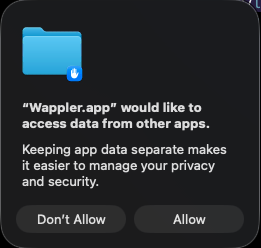
When I deploy a Docker project to a remote server, a message pops up Wappler.app would like to access data from other apps.
I click on Don't Allow and the Docker deployment proceeds without any issues. This message pops up every time I deploy a project after restarting Wappler.
I am seeing this message every time I rebuild a Docker container, whether it is on my local server or remotely. If I click ‘Don’t Allow’, the rebuild works fine.
I am curious, what is this message for? What kind of information does Wappler need to access?
It looks like you’re checking whether that macOS permission prompt is legitimate or what you should do with it. Let’s walk through it clearly and without any fuss.
What that dialog actually means
macOS shows this type of prompt when an app wants access to data that Apple considers sensitive — things like:
Files in other apps’ containers
Documents in protected folders (Desktop, Documents, Downloads)
Calendars, contacts, photos, reminders
Automation permissions (controlling other apps)
It’s part of Apple’s sandboxing and privacy model. The system is basically saying: “Wappler wants to reach beyond its own sandbox. Do you want to allow that?”
Why Wappler might request this
Wappler is a development tool, and depending on what you’re doing, it may need access to:
Thanks for the extra info! I’m happy to grant or allow access permissions to the Wappler app in the Security settings.
However, when I click on the Don’t Allow option, the rebuild still runs as expected. If the Wappler app needs access to specific files or folders, clicking this option should stop the rebuild right away. So, I’m not sure the message is really needed.
Well it seems like one of those bogus warnings from Apple that nobody really knows when it comes and how to auto allow it.
Probably because of docker accessing system resources but because it is started by Wappler you get the question that Wappler is trying to use system resources.
So it should be all fine but annoying indeed as you don’t know exactly why this message comes as it didn’t say. But we don’t know either.
One of those handy security warnings Apple added to fake improve the users feelings.
But still check the system log or so there might be some more info why it comes.
Thanks for the additional context about this window pop-up. I will check the system logs next time it happens to see if it can help us figure out what exactly MacOS needs permission for.