If you're not ready for agentic AI to work on your Wappler projects, I thought of two areas where your current AI help could really make an impact:
Improving the order of tags inside HEAD
Lighthouse Performance Report improvements
The Wappler team deserves a lot of praise for what they have built, but we know there are always areas to be improved upon. Wappler inserts tags inside the HEAD tag but doesn't always do it in an order that improves page load times. At times, the order Wappler uses slows down performance. I like to copy the entire rendered HEAD tag (from the browser's developer console) for a given page, and give it to AI to reorder. It does an excellent job making sure it limits blocking events, uses preloading strategies, adds tags that would help loading or SEO, etc. A typical HEAD tag in my project's pages now includes the following sections:
<!-- 1. CRITICAL META & BASE (MUST BE FIRST) -->
<!-- 2. PRECONNECT (Performance Enhancement) -->
<!-- 3. TITLE & SEO META -->
<!-- 4. FAVICONS & WEB MANIFEST -->
<!-- 5. SOCIAL SHARING META (Open Graph & Twitter Cards) -->
<!-- 6. ALL STYLESHEETS (CSS) - Load CSS before non-deferred JS to prevent FOUC -->
<!-- 7. CRITICAL/BLOCKING JAVASCRIPT (Must execute immediately) -->
<!-- 8. DEFERRED SCRIPTS (Grouped and deferred for max performance) -->
When I finish a new feature, I run the lighthouse performance test, save the report as a JSON file, and ask AI to look at the report findings to identify the fixes required to improve page performance. Since I usually have already set up the HEAD tag as above, the findings are usually based on how the HTML, JS, or CSS should be improved. I've learned a lot about page loading from running these reports and understanding the results. This was something NOT available to me in the early 90's when I started web development. You can find the lighthouse report generation inside Chrome's developer console. There's a public site as well. Make sure to try throttling bandwidth, like slow 4G. The findings are always eye-opening.
These are two areas where you don't have to be an agentic AI master. They are very "low hanging fruit" that often goes overlooked.
In those days I was still tinkering away on an MS‑DOS machine, bouncing between QuickBasic and dBase IV.
What we called “web development” back then was really just plain HTML, no CSS, no JavaScript, no interactivity of any kind. Just static text and hyperlinks, all written in basic text editors. The web was mostly an academic playground, long before search engines or anything resembling SEO.
Anyway, you’ve gone and opened a can of worms for this old codger. I couldn’t resist chiming in.
Early 1980s for me, 8 bit Z80 and 6502 machine code because Basic just didn't cut it for animation.
Bit like you Ben dBase 2 ->3 ->4 -> Clipper ->FoxPro and finally Visual FoxPro before diving into the online world of SQL and .asp via Frontpage!
Woah, now there’s some real nostalgia. HoTMetaL Pro was the first software I ever used in the mid-90s. As Ben said, just HTML, layouts done with tables and splitting images up into loads of segments. No Google, etc.
Visual Basic and then Borland Delphi (Pascal) was my way into coding. Wrote various Windows applications for internal systems use and loved it.
Then Drumbeat was the beginning of web dev for me. It was ASP classic and then Macromedia bought it out and it became Dreamweaver Ultradev. Bruno Mairlot created PHAkT for it which turned it into a PHP dev tool cutting all the costs and agro of Windows hosting.
Then Ultradev added PHP into it’s core and that was my tool for many years.
DMXZone and Interakt with WebAssist being added later by the late great Ray Borduin. This was how I heard about the new tool the DMXZone team were planning called Wappler.
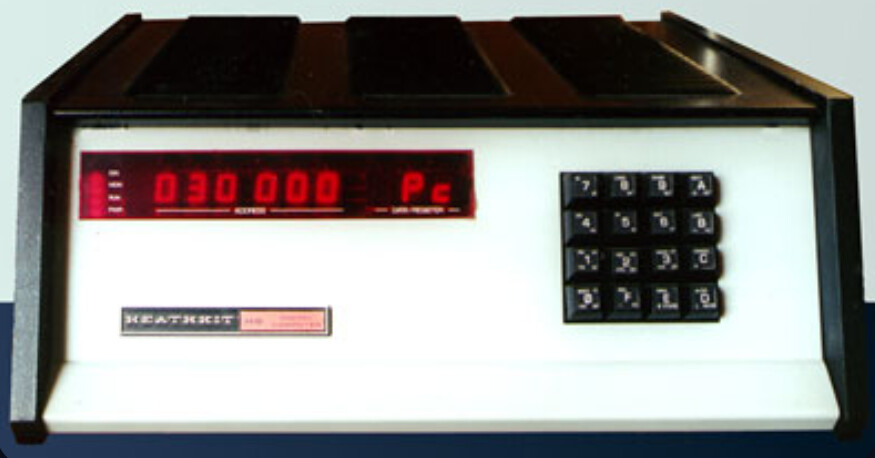
Hold on a moment. I was talking about the early 1990s. My experience goes back to 1977 when I purchased a Heathkit H8, which I had to put together myself.
It had a front-panel octal keypad, an 8080A CPU, and an external double-density, double-sided floppy disk drive. A portable black-and-white TV acted as the monitor, and an ex-army teletype running at 300 baud served as the printer. At first, I programmed it using Assembly Language, which was quite difficult with commands like moves, loads, stores, swaps, and arithmetic operations using the accumulator.
Later, Cobal, Pascal, and several others appeared, and I selected Benton Harbour Basic.
Using this version of Basic, I created my first database called NAW (naam, adres, woonplaats).
Since random-access was not possible in my setup, I chose a sequential-access version.
This setup was the foundation for printing address labels for the few thousand newsletters I had to send every four months.
Fortran 4 on a Harris mainframe in 1978 was my first proper programming but was coding computerised analytical instruments (was a lab chemist) via punch tape around same time, 1977. I still remember my first program name, called BESOL