Hi,
Have followed Brian English, @Hyperbytes you tube tutorials on setting up a login using Hash Verify.
This now my second attempt on a completely new and clean project and each time all I get is the unauthorised error from the login page.
To make matters worse, I have the very same method working on another project on a website hosted on the same server.
If I uncheck the Hash Verify and use an encrypted password the login works as expected.
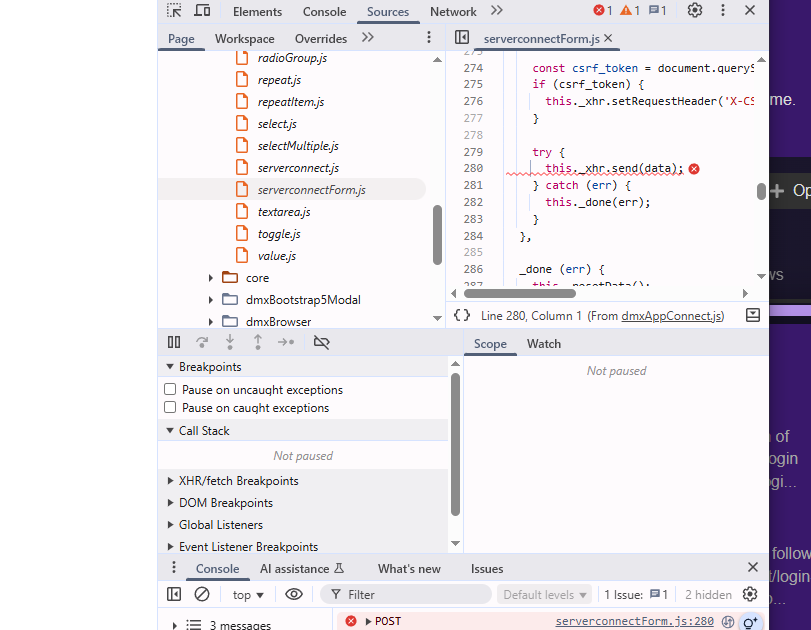
The server error in the page inspector of the login page shows the /dmxConnect/api/Admin/Security/login.php as 401 unauthorized and a red cross in the serverconnect form.js as shown below:
I believe that that video was for node.js, seems like there was another step you had to do if you were doing PHP. As I was doing asp.net had to do the same thing. Seems like I found the answer in the comments or something on either that video or the next one in that series?
Yes, due to the fact that the PHP implementation in Wappler ignores the output directive in a session save step, an additional "set value" step is needed to output the uuid.
It's in comments.
If that is not the cause, we really need to see the server action steps to spot the mistake.
Hundreds have followed that tutorial successfully,i can be 99.99% sure you have made a mistake somewhere.
Not sure why, but I think the issue was to do with the database...
When I looked at the db using PHPMyAdmin I could see the username and password fields were set to Null = No, Default= none. The other fields in the table were all set to Null=Yes, Default=Null.
The register page was able to insert everything OK using these settings so I assumed the table to be OK and not the issue.
Looking at the table of the site which works I noticed the username and password fields were set to Null=Yes, Default=Null.
Changing theses two field to the above on the problem field instantly allowed the login to work!
As i said, not sure why it should make a difference but it did.
Thank you all for your very prompt suggestions and help