I am currently working on a PHP project and the local server was working fine. That is until it mysteriously quit. Here is the output from the server tab. What does ststus 302 mean and how do I get my local server up and running again?
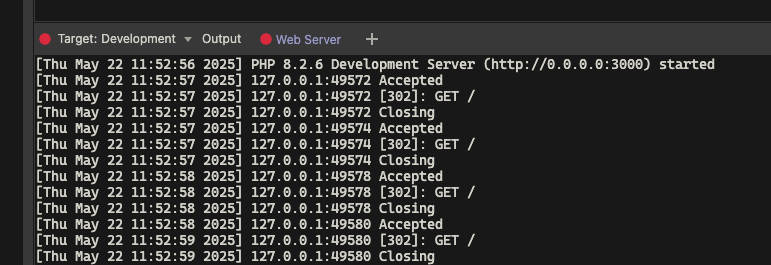
Well 302 means redirect. So check your url rewrites / routing to see if it is not looping to redirect all
I don't have any redirects. I have just started the project and only have a blank index and blank login page.
How would I check my rewrites/routes? Where do I check that?
Seems to be an issue with Security Restrict. I took off the enforcer and it starts up no problem. I need the security enforcer though.
Yep, it's a problem with Security Enforcer. As soon as I add it it crashes the server again.
What is the php header code on your page for the security enforcer?
Can you post the php it is adding?
<?php
require('dmxConnectLib/dmxConnect.php');

$app = new \lib\App();

$app->exec(<<<'JSON'
{
	"steps": [
		"Connections/Client",
		"SecurityProviders/authentication",
		{
			"module": "auth",
			"action": "restrict",
			"options": {"loginUrl":"login.php","forbiddenUrl":"login.php","provider":"authentication"}
		}
	]
}
JSON
, TRUE);
?>
As soon as I remove that the server runs fine.
And this is my provider code.
<?php
$exports = <<<'JSON'
{
  "name": "authentication",
  "module": "auth",
  "action": "provider",
  "options": {
    "secret": "GE8AYDueMuFgWnc",
    "provider": "Database",
    "connection": "Client",
    "expires": 1,
    "users": {
      "table": "c_clients",
      "identity": "client_key",
      "username": "client_email",
      "password": "client_password"
    },
    "permissions": {}
  },
  "meta": [
    {
      "name": "identity",
      "type": "text"
    }
  ]
}
JSON;
?>
What would I check or look for in the browser developer tools to see if this loop exists in production?
This is what AI Assistant told me. Makes sense but I double checked and the restrict code is not included on the login page.
The infinite loop with status 302 is caused by the restrict action in your security provider configuration. Here's why this happens:
- Redirect to Login URL:
- The
restrictaction checks if the user is authenticated using theauthenticationprovider. - If the user is not authenticated, it redirects them to the
loginUrl(/login).
- Login Page Also Protected:
- If the
/loginpage is also protected by the same security provider, therestrictaction on the/loginpage will again redirect the user to/login, causing an infinite loop.
Solution
To fix this, ensure the /login page is not protected by the same security provider. You can do this by:
- Exclude the Login Page:
- Do not include the
restrictaction on the/loginpage.
- Alternative Approach:
- Use a conditional check in the
restrictaction to avoid applying it to the/loginpage.
Example Fix
Update your restrict action to exclude the /login page:
{ "module": "auth", "action": "restrict", "options": { "loginUrl": "/login", "forbiddenUrl": "/login", "provider": "authentication", "exclude": ["/login"] }}
Alternatively, ensure the /login page does not include the restrict action in its server-side configuration.
This will prevent the infinite loop by allowing unauthenticated users to access the login page without being redirected back to it.
1 Like
Restrict code looks good. maybe a login cookie issue?
Do you see it being set in the dev console under "Application -> Cookies
I don't think it's a browser issue ..... problem is when the local server tries to start the console just reads this repeatedly and the server statuses are red circles.
[Thu May 22 21:16:29 2025] 127.0.0.1:62666 Accepted
[Thu May 22 21:16:29 2025] 127.0.0.1:62666 [302]: GET /
[Thu May 22 21:16:29 2025] 127.0.0.1:62666 Closing
Strange thing is I can still preview in browser successfully (sort of) even though it says the server isn't running.
Brad, can you paste the code of the login api?
Right click open code view, maybe something wrong is there?
@George, I think I have narrowed down when this happens. It seems to only happen on projects that have the index page restricted.
Projects with the index page restricted, the redirect causes a loop.
1 Like
I'm changing this to a bug. When adding security restrict to the index page of a PHP project, the PHP server has an error (302). The server still runs and I can preview my project on both desktop and mobile but server has red statuses.
How is it a bug if you restrict the index page and it properly redirects you, as you’re not logged in? The behavior is same as in your browser.
So what your saying is you can't restrict your index page without the server throwing many 302 errors repeatedly and a red status in the servers? So I should just ignore the server statuses?

302 means page was redirected. Same happens when you load your restricted page in the browser - you are then redirected by the security restrict.
Yes, everything works as it should in a browser with no errors in console. The problem is when you start the PHP server without even opening any pages in Wappler, you get a red server status and the server shows as not running when in fact it is

.
What is is redirecting when I haven't even opened any pages in Wappler?