Using wappler 7.7.1 in win 11
The problem is that when I set the internal properties in a “nav item”
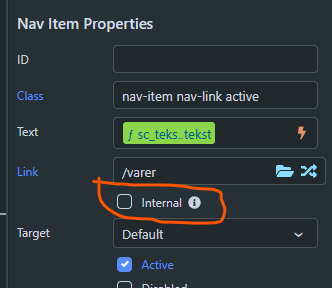
it does not show the main.ejs file. that means that the top of the webpage (menu) disappears. But with a refresh the menu returns as normal.
Using wappler 7.7.1 in win 11
The problem is that when I set the internal properties in a “nav item”
it does not show the main.ejs file. that means that the top of the webpage (menu) disappears. But with a refresh the menu returns as normal.
What exactly do you mean?
Sorry by the bad explanation
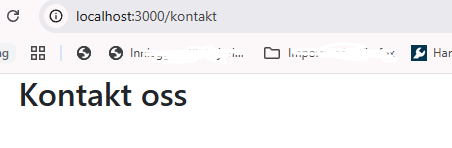
The top of the webpage is missing. It does not show. like this.
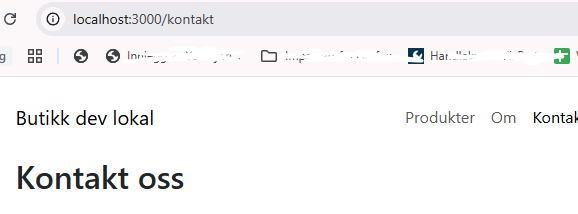
It should be like this
The menu disappears.
Not sure if this will work, it is worth a try: Bring the link to dmxrouting.js further down the list in the head section.
Doing a bit of housekeeping will also help out. Have a look at your re-arranged <head> section:
<head>
  <base href="/">
  <meta charset="UTF-8">
  <meta name="viewport" content="width=device-width, initial-scale=1, shrink-to-fit=no">
  <meta name="description" content="butikk.howden.no Butikk ">
  <meta name="keywords" content="butikk.howden.no Nett butikk">

  <meta property="og:site_name" content="butikk.howden.no">
  <meta property="og:url" content="https://butikk.howden.no/">
  <meta property="og:title" content="Golf butikken ">
  <meta property="og:description" content="butikk.howden.no Butikk ">
  <meta property="og:image" content="https://butikk.howden.no/assets/images/ny-beholder-660L-1920w.webp">

  <meta name="twitter:description" content="butikk.howden.no Butikk ">
  <meta name="twitter:image" content="https://butikk.howden.no/assets/images/ny-beholder-660L-1920w.webp">
  <meta name="twitter:url" content="https://butikk.howden.no/">
  <meta name="twitter:title" content="Golf butikken ">

  <meta name="apple-mobile-web-app-capable" content="yes">
  <meta name="apple-mobile-web-app-status-bar-style" content="black-translucent">

  <title>Golf butikken </title>

  <link rel="canonical" href="https://butikk.howden.no/">

  <link rel="stylesheet" href="/bootstrap/5/css/bootstrap.min.css" />
  <link rel="stylesheet" href="/fontawesome6/css/all.min.css" />
  <link rel="stylesheet" href="/dmxAppConnect/dmxNotifications/dmxNotifications.css" />
  <link rel="stylesheet" href="/css/style.css" />

  <script src="/dmxAppConnect/dmxAppConnect.js"></script>
  <script src="/dmxAppConnect/dmxMoment/dmxMoment.js" defer></script>
  <script src="/dmxAppConnect/dmxScheduler/dmxScheduler.js" defer></script>
  <script src="/dmxAppConnect/dmxNotifications/dmxNotifications.js" defer></script>
  <script src="/dmxAppConnect/dmxBootstrap5Navigation/dmxBootstrap5Navigation.js" defer></script>
  <script src="/dmxAppConnect/dmxBrowser/dmxBrowser.js" defer></script>
  <script src="/dmxAppConnect/dmxFormatter/dmxFormatter.js" defer></script>
  <script src="/dmxAppConnect/dmxStateManagement/dmxStateManagement.js" defer></script>
  <script src="/dmxAppConnect/dmxBootstrap5Toasts/dmxBootstrap5Toasts.js" defer></script>
  <script src="/dmxAppConnect/dmxBootstrap5Alert/dmxBootstrap5Alert.js" defer></script>
  <script src="/dmxAppConnect/dmxRouting/dmxRouting.js" defer></script>

  <script src="https://code.jquery.com/jquery-3.5.1.slim.min.js" integrity="sha384-DfXdz2htPH0lsSSs5nCTpuj/zy4C+OGpamoFVy38MVBnE+IbbVYUew+OrCXaRkfj" crossorigin="anonymous"></script>
  <script src="/js/moment.js/2/moment-with-locales.min.js"></script>
</head>
Edit: Maybe defer the jquery and moment JavaScripts as wel.
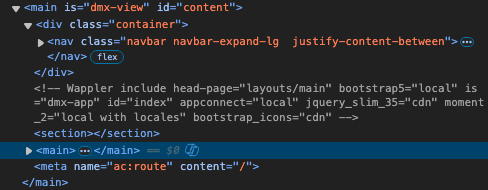
It seems you have included nav element on the content page instead of the layout page.
The nav element should be on the layout page so that it can be called on each content page in a SPA. This is a simple Wappler SPA html structure
<!doctype html>
<html>
<head>
  <meta charset="utf-8">
  <title>Wappler SPA</title>
  <!-- Wappler / App Connect CSS & JS would be linked here -->
</head>
<body is="dmx-app" id="app">

  <!-- Layout header with nav -->
  <header class="navbar">
    <div class="container">
      <h1 class="logo">My SPA</h1>
      <nav>
        <!-- Internal SPA navigation -->
        <a dmx-route="'home'">Home</a>
        <a dmx-route="'about'">About</a>
        <a dmx-route="'contact'">Contact</a>
      </nav>
    </div>
  </header>

  <!-- Main content area where views/pages are loaded -->
  <main class="container">
    <div is="dmx-view" id="content"></div>
  </main>

</body>
</html>
Thanks for the suggestions. The solution was very simple.
I had put the “nav” element inside the “Main” section. that was the problem.
I just moved it over the “Main” section and everything works.