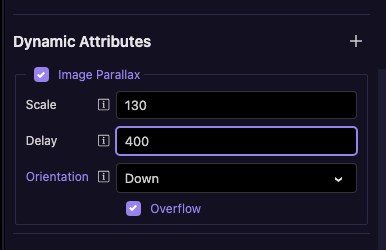
Is there a way to dynamically control component attributes like Parallax settings?
For example, can I change values such as delay or scale based on screen width (e.g., apply different settings for mobile vs desktop)?
Is there a way to dynamically control component attributes like Parallax settings?
For example, can I change values such as delay or scale based on screen width (e.g., apply different settings for mobile vs desktop)?
Hi @Chackmool, you can adjust parallax behaviour dynamically, but not directly through the built‑in UI fields. The trick is to bind those values to App Connect expressions. For example, you can set different delay/scale values based on screen width or breakpoints by using conditional expressions like:
dmx-bind:delay="screen.width < 768 ? 0.1 : 0.3"
dmx-bind:scale="screen.width < 768 ? 1.05 : 1.2"
This lets you fine‑tune the effect for mobile vs desktop without needing separate components.
You are amazing as always. Maybe good idea to add it to UI @George
I am trying like this @Teodor
<img class="resp-img" src="/assets/index/ixtapa-mexico.jpg" alt="" dmx-image-parallax.overflow="down" dmx-bind:scale="izbrowser.viewport.width < 600 ? 120 : 130">
But cant get this work.