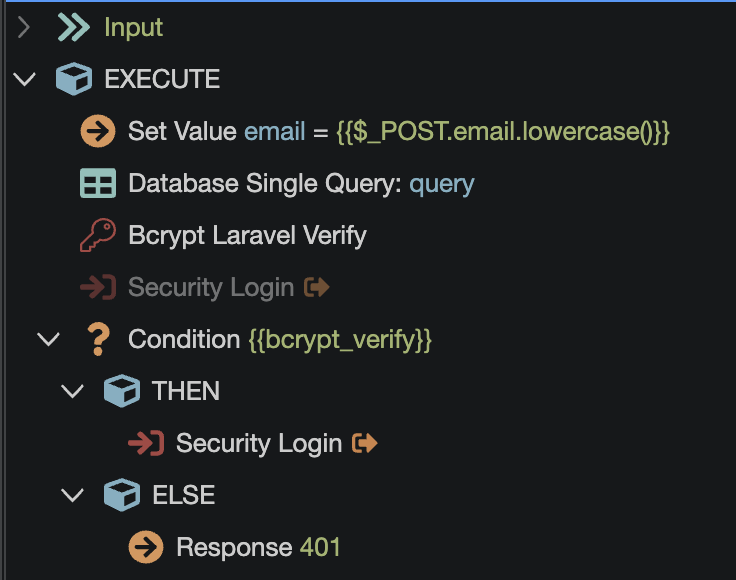
I have not used Validata Data step much. So not sure if this will work.
But in the else part where you have 401, that’s where I suppose you would want to add it.
In its setup, set the value comparision to fail always with your custom message and put the password field ID in linked field.
I think there might be a way to trigger the failed validation using a response step as well… not entirely sure how to configure the response body though.
The validate action will check if the input parameters match any of the validators you choose. If they don’t it will send an error to the front end with the custom message you choose for that specific validator.
So as sid mentions you would need to force a failed validation for that. Although I haven’t tried this myself as I rather not send very specific messages to the frontend about what is actually failing when login in as it opens a door for brute force attacks.
Here we specify the input from which we take the data for verification.
Here is the name of the input on the frontend where we want to send the error message.
In order to achieve the event you need, you need to check the data for existence in the database (in this case, an error will occur if the event has not occurred).
IMPORTANT! Using validation in this form to verify a password is a bad practice, because there may be situations when another user’s password accidentally came up to the data being entered. In this case, the check will be successful and the error will not return. To check security, it is better to use security components, as a last resort, a condition step.
Personally, I use the data validation component only for internal work. When the user is already in the system and checks are required. For example, when creating some objects, they must have unique numbers/names. In this case, the data validation component helps a lot.
I have considered the task, you can not do a reconciliation with the database in the data validation component, but use it only as an error message delivery in the password input.
We do the check using the condition step. If the check is successful, then login occurs. If unsuccessful, we run data validation step and select the “Equal To” condition inside:
The value field specifies the name of the input from which the data for reconciliation should be taken. Here we enter any name of a non-existent input, and in the message field we specify the message that we want to send to the frontend in the password input in case of incorrect input:
This validation setting will always return an error message, since we have set a condition that will always be false.
Thus, first the condition step will check the password, if the password does not match, the data validation step will start, which will always return an error message to the input we need on the frontend side.
Per @Mr.Rubi suggestion, the data validator check if the input is equal to an invalid field causes the validation to fail with my custom message on the password field. And as @sid told, this goes where Response 401 step is located and replaces it
I still take this in consideration, it answers either the password or e-mail address is wrong, it doesn't specify which one (the error always appears in the password field). I think this is better than a "pop-up" notification