Hi @bpj , thanks for your comments and help. I did see in a previous post of yours where you commented about the 'checkboxid.checked ? 1 : 0' trick. I did try it previously but for some reason things just weren't working for me.
Your additional comments spurred me on and thanks to you, and others, I now have a very good result. It may not be THE way to do it but it works, and works well.
Also check out the Can I easily delete ‘blank’ rows in an array? post which also refers to this.
My revised code
<div id="repeat1" is="dmx-repeat" dmx-bind:repeat="var1.value" class="form-group row col-12">

  <label dmx-bind:for="method_item_[{{$index}}][part]" class="col-sm-1 col-form-label">{{$index + 1}}</label>

  <div class="col-sm-8">
    <input type="text" class="form-control form-control-lg"
      id="car_part"
      aria-describedby="input1_help" placeholder="Enter part or item here"
      dmx-bind:value="sc_ad_job_q.data.TEST12[$index].part">
    <div is="dmx-if" id="conditional9" dmx-bind:condition="car_part.value">
      <input id="car_part_use" name="method_item[]" class="form-control"
        dmx-bind:id="method_item_[{{$index}}][part]"
        dmx-bind:name="line_items[{{$index}}][part]"
        dmx-bind:value="car_part.value" type="hidden">
    </div>
  </div>

  <div class="col-sm-3" is="dmx-if" id="conditional10" dmx-bind:condition="car_part.value">

    <div class="custom-control custom-checkbox custom-control-inline">
      <input class="custom-control-input" type="checkbox"
        dmx-bind:id="method_item_[{{$index}}][replace]" id="replace_id"
        dmx-bind:checked="sc_ad_job_q.data.TEST12[$index].replace == 1">
      <label class="custom-control-label"
        dmx-bind:for="method_item_[{{$index}}][replace]"></label>
      <input id="replace_checked" name="method_item[]" type="hidden" class="form-control"
        dmx-bind:name="line_items[{{$index}}][replace]"
        dmx-bind:value="replace_id.checked ? 1 : 0">
    </div>
    <div class="custom-control custom-checkbox custom-control-inline">
      <input class="custom-control-input" type="checkbox"
        dmx-bind:id="method_item_[{{$index}}][repair]" id="repair_id"
        dmx-bind:checked="sc_ad_job_q.data.TEST12[$index].repair == 1">
      <label class="custom-control-label"
        dmx-bind:for="method_item_[{{$index}}][repair]"></label>
      <input id="repair_checked" name="method_item[]" type="hidden" class="form-control"
        dmx-bind:name="line_items[{{$index}}][repair]"
        dmx-bind:value="repair_id.checked ? 1 : 0">
    </div>
    <div class="custom-control custom-checkbox custom-control-inline">
      <input class="custom-control-input" type="checkbox"
        dmx-bind:id="method_item_[{{$index}}][paint]" id="paint_id"
        dmx-bind:checked="sc_ad_job_q.data.TEST12[$index].paint == 1">
      <label class="custom-control-label"
        dmx-bind:for="method_item_[{{$index}}][paint]"
        dmx-class:active=""></label>
      <input id="paint_checked" name="method_item[]" type="hidden" class="form-control"
        dmx-bind:name="line_items[{{$index}}][paint]"
        dmx-bind:value="paint_id.checked ? 1 : 0">
    </div>

  </div>
</div>
I am then able to insert the results into a Database field as JSON which I then use later in a PDF report.
PHP to separate out and display in PDF Report
<?php
  $jsonobj = $_SESSION['for_PDF']['meth_json'];
  $obj = json_decode($jsonobj, true);

  // REPLACE (NEW PARTS)

  $meth_replace_list = '';
  $meth_replace_count = 0;

  foreach($obj as $orders) if($orders['replace'] == 1) {
    $meth_replace_list = $meth_replace_list . $orders['part'] . "<br>|";
    $meth_replace_count++;
  };
  $meth_replace_split = ceil($meth_replace_count / 2);

  $meth_replace_lines = explode("|", $meth_replace_list);

  $meth_replace_left = implode(array_slice($meth_replace_lines,0,$meth_replace_split));
  $meth_replace_right = implode(array_slice($meth_replace_lines,$meth_replace_split,$meth_replace_count));

  // REPAIR
   ...
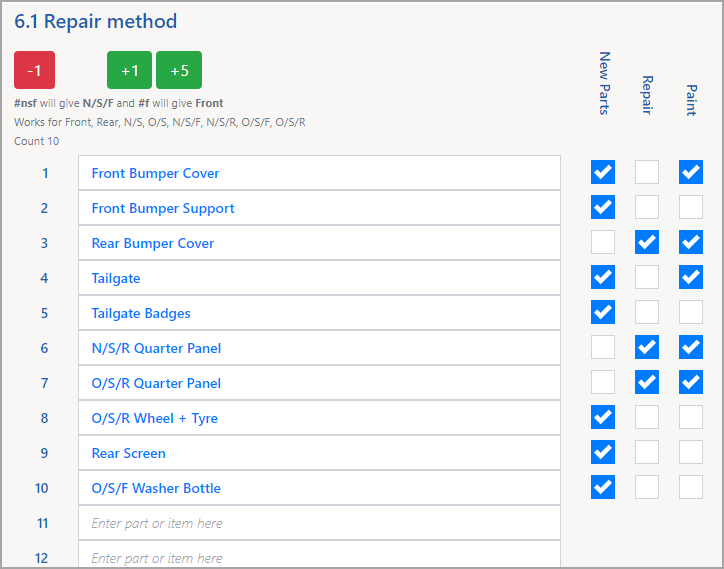
Here is the data entry screen
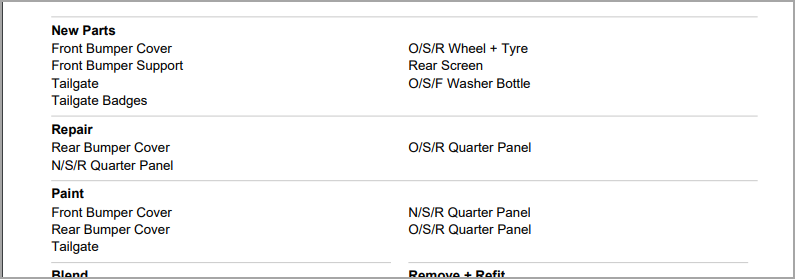
Which looks like this on the final PDF Report