First of all I want to praise the Wappler team for the S3 integration in one of that latest versions, it’s awesome this option has been added to the Wappler features!
I am using the S3 connector in SC actions for one of my projects’ remote production target now. But how do I setup a (dummy) version of S3 storage on my local development target for that project so the SC actions are equal for both targets?
If this is not possible yet, I suppose this would be a great feature to be added to Wappler.
I use the same bucket for my 3 environments(although I might change this in a future).
Ideally you would use an environment variable with the values dev, qa and prd or whatever feels right for you.
I don’t know what model you are using but in nodejs I have my local server start with $_ENV.NODE_ENV set to development and do the same for my QA and PRD environments.
Then I just add the environment variable to the key as @updates pointed.
Finally I read the URLs like this or similar. 'https://cdn.domain.com/<%=$_ENV.NODE_ENV%>/img/'+logo
That way your app always knows in which environment it is running in and will store and read from the right folder in your bucket.
I am using NodeJS in this project, but not really sure how to achieve that the local server version starts with $_ENV.NODE_ENV set to development the remote target starts with this variable set to production. Can you elaborate on that please? Thanks in advance!
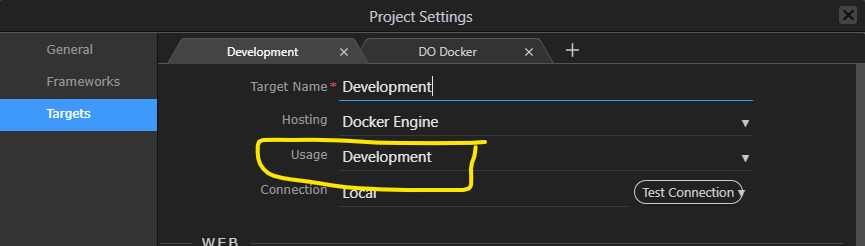
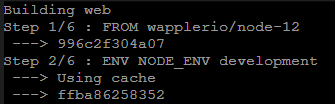
Sorry that was redundant on my side. You don’t need to do anything. If you set your Wappler target usage to be a development one it will start with that environment variable set for you as development.
For QA and PRD it really depends on where your deploy and your method. I use Heroku so I set the env variables there. If you are using your Wappler targets to deploy the $_ENV.NODE_ENV should be set to your target usage. So it could be development, staging or production
I wasn’t aware of any purpose of the target “usage” variable at all, but now I know at least one them
My remote production target is on DO, so I can just set that target to the production usage type in Wappler and change the NODE_ENV for my droplet to production too, right? Quite simple actually, as with a lot of things in Wappler you just have to learn once how to do it
Re-thinking this I think you meant when for example deploying to a non-Docker DO droplet (Own Server hosting type in Wappler) the NODE_ENV variable has to be set manually in DO, but when deploying to a Docker container through Wappler the NODE_ENV variable is set automatically by Wappler, according to the project’s target type setting.
Please correct me if I’m wrong. Thanks.
Although I have never tried it because I don’t use Wappler docker deployment I would say this is a safe assumption because I know that the $_ENV.NODE_ENV is set to ‘development’ when the usage is development.
I would assume the same for staging and production. You could do a quick test or wait for @george’s confirmation.