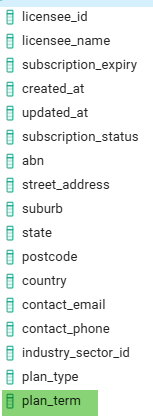
These are the fields in Docker where I have highlighted the missing field in Wappler:
I have checked the connections, refreshed the data in Docker as well as in Wappler. Even restarted my machine, all to no avail. All other tables (44) and views (8) align with Docker,
Hey Ben, I've run into this issue before. The most common reason for the schema not updating is almost always Docker's volume persistence.
Basically, when you destroy the container, the data volume where the database lives is often not removed. When you redeploy, Docker spins up a new container but attaches it to the old volume, which still contains the old table structure.
Here is the most reliable fix:
Stop all services for your project from the Wappler UI.
Open your terminal or command prompt and find the name of the volume for your project by listing them:
docker volume ls
Once you identify the correct volume, remove it with this command:
docker volume rm your_project_volume_name
Now, go back to Wappler and hit the deploy button.
This will force Docker to create a brand new, clean volume, and your database will be initialized with the latest schema from your Wappler changes.
Hope this helps you out!
Thank you both for your replies, much appreciated.
Decide to do this first -- for the umpteenth time -- no luck.
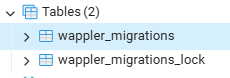
Then decided to kill the Docker container to let Wappler restore it, something that I was scared to do in case I lost all. My fears became reality with this result
and
Getting late now (not referring to my age ), I'll use the backup that I thankfully saved beforehand and start again in the morning.


 ), I'll use the backup that I thankfully saved beforehand and start again in the morning.