Thats what i want to know how to do like, i did tried formatter but not working. please tell me how i can format to 2 decimal place the value 85,01955449753444
You didn't answer my question:
when i applied the formatter for GBP input value, then no more working when entering amount field value, GBP input is not reflecting the devided value.
Well have you tried debugging this - checking the dev tools of the browser for errors?
Why don't you apply the formatter so we can check what's wrong?
I am surprised a long time Wappler user is not familiar with the basics of working with the tool.
I have managed to fix the formatter issue, it works, but i got another issue please check the site https://xchangepro.webonmaster.com/
when i enter amount as 10000 then GBP field is not showing correct value, instead shows 0.00 (placeholder value).
I am using longer period but not continuesly i been working only static sites not dynamic sites. Also some time i find hard to follow up the documentation, instead i prefer full tutorial, from start to finish. Unfortunatlely no one done like that.
Your form is working correctly and getting the right value but for some reason only the display shows 0.00. Too narrow it down can you just make the form field a regular text input instead of a number input (just to test).
1 Like
We had a similar issue in the past when using a number input. Was not rounding down to the correct decimal. Switching the input to text resolved it for us.
I have managed to fix the issue by removing comma seperation inside formatNumber function: as shown in screenshot
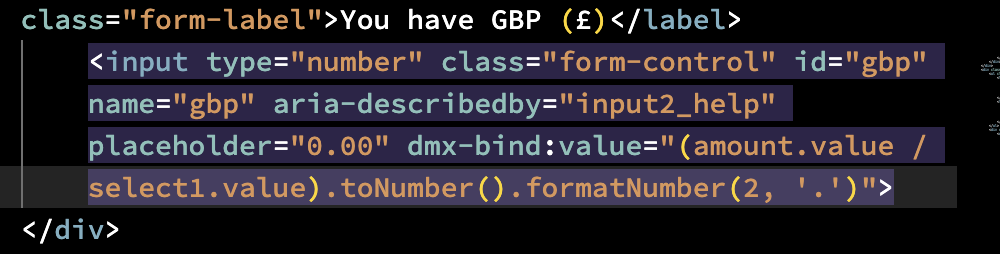
it was like this before: (amount.value / select1.value).toNumber().formatNumber(2, '.', ',')
So i kept my input type as number.
Number inputs only accept a valid floating point number:
https://html.spec.whatwg.org/multipage/common-microsyntaxes.html#valid-floating-point-number
If you want to format the number differently then set the input type to text.
i changed to text input but i want to prevent entering text, validation will help or how to do that?
Could use a regex pattern to do this:
^\d+(\.\d+)?$
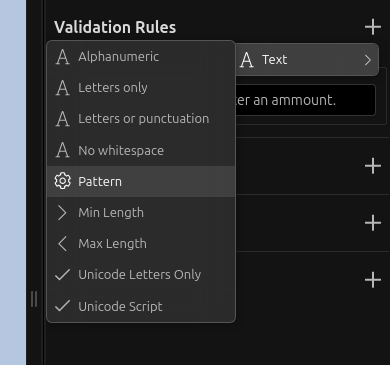
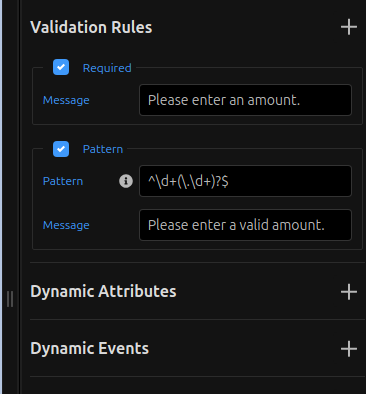
1 Like
still accepts text/characters, strange validation didnt work while typing the value as text
How about having the validation on the Server Action and on error display an alert/toast..?
Why not just simply use the Number Validation?
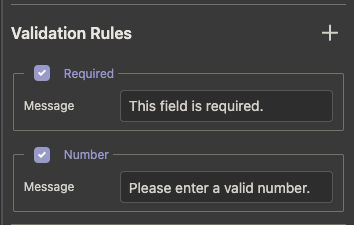
I use it on all my currency input fields.
1 Like
This works 