nevil
April 1, 2020, 3:32pm
1
How do I access the command line of the docker server that is generated by Wappler?
I have the IP address, and the user is probably root. But what is the password?
My end goal is to get HTTPS working on this server, but I’ve heard the team is building an easy SSL switch too. Is there any ETA on that @George ?
nevil
April 3, 2020, 9:43am
2
Accessing the command line is usually pretty basic, and it might be the case here too but I’m not sure. It probably has something to do with the keys in the .docker folder in windows. How do I proceed?
George
April 6, 2020, 6:05pm
4
Hi Nevil,
Sorry for the delay.
To connect to the server with digital ocean you can use the general SSH:
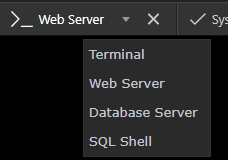
If you want a command line to a specific docker running instance, like the web server or the database server, you can use directly the Wappler terminal, when you select the right instance, see:
If you have not read Part 1, please go here and read it first.
We have included more Docker power in the latest Wappler update.
Awesome single click Database backup and range of terminals and shells directly at your disposal!
Also The Docker toolbar now has animated icons to indicate actions in progress! Managing Docker development environment has never being easier!
So let see how this all works.
Database Backup - Saving the State
With Docker it is easy to complete rebuild all your image…
nevil
April 6, 2020, 7:21pm
5
Aaah yes the Wappler terminal does it.
Now if I want to install SSL using Certbot/Letsencrypt, do I use the web server to install it there?
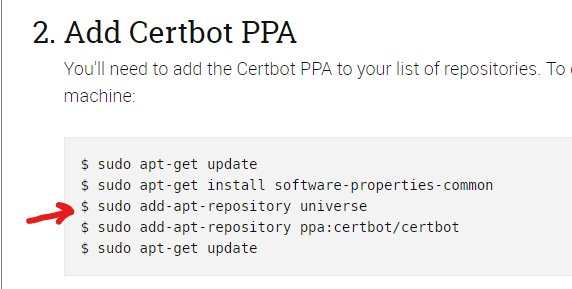
I am following the official certbot instructions as noted here: https://certbot.eff.org/lets-encrypt/ubuntubionic-apache.html
First error I get in the terminal is the following:
bash: sudo: command not found
Leaving out sudo does work though, but then I’m stuck at this point:
Gives me in the terminal:
Error: 'universe' invalid
And then I’m stuck again. I cannot find anything about this issue online either.
This is a bit difficult!
nevil
April 7, 2020, 11:42am
6
Ah apparently it’s not Ubuntu what is installed by Wappler, but Debian?
cat /etc/os-release

PRETTY_NAME="Debian GNU/Linux 10 (buster)"
NAME="Debian GNU/Linux"
VERSION_ID="10"
VERSION="10 (buster)"
VERSION_CODENAME=buster
ID=debian
HOME_URL="https://www.debian.org/"
SUPPORT_URL="https://www.debian.org/support"
BUG_REPORT_URL="https://bugs.debian.org/"
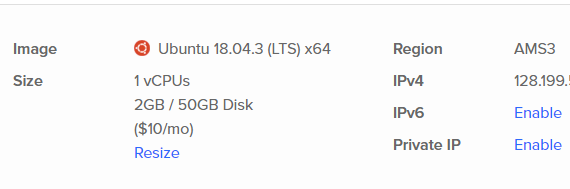
But in Digital Ocean it says Ubuntu 18.04:
Is this correct @George ?
George
April 7, 2020, 2:50pm
7
That is definitely not the way to do it Nevil.
You can't just go in to the docker containers and install stuff manually.
On the next rebuild of the docker containers - all your changes will be gone.
This is how docker works and it is perfect to have everything auto installed and a clean sheet.
To have your SSL installed you should either do it in other dedicated docker containers for that or central on your server with SSH.
I already provided some links to possible ways to do it with Traefik. see:
This is possible by using Proxy/load balancers to route traffic to multiple docker sites and also maintain SSL certificates.
The two main solutions are Traefik or Nginx Proxy:
We will be making more user friendly integration of both in Wappler.
Hope to get it more integrated in Wappler soon.
nevil
April 7, 2020, 2:57pm
8
Ah jeez, all that time spent… Well I would have to wait a bit more then. The links you provided are too intimidating and long to implement for me. Hope I can use something out of the box from Wappler asap.
nevil
April 7, 2020, 8:03pm
9
@George does the same problem occur when I set cronjobs on the webserver? If so, what would be a way to setup cronjobs on the remote docker instance?
George
April 7, 2020, 8:39pm
10
Maybe this will help you:
Update September 2017:
Reading time: 1 min read
Do note, as stated:
You are way better off running Docker cron jobs from your host system, not from inside your Docker containers. Your Docker containers should only have one concern only, and not be saddled with the weight of cron jobs.