I added a button to return to the top of the page to a page, as I've always done successfully.
This works without any problems, but I then configured it to hide the button only when the page is at the top.
This time, however, I don't understand why it's not working.
Any ideas?
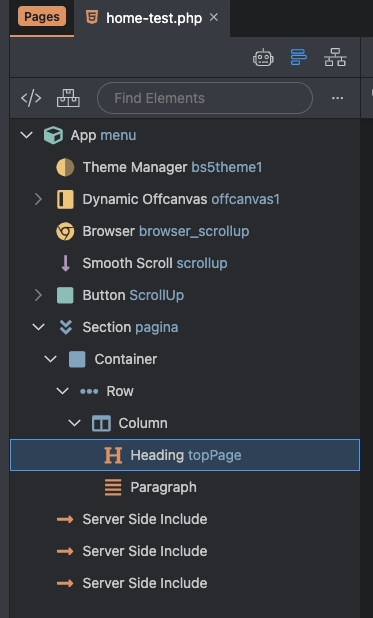

Your expression seems correct:
dmx-hide="browser_scrollup.scrollY.offset < 100"
should make the element disappear, when the scroll position is less than 100px from top.
In fact, it seems correct to me too, but with this setting the button is always hidden, and if I set 0 instead of 100, the button is always visible.
Perhaps the problem is because there are two inclusions, the top-fix and bottom-fix Navbar menu?
Please provide a link where we can check this.
It's your page layout breaking this.
Why do you have the section set to position fixed?
.contentArea {
    position: fixed;
    top: 90px;
    bottom: 60px;
    left: 0;
    right: 0;
    overflow-y: auto;
    padding: 20px;
    z-index: 1;
}
When you scroll, with this style applied to your page, you are scrolling the content inside the section, not the page body, so the scroll offset that the browser component detects is 0, as the body has not scrolled a single pixel.
I don't understand your idea here.
Thank You Teodor, but the problem is that:
if I insert the menu inclusions, without Fixed Position of the ContentArea the section, when scrolling, goes to cover the fixed top menu
Sorry, I don’t really understand what you mean, but setting a fixed position for your content section should never be the solution to a problem.
Your page content should use its default position, which is static.
If you have an issue with the fixed top navbar, then create a test page where we can see what you are doing exactly.
test3 test with navbar
So what is the issue here? Please explain?
The content of the section, when scrolling, mixes with the menu
Your fixed-top element (navbar) has no background set, so its background is transparent and you see the content behind.
I created the menu using Wappler's options, taking into account the difference between the two display options (Dark or Light).
Evidently I did something wrong; I'll check today.
Thanks.