I seem to have screwed up my PHP environment. Tried full WAPPLER reinstall but didnt help.
When issuing a
composer update
command into terminal I get

Anyone any ideas
I seem to have screwed up my PHP environment. Tried full WAPPLER reinstall but didnt help.
When issuing a
composer update
command into terminal I get
Anyone any ideas
And when running an API action i get
<br/>
<b>Fatal error</b>
:  Composer detected issues in your platform: Your Composer dependencies require the following PHP extensions to be installed: curl, gd, mbstring, openssl. in <b>E:\webs\dandgv2\www\vendor\composer\platform_check.php</b>
on line <b>39</b>
<br/>
my composer.json file
{
  "require": {
    "php": ">=5.6",
    "ext-curl": "*",
    "ext-gd": "*",
    "ext-hash": "*",
    "ext-json": "*",
    "ext-mbstring": "*",
    "ext-openssl": "*",
    "ext-pcre": "*",
    "ext-pdo": "*",
    "ext-session": "*",
    "phpmailer/phpmailer": "^6.8.0"
  },
  "config": {
    "platform": {
      "php": "5.6.0"
    },
    "platform-check": true
  }
}
What did you do to your php.ini?
Check the extensions section in your php.ini, you have to enable the extensions that are needed
Will check but only change i have made is to remap browscap in [browscap] section
Is this a fresh install of PHP or it's your old PHP that always worked?
Did downgrade PHP version earlier, gut feeling is that's where things went wrong
Hey Brian,
GPT response below that may help...
The error you're seeing indicates that Composer has detected missing PHP extensions required by your dependencies. Specifically, the following extensions are missing:
curlgdmbstringopensslTo resolve this issue, follow these steps:
Make sure that your PHP installation includes these extensions. You can check which extensions are currently enabled by running the following command in your terminal:
bash
Copy code
php -m
This will show a list of all the installed PHP extensions. If any of the required extensions (curl, gd, mbstring, openssl) are missing, you need to enable them.
The method for enabling extensions depends on the operating system you're using.
php.ini file: The php.ini file is located in your PHP installation folder. If you're using XAMPP or WAMP, it is usually found in php\php.ini.php.ini and search for the following lines (they might be commented out with a ;):ini
Copy code
;extension=curl
;extension=gd
;extension=mbstring
;extension=openssl
Remove the semicolon (;) at the beginning of each line to enable the extensions.
3. Restart your web server (e.g., Apache, Nginx, or PHP's built-in server) after making these changes.
If you're using Linux or macOS, you can install these extensions via apt-get, yum, or brew (depending on your package manager).
For example, on Ubuntu, you can install these extensions with the following commands:
bash
Copy code
sudo apt-get install php-curl php-gd php-mbstring php-openssl
After installing, restart your web server or PHP-FPM service.
Once the extensions are enabled or installed, you can verify that they're active by running:
bash
Copy code
php -m
You should now see curl, gd, mbstring, and openssl listed among the extensions.
After enabling the required extensions, go back to your project directory and run Composer again:
bash
Copy code
composer install
This should resolve the error and allow Composer to proceed without issues.
Thanks Cheese but no cigar!
Finally completely removed php from wappler and reinstalled with "composer install PHP" which installed 8.4.1
That seems to have resolved the above issue but then leaves me with the initial problem I was trying to deal with which appears related to PHP 8.4.1 (as 8.1 does not display the error)
Unfortunately installing 8.1 implicitly with "composer install php81" seems to screw things up again as above.
Message I get with 8.4 is, (Starting to think BUG)
{
    "code": 0,
    "file": "E:\\webs\\mysite\\www\\dmxConnectLib\\lib\\App.php",
    "line": 244,
    "message": "lib\\App::parse(): Implicitly marking parameter $scope as nullable is deprecated, the explicit nullable type must be used instead",
    "trace": "#0 E:\\webs\\mysite\\www\\dmxConnectLib\\dmxConnect.php(115): exception_error_handler(8192, 'lib\\\\App::parse(...', 'E:\\\\webs\\\\mysite..', 244)\n#1 E:\\webs\\mysite\\www\\dmxConnectLib\\dmxConnect.php(115): require()\n#2 E:\\webs\\mysite\\www\\dmxConnect\\api\\DG_Admin\\Login\\Login.php(5): {closure:E:\\webs\\mysite\\www\\dmxConnectLib\\dmxConnect.php:104}('lib\\\\App')\n#3 {main}"
}
Suspect that it is related to something depreciated after 8.1. Certainly copilot seems to suggest to:
This message is appearing because PHP 8.1 has introduced stricter type checking and deprecates implicitly marking parameters as nullable. Previously, you could have a parameter that could implicitly be
null, but this practice is now deprecated.To resolve this and ensure compatibility with PHP 8.1 and future versions, you need to explicitly mark the parameter as nullable using the
?operator. Here's how you can update your code:
php
function exampleFunction($scope) {
    // Function logic
}
php
function exampleFunction(?string $scope) {
    // Function logic
}
The error seems to originate from
	public function parse($value, Scope $scope = NULL, $stripNull = FALSE) {
		return $this->parseObject($value, $scope, $stripNull);
	}
Starting to think BUG
I see that PHP 8.4 introduces more breaking changes and more deprecations. The recommended syntax for nullable types is not fully backwards compatible with older PHP versions, we probably have to drop support for PHP 5, 6 and 7 and set minimum to PHP 8.0 or 8.1. If it is possible to install an older PHP then do that, we will have a look at PHP 8.4 compatibility.
About the error, I don't think the $scope is the only argument with this problem. You can search for Scope $scope = NULL and replace it with ?Scope $scope = NULL to see if it then runs.
Found three occurrences in App.php, changed them all but same error ( i had actually tried that on the offending line yesterday looking for a solution)
Also having issues downgrading php version (even tried switching to non php site to do it)
scoop uninstall php
returns
ERROR Application is still running!
ERROR Process with following ID is blocking uninstallation:
ERROR 4696
Any ideas?
Might it be worth switching php default for new sites to 8.1 temporarily if this is not fixed before next update?
Killing service in task manager allowed removal
But unfortunately after 8.1 install back to original error
Normally the extensions curl, gd, mbstring and openssl are installed by default in php. Did you try out the options @Cheese gave in his response? Check in the php.ini file if there is no ; in front of the extension extension=curl.
You can just install php 8.1 with scoop, as we won't be supporting php 8.4 for now.
Just execute the following commands in a terminal:
scoop bucket add versions

scoop install php81
then when you can check the version with
php -v
installed as above
Now get this on startup
<br />
<b>Warning</b>:  PHP Startup: Unable to load dynamic library 'curl' (tried: C:\Users\brian\scoop\apps\php\current\ext\curl (The specified module could not be found), C:\Users\brian\scoop\apps\php\current\ext\php_curl.dll (The specified module could not be found)) in <b>Unknown</b> on line <b>0</b><br />
<br />
<b>Warning</b>:  PHP Startup: Unable to load dynamic library 'gd' (tried: C:\Users\brian\scoop\apps\php\current\ext\gd (The specified module could not be found), C:\Users\brian\scoop\apps\php\current\ext\php_gd.dll (The specified procedure could not be found)) in <b>Unknown</b> on line <b>0</b><br />
<br />
<b>Warning</b>:  PHP Startup: Unable to load dynamic library 'mbstring' (tried: C:\Users\brian\scoop\apps\php\current\ext\mbstring (The specified module could not be found), C:\Users\brian\scoop\apps\php\current\ext\php_mbstring.dll (The specified procedure could not be found)) in <b>Unknown</b> on line <b>0</b><br />
<br />
<b>Warning</b>:  PHP Startup: Unable to load dynamic library 'openssl' (tried: C:\Users\brian\scoop\apps\php\current\ext\openssl (The specified module could not be found), C:\Users\brian\scoop\apps\php\current\ext\php_openssl.dll (The specified module could not be found)) in <b>Unknown</b> on line <b>0</b><br />
<br />
<b>Warning</b>:  PHP Startup: Unable to load dynamic library 'gettext' (tried: C:\Users\brian\scoop\apps\php\current\ext\gettext (The specified module could not be found), C:\Users\brian\scoop\apps\php\current\ext\php_gettext.dll (The specified procedure could not be found)) in <b>Unknown</b> on line <b>0</b><br />
<br />
<b>Warning</b>:  PHP Startup: Unable to load dynamic library 'intl' (tried: C:\Users\brian\scoop\apps\php\current\ext\intl (The specified module could not be found), C:\Users\brian\scoop\apps\php\current\ext\php_intl.dll (The specified module could not be found)) in <b>Unknown</b> on line <b>0</b><br />
<br />
<b>Warning</b>:  PHP Startup: Unable to load dynamic library 'pdo_mysql' (tried: C:\Users\brian\scoop\apps\php\current\ext\pdo_mysql (The specified module could not be found), C:\Users\brian\scoop\apps\php\current\ext\php_pdo_mysql.dll (The specified procedure could not be found)) in <b>Unknown</b> on line <b>0</b><br />
<br />
<b>Warning</b>:  PHP Startup: Unable to load dynamic library 'pdo_odbc' (tried: C:\Users\brian\scoop\apps\php\current\ext\pdo_odbc (The specified module could not be found), C:\Users\brian\scoop\apps\php\current\ext\php_pdo_odbc.dll (The specified procedure could not be found)) in <b>Unknown</b> on line <b>0</b><br />
<br />
<b>Warning</b>:  PHP Startup: Unable to load dynamic library 'pdo_pgsql' (tried: C:\Users\brian\scoop\apps\php\current\ext\pdo_pgsql (The specified module could not be found), C:\Users\brian\scoop\apps\php\current\ext\php_pdo_pgsql.dll (The specified procedure could not be found)) in <b>Unknown</b> on line <b>0</b><br />
<br />
<b>Warning</b>:  PHP Startup: Unable to load dynamic library 'pdo_sqlite' (tried: C:\Users\brian\scoop\apps\php\current\ext\pdo_sqlite (The specified module could not be found), C:\Users\brian\scoop\apps\php\current\ext\php_pdo_sqlite.dll (The specified procedure could not be found)) in <b>Unknown</b> on line <b>0</b><br />
<br />
<b>Warning</b>:  PHP Startup: Unable to load dynamic library 'pgsql' (tried: C:\Users\brian\scoop\apps\php\current\ext\pgsql (The specified module could not be found), C:\Users\brian\scoop\apps\php\current\ext\php_pgsql.dll (The specified procedure could not be found)) in <b>Unknown</b> on line <b>0</b><br />
[Wed Dec  4 11:27:21 2024] PHP 8.1.31 Development Server (http://0.0.0.0:3000) started
[Wed Dec  4 11:27:21 2024] 127.0.0.1:51613 Accepted
[Wed Dec  4 11:27:21 2024] 127.0.0.1:51613 [200]: GET /
[Wed Dec  4 11:27:21 2024] 127.0.0.1:51613 Closing
[Wed Dec  4 11:27:22 2024] 127.0.0.1:51614 Accepted
[Wed Dec  4 11:27:22 2024] 127.0.0.1:51614 [200]: GET /
[Wed Dec  4 11:27:22 2024] 127.0.0.1:51614 Closing
php.ini-development, relevant section is:
extension=curl
;extension=ffi
;extension=ftp
;extension=fileinfo
extension=gd
extension=gettext
;extension=gmp
extension=intl
;extension=imap
extension=mbstring
;extension=exif      ; Must be after mbstring as it depends on it
;extension=mysqli
;extension=oci8_12c  ; Use with Oracle Database 12c Instant Client
;extension=oci8_19  ; Use with Oracle Database 19 Instant Client
;extension=odbc
extension=openssl
;extension=pdo_firebird
extension=pdo_mysql
;extension=pdo_oci
extension=pdo_odbc
;extension=pdo_pgsql
extension=pdo_sqlite
extension=pgsql
;extension=shmop
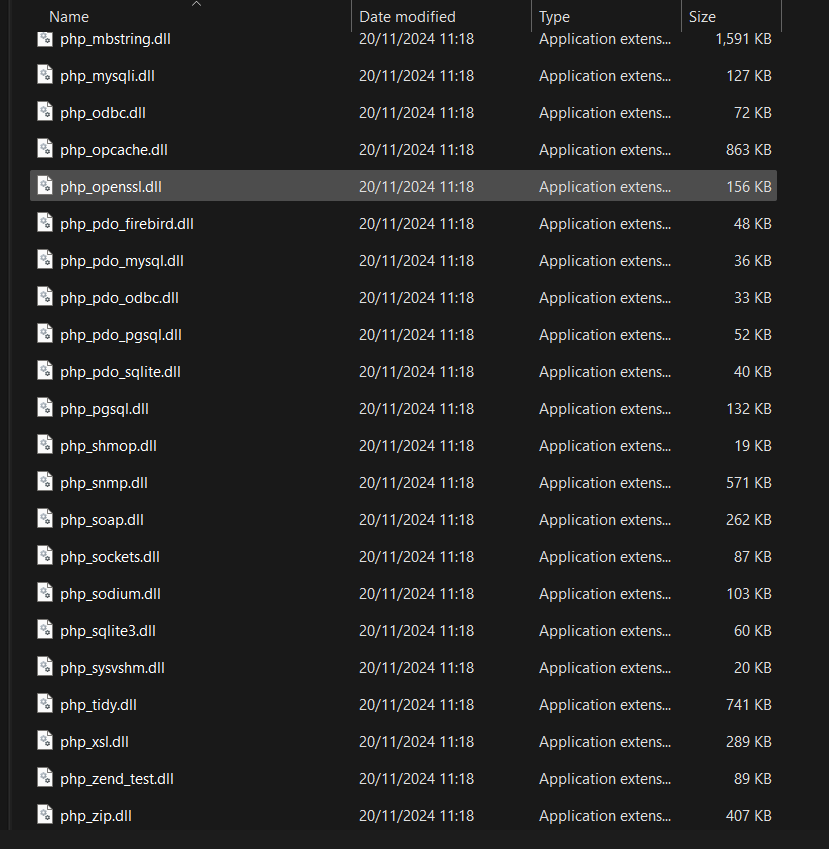
all dll files present in C:\Users\brian\scoop\apps\php\current\ext folder
sorry you need to remove first the old php version with:
scoop uninstall php
anyway, I will pin point the php installation to 8.1 in the next Wappler 7 beta.