Using Node.JS and MS SQL Server.
Please tell me why my dates are wrong, and how to fix them.
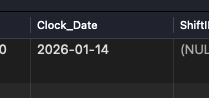
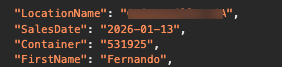
Here it is in the dev tools:
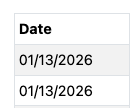
And in the browser:
In my settings for my database connection, I have my timezone setting set for “Driver Dependent”
In my Server Action settings, I have Timezone set for “Use OS”
Why is it sending over timezone data? I have tried to format it like:
SalesDate.replace('Z','').formatDate('MM/dd/yyyy')
But it does not ignore the timezone. I just need it to display what is in my database and not modify it!
franse
January 14, 2026, 11:41pm
2
Hello, maybe this can clarify something?
The datetime strings use the ISO 8601 notation. An UTC datetime string looks like 2023-01-11T12:00:00.000Z, Z is the zone designator for the zero UTC offset. Without the Z it would be seen as a local time, with local times the T is often replaced with a space like 2023-01-11 12:00:00.000.
When you use one of the date formatters on the client it will use the local timezone, when the datetime string didn’t contain timezone information it will be handled as if it were the local timezone. With UTC…
Yes, thanks Franse. I have read that before. In my experience, if I format the date time and add .replace(‘z’,’’) it will strip out the timezone data and display it as it comes over. However, there is no timezone flag in that datetime value. So why is it changing it? It should not know what to change it to if there is not a timezone flag in there.