I may be out of luck, I’m having a lot of trouble making the web interface as flexible as I was going to get.
I’m using Wappler v3.4.2 on Windows 10.
Some of the problems I encountered were:
Sometimes the display in the design view does not match the appearance in the browser like the problem I previously said.
I had a problem when using an iframe, in the design view the contents of the iframe were broken but when viewed through a browser it was fine, then I was forced to use SIS with the “include file” scenario.
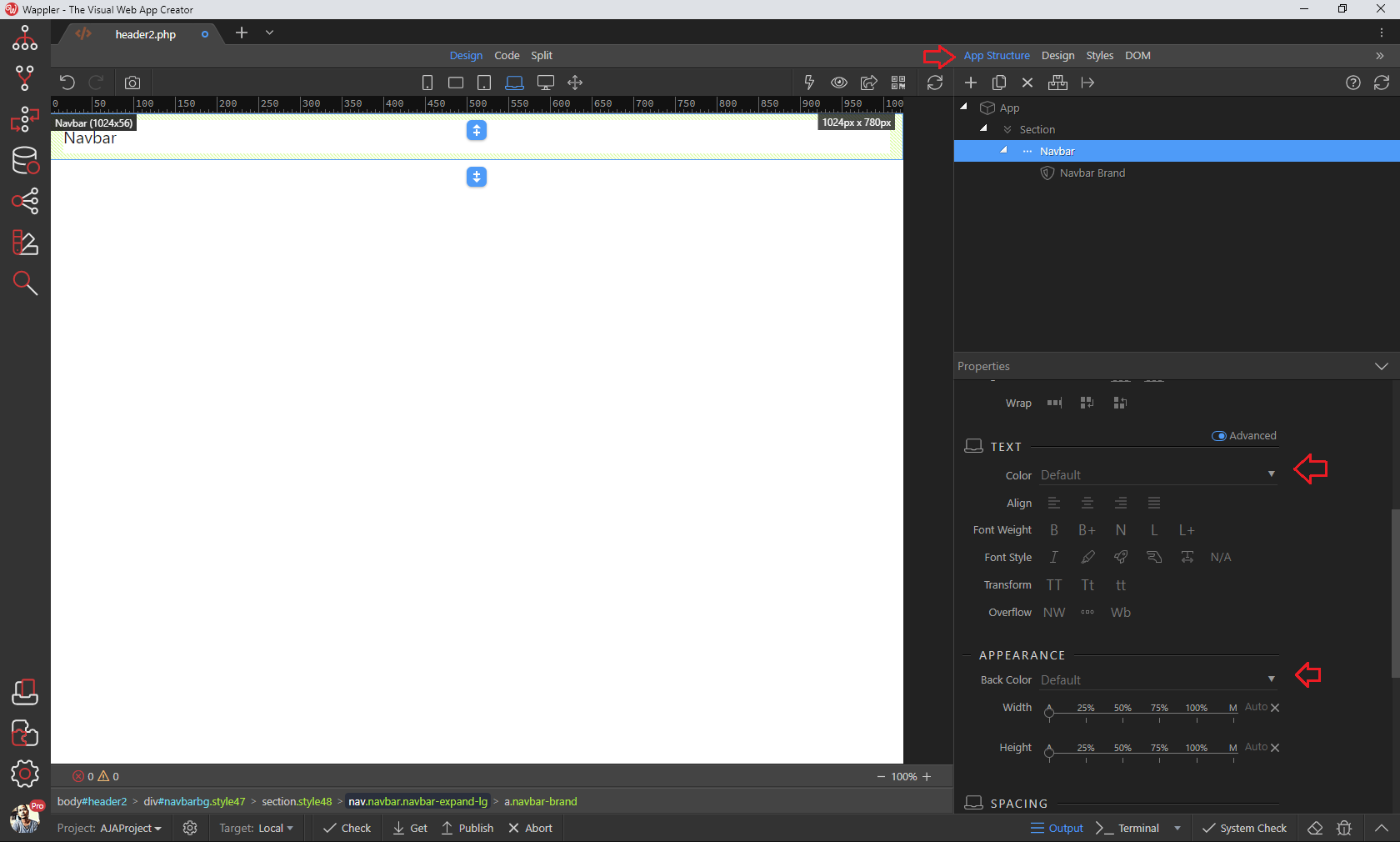
I have a hard time making the color theme according to what I want, I can only change the color properties, dimensions, and so on only through the “App Structure” tab but I can’t change it via the “Design” tab even though I have adjusted the value but there is no change in the design view even though the values in “App Structure” are default, even creating custom styles via the “Styles” tab doesn’t help either as the screenshot below:
Thank you for the answers and the demonstration videos, I’ll try again, I’m almost in a state of going back to writing code from scratch instead of trying to solve problems that arise and trying to understand Wappler for too long, and you came as the hero who helped me today .
Your first issue is most probably caused by a wrong site / target paths configuration.
Your second issue - iframes should really not be used nowadays. They are old technology and it's not recommended using them. Use SSI if you want to include something on the page.
As for the Design panel issue - make sure to check the documentation explaining how to use it, as it's pretty detailed:
We have been using Wappler for quite some time now. On every new project, after a few days or hours, the design view does not really work for us.
We mostly live in the code view. The design view, as powerful it is, has various quirks and bugs. With different server models and architectures of the project, the view starts breaking even more.
What I would suggest is to start out with the basic tutorials etc, like Ben has suggested, and once you get the hang of it, you can pretty much do everything much faster from the code view and the properties panel.
As for the design view issues, what I have experienced is that it does not actually always save and upload the file to the remote target. So that could be the reason why the preview is broken for you.
I had stopped using design panel also because the class selection and management was not something I could wrap my head around. It did not offer me enough flexibility via UI, so I mostly write CSS in the style file itself.
You must understand that its not practical to write bug reports in the middle of building an application for every single issue we face.
I try to report as much as I can, and have been reporting more often lately. But without real support.. posting in community, awaiting answers, time-zone differences, re-testing suggestions.. is not affordable.
I sometimes find people posting bug I could not, so I try to post a confirmation.
Then there are cases where posts just get lost in the community or lost in translation due to limitations of form of communication.
I have seen numerous posts just lying in the community without any responses or solution or unlisted. Some my own.
From what I know, you guys are a small team and are working on both support and development fronts. So expecting a top-class support with new updates every-week is not practical either.
The observations I share in this open community are completely my own. I have never knowingly made any conclusions on behalf of Wappler. Its just what my experience has been and what work-arounds I implement.
I hope you understand that when a problem is not reported we are not aware of it and we cannot fix it because of that.
If you don't report issues related to design view they will probably never be fixed.
In the same time you have time to post in topics like this explaining "the design view doesn't work so don't use it" which is really bad experience especially for new users getting started with Wappler....
It really costs no time to post explanation like:
I have problems changing XXXX property in Design View / Panel. When i change this and that they don't change in Design view.
You can reproduce this by clicking here and then there. Here is what i see when i do that: [screenshot]
Also not sure what you mean with this statement?
Which part of this is not real support? It is not possible to assign a personal support assistant per user in their specific location, hope you also understand that.
If you prefer not posting in the community use the support email to communicate with us ...
It does cost a lot of time. Specially when in the middle of building an application.
And even more so when the bug cannot be reproduced reliably.
With a small or incomplete bug post, the reply I would receive would just be "please explain".
Like I said, I have been trying be more active, and reporting issues I am experiencing recently.
What I have shared here is an old experience and seeing this post I am just informing that I have seen the same in very old versions, so maybe the problems remain.
This is a community. Not a support center. One on one real-time chat/call support is real support in my opinion. Being a weekly updated-application, I completely understand this is not practical. But that would be the real thing to have when developing.
Even if there would be Wappler a ticketing system and a resolution commitment constraint, that would be a great start.
There is a Wappler support email? Please share the email id.
What are the service hours and turn-around time for that?


 Please share the email id.
